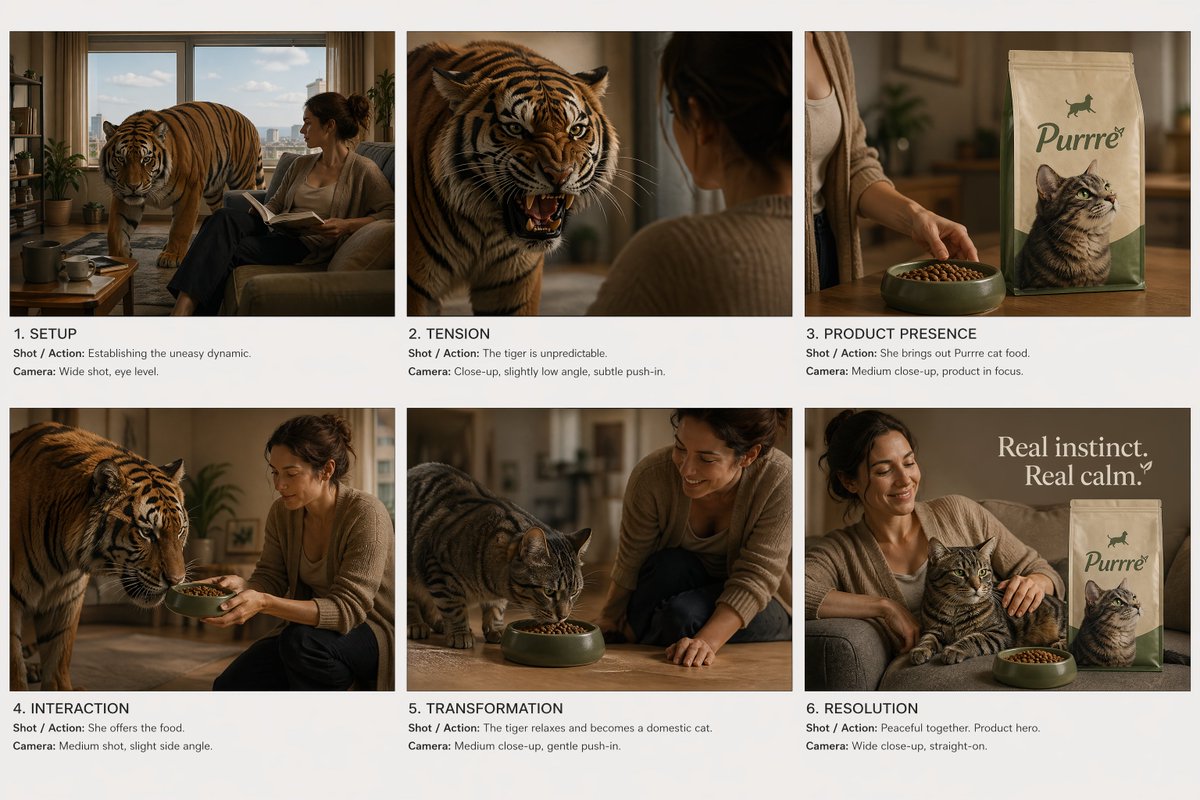
Tata Letak Storyboard Iklan Komersial
Sebuah panduan terstruktur untuk menghasilkan tata letak storyboard komersial enam panel dengan karakter yang konsisten dan alur naratif yang berkesinambungan.
Ini adalah contoh kasus GPT Image 2 untuk Produk & Komersial . Gunakan contoh siap salin di bawah ini untuk menghasilkan visual serupa, dan tinjau atribusi Awesome GPT Image 2 Prompts serta hak penggunaan komersial sebelum digunakan kembali.
Free 1K preview
Generate one preview image instantly, no sign-up required.
Free text preview doesn’t preserve reference-image consistency.
Mengingatkan
Prompt siap salin
Create a cinematic commercial storyboard sheet.\n\nLAYOUT:\n- Fixed 6-panel grid (2x3), evenly spaced\n- Clean white or neutral background\n- Each panel clearly separated, no UI, no clutter\n\nGLOBAL STYLE:\n- Cinematic realism, high-end commercial look\n- Soft controlled lighting, consistent across all panels\n- No character or environment drift\n\nSTORY ARC (strict order):\n1. Setup\n2. Tension\n3. Product reveal\n4. Product interaction\n5. Transformation (impact)\n6. Clean closing shot\n\nSCENE CONCEPT:\n{argument name="story concept" default="A woman lives in a quiet apartment with a tense, unpredictable tiger. The tiger behaves like a domestic cat but carries constant danger. When she serves the product (cat food), the tiger visibly relaxes and transforms into a calm domestic house cat."}\n\nPANEL REQUIREMENTS (for EACH panel include):\n- Cinematic frame (clear composition, subject readable)\n- Shot / Action (focused on character + product when applicable)\n- Camera (shot type, angle, movement)\n\nPRODUCT RULES:\n- Product must be sharp, readable, and well-lit in panels 3, 4, 6\n- No distortion, no redesign\n- Packaging must remain consistent\n\nVISUAL PRIORITIES:\n- Strong contrast between tension (tiger) and relief (cat)\n- Clear readability in every frame\n- No abstract or surreal distortion, grounded realism\n\nTEXT:\n- Minimal, small, professional labels only (panel number + short shot note)\n- No extra graphicsVariabel perintah
Placeholder argumen yang dapat diedit ditemukan dalam prompt, beserta nilai defaultnya.
Best for
- - Produk & Komersial visual exploration
- - Image generation and reference-image edits
- - Reusable briefs that keep source attribution visible
Change these parts
- - Subject, product, character, or scene
- - Aspect ratio, camera, lighting, and background
- - Brand, text, color, and output constraints
Recommended model and settings
- - Model: gpt-image-2
- - Input mode: Gambar ke Gambar
- - Aspect ratio: source
- - Commercial status: review original source
How to use this prompt
- 1. Copy the prompt and preserve its structure for the first test.
- 2. Replace the subject, context, and publishing channel.
- 3. Change one camera, lighting, or style variable per iteration.
- 4. Inspect the output, source, text, and rights before reuse.
Limitations, source, and reuse cautions
- - Generated output is an editable draft, not factual, legal, or rights evidence.
- - Review the linked source, people, brands, logos, text, and third-party media before commercial use.
Lebih banyak kasus dalam kategori ini
Diprioritaskan berdasarkan kategori, kompatibilitas mode input, kualitas, dan risiko yang lebih rendah.






Catatan penggunaan kembali dan sumber
Gunakan perintah ini dengan aman setelah melihat pratinjau kasus.
- 1.Salin perintah tersebut atau buka langsung di Dovoo dengan tombol pembuatan.
- 2.Sesuaikan variabel, rasio aspek, dan gambar referensi untuk kebutuhan Anda sendiri.
- 3.Sebelum mempublikasikan atau menggunakan untuk tujuan berbayar, verifikasi hak sumber, persyaratan atribusi, dan risiko merek atau citra.