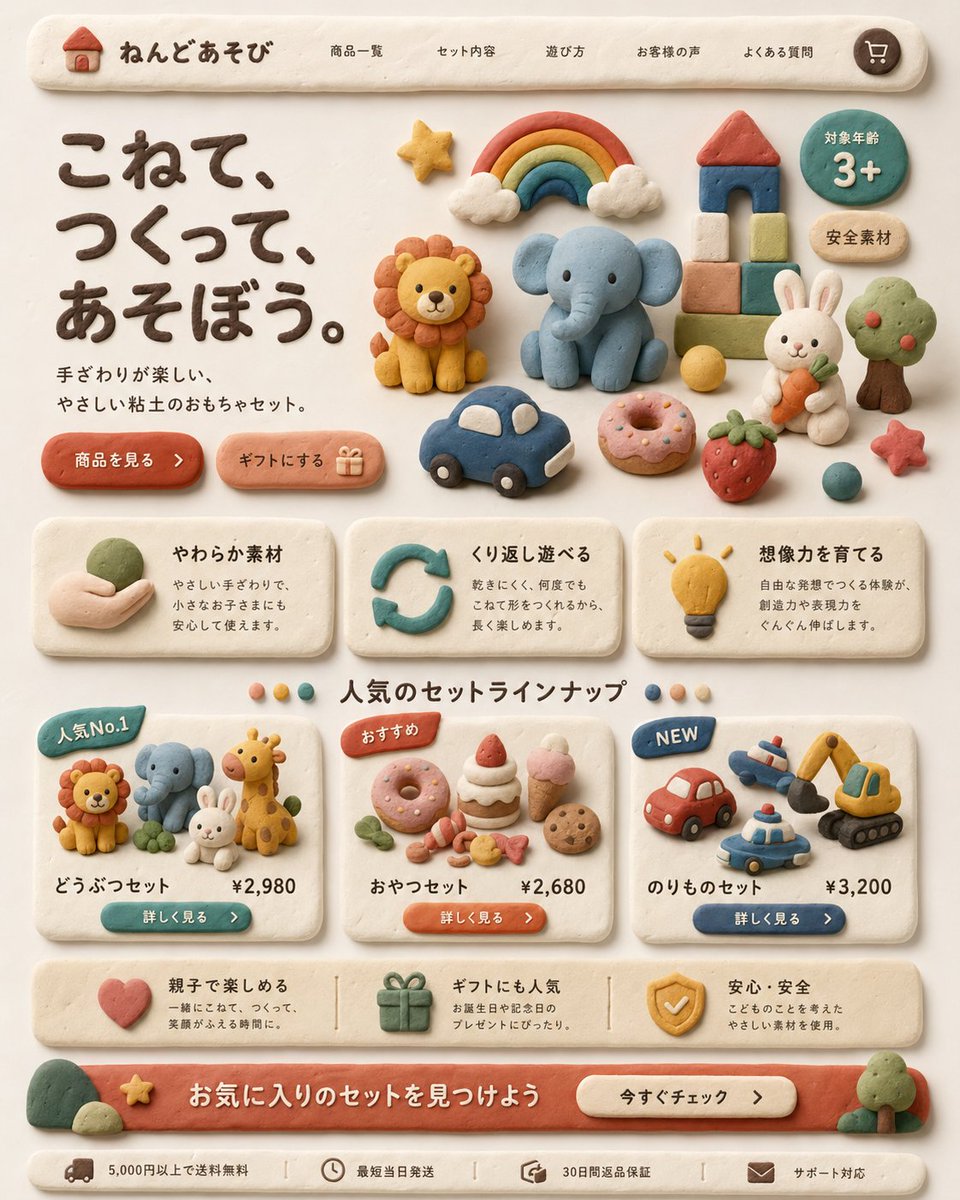
UI Halaman Landing Mainan Tanah Liat
Maket halaman arahan e-commerce Jepang bergaya tanah liat buatan tangan untuk merek mainan anak-anak, ideal untuk desain konsep, eksplorasi UI yang menyenangkan, dan presentasi produk bergaya iklan.
Ini adalah contoh kasus GPT Image 2 untuk Produk & Komersial . Gunakan contoh siap salin di bawah ini untuk menghasilkan visual serupa, dan tinjau atribusi Awesome GPT Image 2 Prompts serta hak penggunaan komersial sebelum digunakan kembali.
Butuh seluruh rangkaian prompt? Gunakan Produk & Komersial Untuk contoh terkait lainnya, kunjungi pusat topik, atau buka GPT Image 2 katalog cepat untuk indeks contoh lengkap, struktur yang dapat digunakan kembali, dan atribusi sumber.
Free 1K preview
Generate one preview image instantly, no sign-up required.
2812/4000
Mengingatkan
Prompt siap salin
Create a warm, playful Japanese landing page for a children's clay toy brand, designed entirely in a handmade soft clay diorama style. The whole interface should look sculpted from pastel modeling clay with rounded edges, slight finger-pressed imperfections, matte texture, soft shadows, and a cozy cream background. At the top, show a pill-shaped navigation bar with a small clay house logo and the brand name "ねんどあそび", followed by 5 navigation items: "商品一覧", "セット内容", "遊び方", "お客様の声", "よくある質問", plus a round cart icon on the far right. In the hero section, place a large dark-brown clay headline on the left reading "こねて、つくって、あそぼう。" and a smaller supporting sentence beneath it reading "手ざわりが楽しい、やさしい粘土のおもちゃセット。" Add 2 rounded clay call-to-action buttons below: "商品を見る" and "ギフトにする" with a small gift icon. On the right side of the hero area, arrange 12 clay toy illustrations: a rainbow with clouds, a lion, an elephant, a block tower with red roof, a green circular badge reading "対象年齢 3+", a beige oval badge reading "安全素材", a white rabbit holding a carrot, a tree, a yellow ball, a blue toy car, a pink donut, and a strawberry, plus a small red star near the lower right. Below, create a 3-card benefits row, each card made from off-white clay with icon, title, and short Japanese description. Card 1 title: "やわらか素材" with a hand holding clay icon. Card 2 title: "くり返し遊べる" with a circular arrow icon. Card 3 title: "想像力を育てる" with a lightbulb icon. Under that, add a centered section title "人気のセットラインナップ" with 4 small colored dots around it. Then show 3 product cards. Card 1 has a blue badge "人気No.1", shows 4 animal figures: lion, elephant, rabbit, giraffe, and includes the title "どうぶつセット" and price "¥2,980" with a teal button "詳しく見る". Card 2 has an orange badge "おすすめ", shows 7 snack items: donut, cake slice, strawberry shortcake, pink ice cream cone, cookie, candy pieces, and small leaves, and includes the title "おやつセット" and price "¥2,680" with an orange button "詳しく見る". Card 3 has a blue badge "NEW", shows 4 vehicle toys: red car, airplane, police car, excavator, and includes the title "のりものセット" and price "¥3,200" with a navy button "詳しく見る". Add a horizontal reassurance strip with 3 items: a heart icon with text about parent-child fun, a gift icon with text about gift popularity, and a shield icon with text about safety and安心・安全. At the bottom, create a large coral clay banner with the headline "お気に入りのセットを見つけよう" and a cream button reading "今すぐチェック". Finally add a slim footer bar with 4 compact items and icons: "5,000円以上で送料無料", "最短当日発送", "30日間返品保証", and "サポート対応". Use a balanced, grid-based web layout, front-facing view, soft natural lighting, subtle shadows, highly polished product-design mockup quality, charming handcrafted claymation aesthetic, and a premium yet child-friendly feel.
Best for
- - Produk & Komersial visual exploration
- - Image generation and reference-image edits
- - Reusable briefs that keep source attribution visible
Change these parts
- - Subject, product, character, or scene
- - Aspect ratio, camera, lighting, and background
- - Brand, text, color, and output constraints
Recommended model and settings
- - Model: gpt-image-2
- - Input mode: Teks ke Gambar
- - Aspect ratio: source
- - Commercial status: review original source
How to use this prompt
- 1. Copy the prompt and preserve its structure for the first test.
- 2. Replace the subject, context, and publishing channel.
- 3. Change one camera, lighting, or style variable per iteration.
- 4. Inspect the output, source, text, and rights before reuse.
Limitations, source, and reuse cautions
- - Generated output is an editable draft, not factual, legal, or rights evidence.
- - Review the linked source, people, brands, logos, text, and third-party media before commercial use.
Diimpor dari Awesome GPT Image 2 Prompts . Atribusi diperlukan. Status penggunaan komersial adalah allowed ; tinjau hak sumber sebelum penggunaan berbayar.
Lebih banyak kasus dalam kategori ini
Diprioritaskan berdasarkan kategori, kompatibilitas mode input, kualitas, dan risiko yang lebih rendah.






Catatan penggunaan kembali dan sumber
Gunakan perintah ini dengan aman setelah melihat pratinjau kasus.
- 1.Salin perintah tersebut atau buka langsung di Dovoo dengan tombol pembuatan.
- 2.Sesuaikan variabel, rasio aspek, dan gambar referensi untuk kebutuhan Anda sendiri.
- 3.Sebelum mempublikasikan atau menggunakan untuk tujuan berbayar, verifikasi hak sumber, persyaratan atribusi, dan risiko merek atau citra.