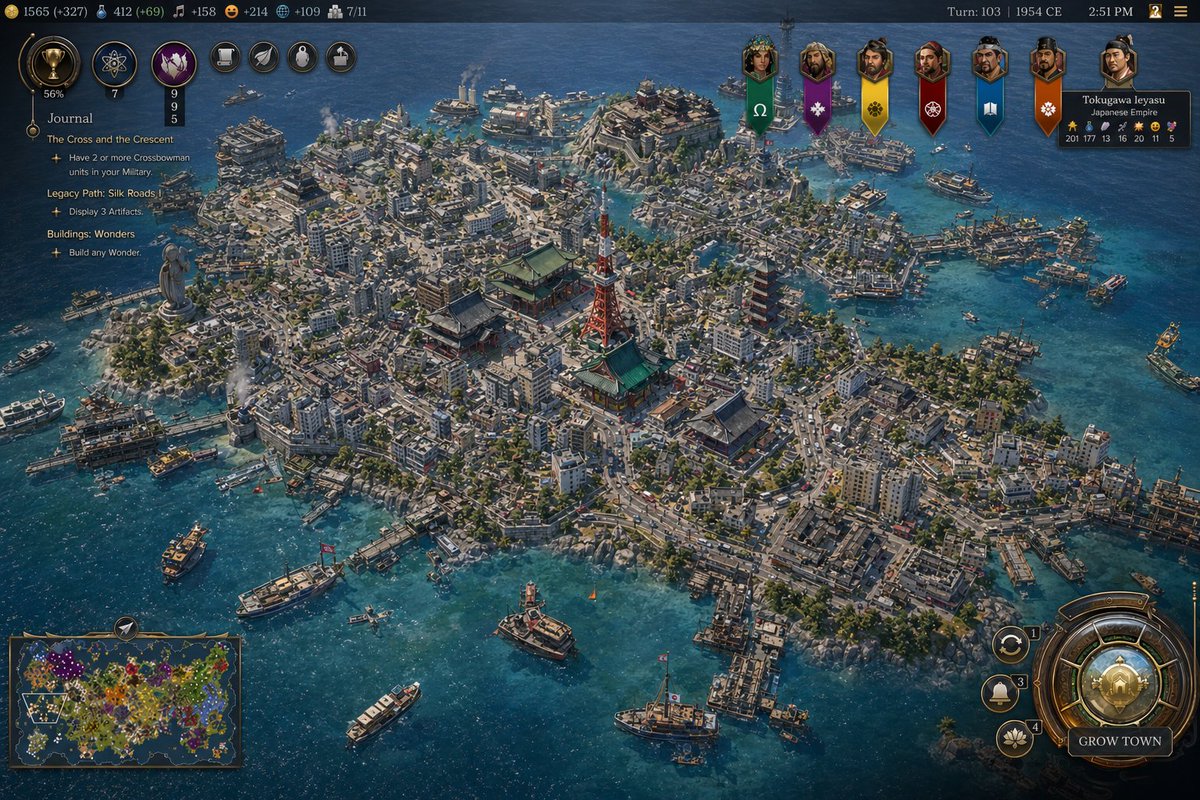
Cuplikan Layar Pelabuhan Tokyo 1954 Gaya Civ
Perintah ini menghasilkan tangkapan layar game strategi bergaya Civilization yang dipoles, menampilkan kota pelabuhan Jepang pertengahan abad yang padat dengan antarmuka game 4X lengkap, ideal untuk maket game sejarah fiksi dan postingan tebak lokasi.
Ini adalah contoh kasus GPT Image 2 untuk Anime & Game . Gunakan contoh siap salin di bawah ini untuk menghasilkan visual serupa, dan tinjau atribusi Awesome GPT Image 2 Prompts serta hak penggunaan komersial sebelum digunakan kembali.
Free 1K preview
Generate one preview image instantly, no sign-up required.
Mengingatkan
Prompt siap salin
A high-detail grand strategy game screenshot in the style of a modern Civilization VII interface, showing an isometric aerial view of a dense coastal island metropolis inspired by {argument name="city location" default="Tokyo, Japan"} in {argument name="year" default="1954 CE"}. The city fills a compact island and several connected reclaimed islets in a bright blue harbor, with intricate urban density, narrow streets, mid-century low- and mid-rise concrete buildings, docks, ferries, cargo boats, patrol vessels, and small ships scattered across the water. At the visual center, include a cluster of iconic Japanese landmarks: a red-and-white lattice broadcast tower resembling Tokyo Tower, a large traditional temple complex with green roofs, and a multi-tier pagoda, surrounded by tightly packed neighborhoods. Add a large waterfront statue on the left side of the island, industrial smoke stacks near the shoreline, bridges, piers, seawalls, and layered districts climbing gentle hills. The architecture should mix postwar urban Japan with traditional shrines and temples, conveying a believable historical city simulation with accurate transportation details and harbor infrastructure. Use crisp strategy-game rendering, cinematic sunlight, realistic water reflections, tiny moving vehicles and ships, and rich texture detail across roads, rooftops, trees, and coastlines.

Overlay a complete 4X strategy game UI: a dark top bar with resource counters on the left, exactly 7 circular action or technology icons near the upper left, turn and date text at the top right reading {argument name="turn label" default="Turn: 103 | 1954 CE"}, and a small time readout. On the left side, add a journal panel titled {argument name="journal title" default="Journal"} with 3 visible quest sections: "The Cross and the Crescent", "Legacy Path: Silk Roads", and "Buildings: Wonders", each with short objective lines beneath. Across the upper center-right, place exactly 7 vertical civilization banners with portrait medallions. On the upper right, include a leader info card for "Tokugawa Ieyasu" and "Japanese Empire" with small stat values. On the bottom left, include a minimap framed in bronze showing a colorful world map. On the bottom right, add a large ornate circular command dial with smaller adjacent buttons and a prominent button labeled "GROW TOWN". The whole image should look like an authentic in-game screenshot rather than concept art, with polished UI, readable but small text, and the composition focused on the spectacular cityscape and harbor.
Variabel perintah
Placeholder argumen yang dapat diedit ditemukan dalam prompt, beserta nilai defaultnya.
Best for
- - Anime & Game visual exploration
- - Image generation and reference-image edits
- - Reusable briefs that keep source attribution visible
Change these parts
- - Subject, product, character, or scene
- - Aspect ratio, camera, lighting, and background
- - Brand, text, color, and output constraints
Recommended model and settings
- - Model: gpt-image-2
- - Input mode: Teks ke Gambar
- - Aspect ratio: source
- - Commercial status: review original source
How to use this prompt
- 1. Copy the prompt and preserve its structure for the first test.
- 2. Replace the subject, context, and publishing channel.
- 3. Change one camera, lighting, or style variable per iteration.
- 4. Inspect the output, source, text, and rights before reuse.
Limitations, source, and reuse cautions
- - Generated output is an editable draft, not factual, legal, or rights evidence.
- - Review the linked source, people, brands, logos, text, and third-party media before commercial use.
Lebih banyak kasus dalam kategori ini
Diprioritaskan berdasarkan kategori, kompatibilitas mode input, kualitas, dan risiko yang lebih rendah.






Catatan penggunaan kembali dan sumber
Gunakan perintah ini dengan aman setelah melihat pratinjau kasus.
- 1.Salin perintah tersebut atau buka langsung di Dovoo dengan tombol pembuatan.
- 2.Sesuaikan variabel, rasio aspek, dan gambar referensi untuk kebutuhan Anda sendiri.
- 3.Sebelum mempublikasikan atau menggunakan untuk tujuan berbayar, verifikasi hak sumber, persyaratan atribusi, dan risiko merek atau citra.