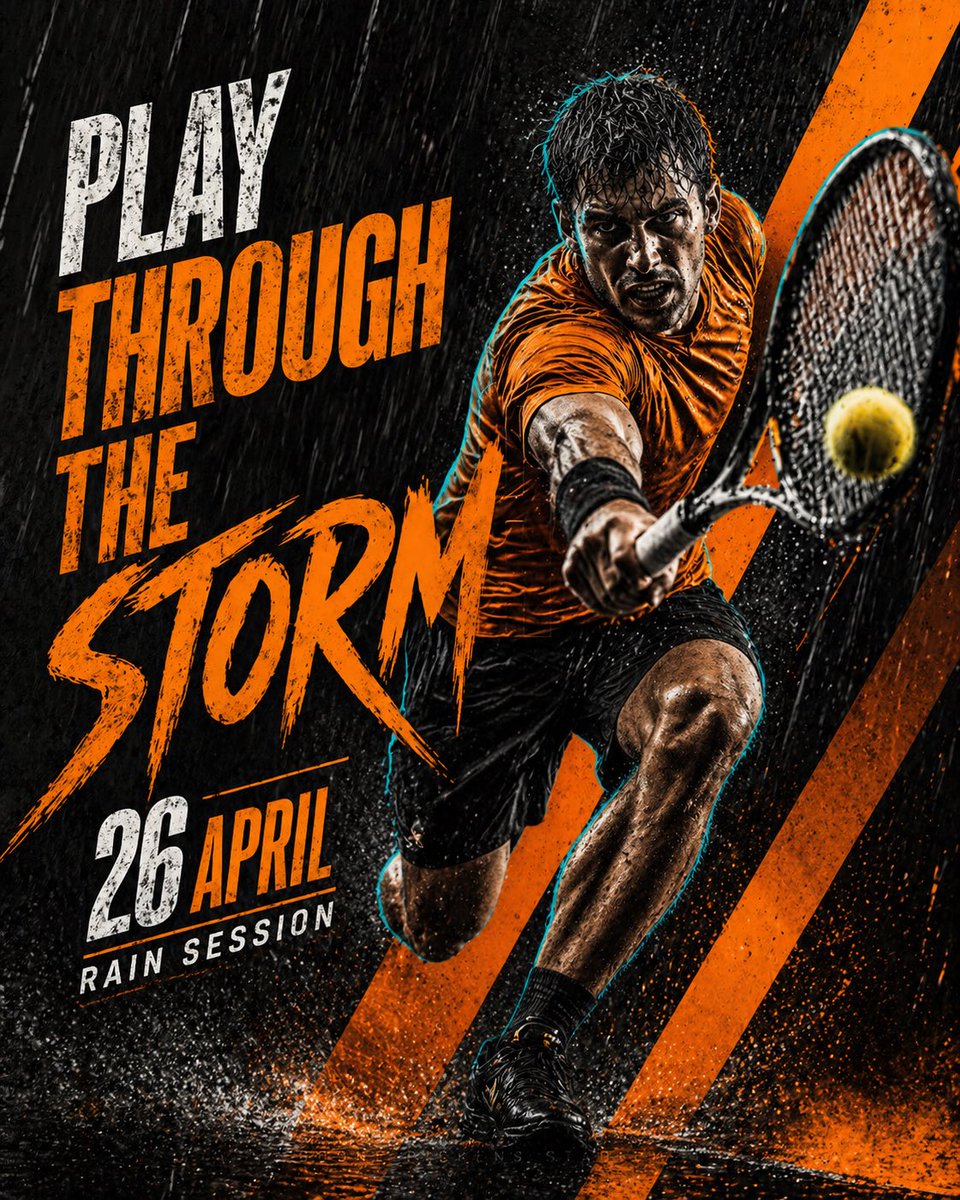
Poster Olahraga Tenis Sinematik
Sebuah desain poster olahraga premium yang berani dan penuh gaya dengan tema hitam dan oranye, menampilkan seorang pemain tenis atletis yang menerobos hujan deras.
Ini adalah contoh kasus GPT Image 2 untuk Grafis & Poster . Gunakan contoh siap salin di bawah ini untuk menghasilkan visual serupa, dan tinjau atribusi Awesome GPT Image 2 Prompts serta hak penggunaan komersial sebelum digunakan kembali.
Butuh seluruh rangkaian prompt? Gunakan Grafis & Poster Untuk contoh terkait lainnya, kunjungi pusat topik, atau buka GPT Image 2 katalog cepat untuk indeks contoh lengkap, struktur yang dapat digunakan kembali, dan atribusi sumber.
Free 1K preview
Generate one preview image instantly, no sign-up required.
1433/4000
Mengingatkan
Prompt siap salin
Create a premium cinematic tennis sports poster in a bold {argument name="color theme" default="black and orange rainy theme"}. Show one athletic male tennis player in a powerful action pose, lunging forward during heavy rain, holding a tennis racket close to the camera as he strikes a yellow tennis ball. The player wears a {argument name="outfit" default="bright orange sports shirt"}, black shorts, black socks, and black tennis shoes. His body is wet from the rain, with dramatic water droplets, splashes, and motion blur around him. Add a subtle cyan rim light around the player for a sharp energetic outline.

Use a dark gritty textured background with heavy rain streaks, wet court reflections, water splashes, and orange diagonal graphic shapes behind the player. The poster should feel intense, modern, competitive, and social-media-ready.

Use large bold distressed typography on the left side with the main headline:

{argument name="main text" default="PLAY THROUGH THE STORM"}

Make “STORM” the biggest word in a rough brushstroke style. Add the {argument name="date" default="26 APRIL"} below:

Add a small supporting line:

RAIN SESSION

Color palette: deep black, charcoal gray, bright orange, white text, and subtle cyan glow.

Style: premium sports campaign poster, high contrast, gritty editorial design, dramatic rain atmosphere, sharp details, dynamic composition, modern typography, 4:5 vertical poster format.
Variabel perintah
Placeholder argumen yang dapat diedit ditemukan dalam prompt, beserta nilai defaultnya.
Variabel
color theme
Bawaan
black and orange rainy theme
Variabel
outfit
Bawaan
bright orange sports shirt
Variabel
main text
Bawaan
PLAY THROUGH THE STORM
Variabel
date
Bawaan
26 APRIL
Best for
- - Grafis & Poster visual exploration
- - Image generation and reference-image edits
- - Reusable briefs that keep source attribution visible
Change these parts
- - Subject, product, character, or scene
- - Aspect ratio, camera, lighting, and background
- - Brand, text, color, and output constraints
Recommended model and settings
- - Model: gpt-image-2
- - Input mode: Teks ke Gambar
- - Aspect ratio: source
- - Commercial status: review original source
How to use this prompt
- 1. Copy the prompt and preserve its structure for the first test.
- 2. Replace the subject, context, and publishing channel.
- 3. Change one camera, lighting, or style variable per iteration.
- 4. Inspect the output, source, text, and rights before reuse.
Limitations, source, and reuse cautions
- - Generated output is an editable draft, not factual, legal, or rights evidence.
- - Review the linked source, people, brands, logos, text, and third-party media before commercial use.
Diimpor dari Awesome GPT Image 2 Prompts . Atribusi diperlukan. Status penggunaan komersial adalah allowed ; tinjau hak sumber sebelum penggunaan berbayar.
Lebih banyak kasus dalam kategori ini
Diprioritaskan berdasarkan kategori, kompatibilitas mode input, kualitas, dan risiko yang lebih rendah.

Fashion Studio Portrait with Blue Rim Lighting
Teks ke Gambar

Transparent Earbuds on Stone Pedestal
Teks ke Gambar

Female Clown Cyborg Portrait
Teks ke Gambar

Greyscale Puzzle Portrait with Color Accent
Teks ke Gambar

Spring Editorial Fashion Collage
Teks ke Gambar

New Chinese-Style Editorial Portrait
Teks ke Gambar
Catatan penggunaan kembali dan sumber
Gunakan perintah ini dengan aman setelah melihat pratinjau kasus.
- 1.Salin perintah tersebut atau buka langsung di Dovoo dengan tombol pembuatan.
- 2.Sesuaikan variabel, rasio aspek, dan gambar referensi untuk kebutuhan Anda sendiri.
- 3.Sebelum mempublikasikan atau menggunakan untuk tujuan berbayar, verifikasi hak sumber, persyaratan atribusi, dan risiko merek atau citra.