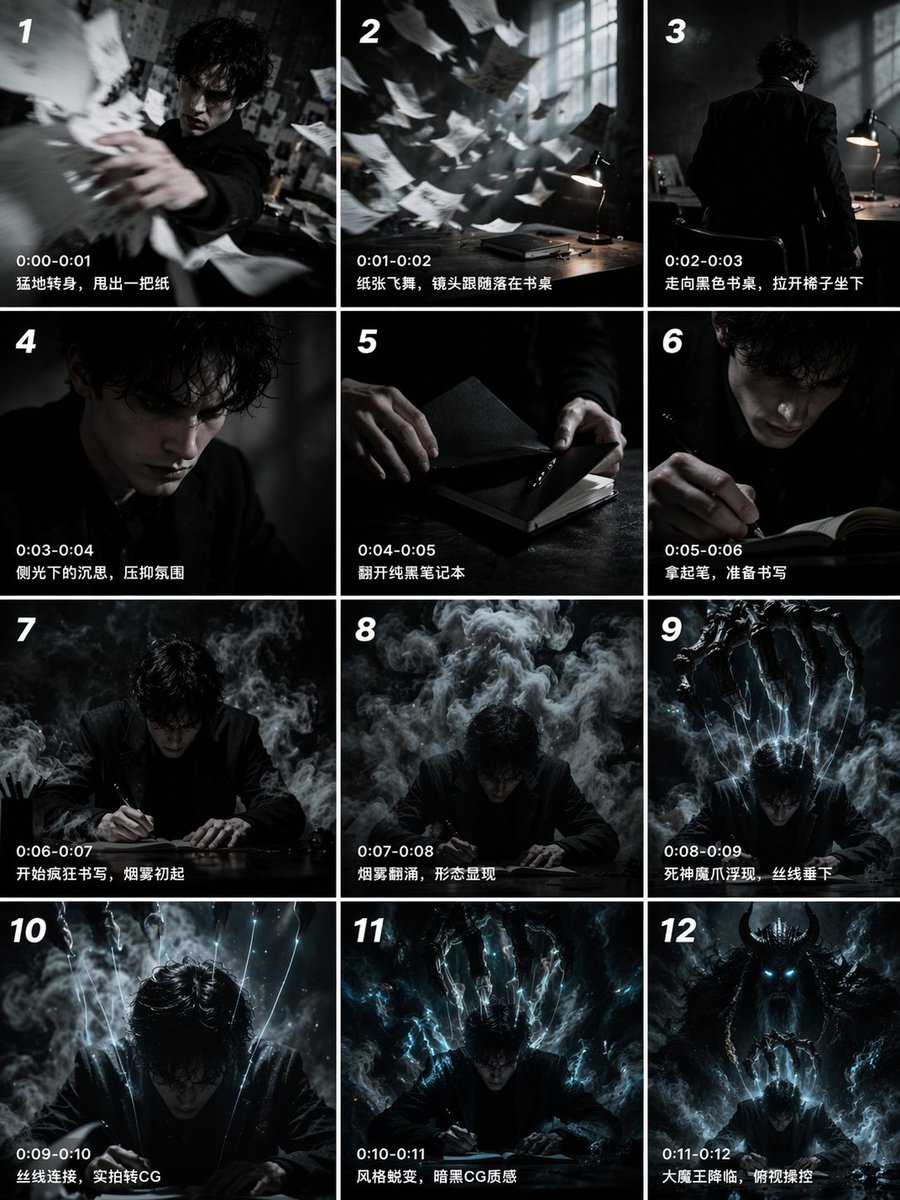
Kisi-kisi Papan Cerita Sinematik 12 Panel
Menghasilkan storyboard berurutan 12 panel dengan stempel waktu dan keterangan, ideal untuk pra-visualisasi film pendek atau sebagai pemicu pembuatan video.
Ini adalah contoh kasus GPT Image 2 untuk Ilustrasi & Seni . Gunakan contoh siap salin di bawah ini untuk menghasilkan visual serupa, dan tinjau atribusi Awesome GPT Image 2 Prompts serta hak penggunaan komersial sebelum digunakan kembali.
Butuh seluruh rangkaian prompt? Gunakan Ilustrasi & Seni Untuk contoh terkait lainnya, kunjungi pusat topik, atau buka GPT Image 2 katalog cepat untuk indeks contoh lengkap, struktur yang dapat digunakan kembali, dan atribusi sumber.
Free 1K preview
Generate one preview image instantly, no sign-up required.
2756/4000
Mengingatkan
Prompt siap salin
{
  "type": "12-panel cinematic storyboard grid",
  "style": "{argument name=\"visual style\" default=\"dark cinematic transitioning to dark fantasy CG\"}",
  "character": "{argument name=\"main character\" default=\"pale young man with messy black hair in a dark suit\"}",
  "layout": {
    "columns": 3,
    "rows": 4,
    "panel_count": 12
  },
  "panels": [
    {
      "id": "1",
      "timestamp": "0:00-0:01",
      "caption": "Suddenly turning around, he threw out a piece of paper.",
      "visual": "character throwing papers at camera"
    },
    {
      "id": "2",
      "timestamp": "0:01-0:02",
      "caption": "The paper fluttered, and the camera followed it as it landed on the desk.",
      "visual": "papers flying in dark room with desk lamp"
    },
    {
      "id": "3",
      "timestamp": "0:02-0:03",
      "caption": "Walking towards the black desk, he pulled out a chair and sat down.",
      "visual": "character walking away towards desk"
    },
    {
      "id": "4",
      "timestamp": "0:03-0:04",
      "caption": "Pensive in the sidelight, a suppressed atmosphere.",
      "visual": "close-up of character's face in shadow"
    },
    {
      "id": "5",
      "timestamp": "0:04-0:05",
      "caption": "Opening the pure black notebook.",
      "visual": "close-up of hands opening a black notebook"
    },
    {
      "id": "6",
      "timestamp": "0:05-0:06",
      "caption": "Pick up the pen, prepare to write",
      "visual": "close-up of character holding pen over notebook"
    },
    {
      "id": "7",
      "timestamp": "0:06-0:07",
      "caption": "Start writing frantically, smoke begins to rise",
      "visual": "character writing frantically, smoke rising"
    },
    {
      "id": "8",
      "timestamp": "0:07-0:08",
      "caption": "Smoke swirls, a form appears",
      "visual": "thick smoke surging around character"
    },
    {
      "id": "9",
      "timestamp": "0:08-0:09",
      "caption": "The Reaper's demonic claws emerge, threads descend",
      "visual": "skeletal hands emerging above, glowing threads hanging down"
    },
    {
      "id": "10",
      "timestamp": "0:09-0:10",
      "caption": "Threads connect, live-action transitions to CG",
      "visual": "glowing threads attaching to character's head"
    },
    {
      "id": "11",
      "timestamp": "0:10-0:11",
      "caption": "Style transformation, dark CG texture",
      "visual": "magical energy, heavy CG fantasy style shift"
    },
    {
      "id": "12",
      "timestamp": "0:11-0:12",
      "caption": "The Great Demon King descends, overlooking and controlling",
      "visual": "{argument name=\"final entity\" default=\"giant horned demon figure\"} looming behind, controlling character like a puppet"
    }
  ]
}
Variabel perintah
Placeholder argumen yang dapat diedit ditemukan dalam prompt, beserta nilai defaultnya.
Variabel
visual style
Bawaan
dark cinematic transitioning to dark fantasy CG
Variabel
main character
Bawaan
pale young man with messy black hair in a dark suit
Variabel
final entity
Bawaan
giant horned demon figure
Best for
- - Ilustrasi & Seni visual exploration
- - Image generation and reference-image edits
- - Reusable briefs that keep source attribution visible
Change these parts
- - Subject, product, character, or scene
- - Aspect ratio, camera, lighting, and background
- - Brand, text, color, and output constraints
Recommended model and settings
- - Model: gpt-image-2
- - Input mode: Teks ke Gambar
- - Aspect ratio: source
- - Commercial status: review original source
How to use this prompt
- 1. Copy the prompt and preserve its structure for the first test.
- 2. Replace the subject, context, and publishing channel.
- 3. Change one camera, lighting, or style variable per iteration.
- 4. Inspect the output, source, text, and rights before reuse.
Limitations, source, and reuse cautions
- - Generated output is an editable draft, not factual, legal, or rights evidence.
- - Review the linked source, people, brands, logos, text, and third-party media before commercial use.
Diimpor dari Awesome GPT Image 2 Prompts . Atribusi diperlukan. Status penggunaan komersial adalah allowed ; tinjau hak sumber sebelum penggunaan berbayar.
Lebih banyak kasus dalam kategori ini
Diprioritaskan berdasarkan kategori, kompatibilitas mode input, kualitas, dan risiko yang lebih rendah.

Surreal 3D Chess Match Artwork
Teks ke Gambar

Female Clown Cyborg Portrait
Teks ke Gambar

Greyscale Puzzle Portrait with Color Accent
Teks ke Gambar

Grumpy Rhino Storybook Illustration
Teks ke Gambar

Manga Desert Radio Telescope Road Trip
Teks ke Gambar

Imperial Research Bunker on Volcanic Planet
Teks ke Gambar
Catatan penggunaan kembali dan sumber
Gunakan perintah ini dengan aman setelah melihat pratinjau kasus.
- 1.Salin perintah tersebut atau buka langsung di Dovoo dengan tombol pembuatan.
- 2.Sesuaikan variabel, rasio aspek, dan gambar referensi untuk kebutuhan Anda sendiri.
- 3.Sebelum mempublikasikan atau menggunakan untuk tujuan berbayar, verifikasi hak sumber, persyaratan atribusi, dan risiko merek atau citra.