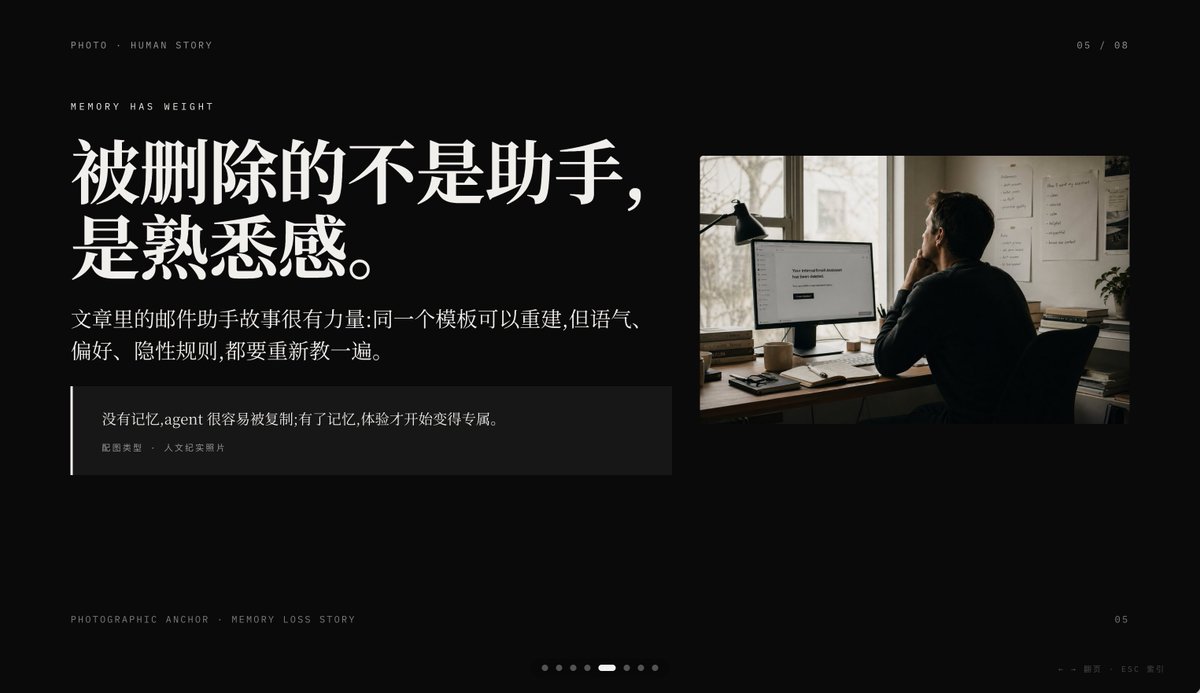
Slide PPT Kehilangan Memori Sinematik
Prompt ini menghasilkan slide presentasi editorial premium dengan latar belakang hitam yang menggabungkan tipografi bercerita ala Tiongkok dengan foto kantor bergaya dokumenter, ideal untuk halaman narasi Keynote atau PPT.
Ini adalah contoh kasus GPT Image 2 untuk Grafis & Poster . Gunakan contoh siap salin di bawah ini untuk menghasilkan visual serupa, dan tinjau atribusi Awesome GPT Image 2 Prompts serta hak penggunaan komersial sebelum digunakan kembali.
Free 1K preview
Generate one preview image instantly, no sign-up required.
Mengingatkan
Prompt siap salin
Create a minimalist, cinematic presentation Slides with a deep black background and high-end editing style PPT layout, in a 16:9 widescreen aspect ratio. The layout should employ an asymmetrical design, with a large text block on the left and a documentary-style photograph in the upper right corner, leaving ample negative space. Use elegant and high-contrast Chinese fonts to create a high-end magazine feel. Place a line of small, uppercase, miniature text in the upper left corner: “PHOTO • HUMAN STORY”. Below that, add another line of small, uppercase text: “MEMORY HAS WEIGHT”. The main title on the left should be a very prominent, white, bold Chinese font, split into two lines: {argument name="headline text" default="What's lost isn't the assistant,\nbut the familiarity."}. Below the title, place a smaller paragraph of white or light gray Chinese text, consisting of two lines: {argument name="body text" default="The email assistant story in the article is powerful: the same template can be rebuilt, but the tone,\npreferences, and implicit rules all need to be retaught."}. Add a dark, semi-transparent quote box below, with a thin white vertical line along the left edge; the box should contain two layers of text: a Chinese quote {argument name="quote" default="Without memory, an agent is easily copied; with memory, the experience becomes uniquely its own."}, and a smaller line of attribution text “Image Type · Humanistic Documentary Photo”. On the right, insert a warm-toned humanistic documentary photograph: an adult with their back to the camera, sitting at a dimly lit office desk looking at a computer monitor; a desk lamp stands to the left of the monitor, and files are posted on the wall, with soft daylight streaming through the window. The monitor screen displays a simple white interface, with the centered text being {argument name="screen text" default="Your conversational Assistant has been deleted."}. The photo should have a film photography texture, with tones of soft browns and grays, creating an intimate, deep, and slightly melancholic atmosphere. Add similar interface pagination details: “05 / 08” in the upper right corner, miniature text “PHOTOGRAPHIC ANCHOR · MEMORY LOSS STORY” in the lower left corner, small text “05” in the lower right corner, and 8 tiny pagination dots at the bottom center, with the 5th dot highlighted as a slender white capsule, and the rest as dark gray dots. Add a small navigation prompt in the lower right corner: “← → Page · ESC Close”. Overall atmosphere: editorial style, restrained, cinematic, memory and loss, high-end Keynote slide design, concise spacing, precise alignment, high-end narrative presentation aesthetics.Variabel perintah
Placeholder argumen yang dapat diedit ditemukan dalam prompt, beserta nilai defaultnya.
Best for
- - Grafis & Poster visual exploration
- - Image generation and reference-image edits
- - Reusable briefs that keep source attribution visible
Change these parts
- - Subject, product, character, or scene
- - Aspect ratio, camera, lighting, and background
- - Brand, text, color, and output constraints
Recommended model and settings
- - Model: gpt-image-2
- - Input mode: Teks ke Gambar
- - Aspect ratio: source
- - Commercial status: review original source
How to use this prompt
- 1. Copy the prompt and preserve its structure for the first test.
- 2. Replace the subject, context, and publishing channel.
- 3. Change one camera, lighting, or style variable per iteration.
- 4. Inspect the output, source, text, and rights before reuse.
Limitations, source, and reuse cautions
- - Generated output is an editable draft, not factual, legal, or rights evidence.
- - Review the linked source, people, brands, logos, text, and third-party media before commercial use.
Lebih banyak kasus dalam kategori ini
Diprioritaskan berdasarkan kategori, kompatibilitas mode input, kualitas, dan risiko yang lebih rendah.






Catatan penggunaan kembali dan sumber
Gunakan perintah ini dengan aman setelah melihat pratinjau kasus.
- 1.Salin perintah tersebut atau buka langsung di Dovoo dengan tombol pembuatan.
- 2.Sesuaikan variabel, rasio aspek, dan gambar referensi untuk kebutuhan Anda sendiri.
- 3.Sebelum mempublikasikan atau menggunakan untuk tujuan berbayar, verifikasi hak sumber, persyaratan atribusi, dan risiko merek atau citra.