Perbandingan VPS Cina
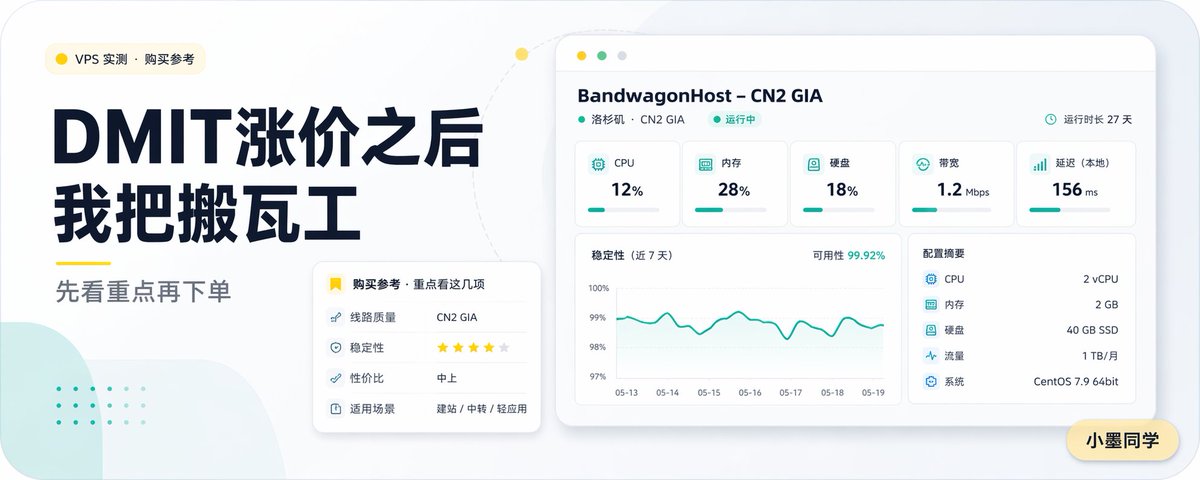
Sampul artikel teknologi berbahasa Mandarin berformat lebar yang apik, menampilkan judul utama yang berani, dasbor pemantauan server, dan kartu rekomendasi untuk konten perbandingan VPS.
Ini adalah contoh kasus GPT Image 2 untuk Grafis & Poster . Gunakan contoh siap salin di bawah ini untuk menghasilkan visual serupa, dan tinjau atribusi Awesome GPT Image 2 Prompts serta hak penggunaan komersial sebelum digunakan kembali.
Butuh seluruh rangkaian prompt? Gunakan Grafis & Poster Untuk contoh terkait lainnya, kunjungi pusat topik, atau buka GPT Image 2 katalog cepat untuk indeks contoh lengkap, struktur yang dapat digunakan kembali, dan atribusi sumber.
Free 1K preview
Generate one preview image instantly, no sign-up required.
3022/4000
Mengingatkan
Prompt siap salin
Create a concise and modern Chinese tech blog cover, using a 16:9 widescreen layout. The background should be a soft light gray, with rounded corners on the canvas, and a minimalist dashboard aesthetic. Place a small rounded corner category tag with a yellow dot icon in the upper left corner, with the text “VPS Measurement · Purchase Reference”. Below this, set two stacked, oversized dark navy blue Chinese titles: “After DMIT Price Increase” and “I Switched to BandwagonHost”. Add a short yellow underline decoration below the titles, followed by a medium gray subtitle: “See the Highlights First, Then Place Your Order”. The layout should be sophisticated, editorial, and easy to read, with strong contrast and ample spacing. On the right side, display a floating desktop application-style server monitoring panel, primarily white with subtle shadows and rounded corners. The top should feature a light beige browser bar with three circular window buttons. The panel title should be “BandwagonHost – CN2 GIA”, followed by the smaller text “Los Angeles · CN2 GIA” and a green “Running” status label. A small clock icon and the text “Runtime 27 Days” should be in the upper right corner. The panel’s top row should contain 5 indicator cards, labeled “CPU” displaying “12%”, “Memory” displaying “28%”, “Disk” displaying “18%”, “Bandwidth” displaying “1.2 Mbps”, and “Latency (Local)” displaying “156 ms”, each with a teal icon and a thin teal progress bar. Below and to the left, place a large line chart card titled “Stability (Last 7 Days)”. The upper right corner should indicate “Availability 99.92%”. The chart should have a teal fluctuating curve, with the y-axis scale ranging from 97% to 100% and date labels from “05-13” to “05-19”. To the right of the chart, add a specification card titled “Configuration Summary”, listing 5 items: “CPU 2 vCPU”, “Memory 2 GB”, “Disk 40 GB SSD”, “Traffic 1 TB/month”, and “System CentOS 7.9 64bit”. In the overlapping area of the lower left text block and the dashboard, add a smaller white rounded shadow recommendation card. The header should include a yellow bookmark icon and the text “Purchase Reference · Focus on These”. Inside, list 4 items: “Line Quality CN2 GIA”, “Stability ★★★★☆”, “Cost Performance Medium-High”, and “Application Scenarios Website Building / Transit / Lightweight Applications”. Add soft decorative elements to the background: a light mint green abstract rounded shape in the lower left corner, with faint mint green dot patterns above it, and a light-colored dotted arc extending from the left text area to the top of the dashboard, with a small yellow dot on the curve. Place a yellow rounded nameplate in the lower right corner of the canvas with the text “Xiao Mo Tongxue”. The overall color scheme should be restrained, using dark navy blue, teal, yellow, white, and light gray, presenting a clear vector style rendering, delicate shadows, and a spacious composition to create a professional and refined AI-generated VPS review article cover.
Best for
- - Grafis & Poster visual exploration
- - Image generation and reference-image edits
- - Reusable briefs that keep source attribution visible
Change these parts
- - Subject, product, character, or scene
- - Aspect ratio, camera, lighting, and background
- - Brand, text, color, and output constraints
Recommended model and settings
- - Model: gpt-image-2
- - Input mode: Teks ke Gambar
- - Aspect ratio: source
- - Commercial status: review original source
How to use this prompt
- 1. Copy the prompt and preserve its structure for the first test.
- 2. Replace the subject, context, and publishing channel.
- 3. Change one camera, lighting, or style variable per iteration.
- 4. Inspect the output, source, text, and rights before reuse.
Limitations, source, and reuse cautions
- - Generated output is an editable draft, not factual, legal, or rights evidence.
- - Review the linked source, people, brands, logos, text, and third-party media before commercial use.
Diimpor dari Awesome GPT Image 2 Prompts . Atribusi diperlukan. Status penggunaan komersial adalah allowed ; tinjau hak sumber sebelum penggunaan berbayar.
Lebih banyak kasus dalam kategori ini
Diprioritaskan berdasarkan kategori, kompatibilitas mode input, kualitas, dan risiko yang lebih rendah.






Catatan penggunaan kembali dan sumber
Gunakan perintah ini dengan aman setelah melihat pratinjau kasus.
- 1.Salin perintah tersebut atau buka langsung di Dovoo dengan tombol pembuatan.
- 2.Sesuaikan variabel, rasio aspek, dan gambar referensi untuk kebutuhan Anda sendiri.
- 3.Sebelum mempublikasikan atau menggunakan untuk tujuan berbayar, verifikasi hak sumber, persyaratan atribusi, dan risiko merek atau citra.