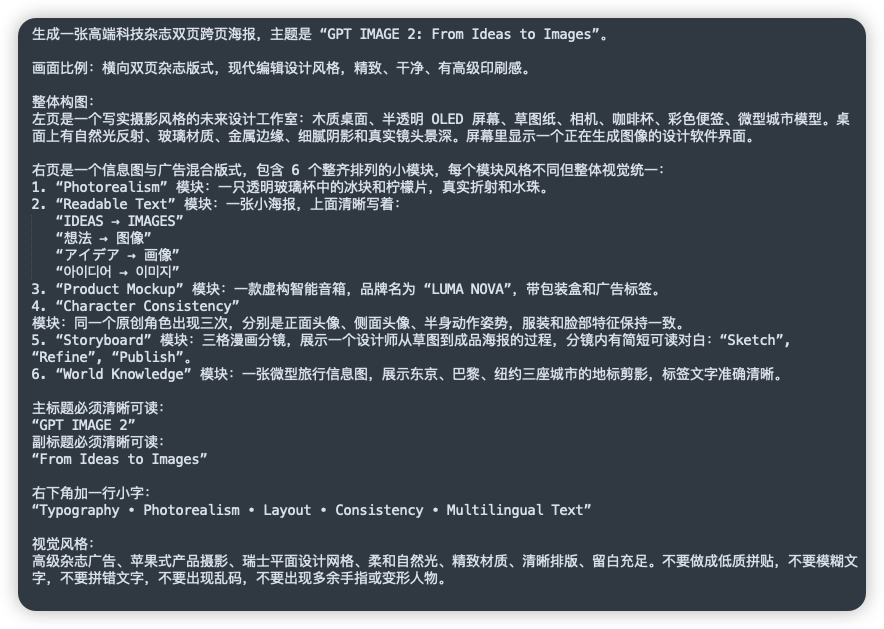
Lembar Petunjuk Bahasa Mandarin untuk GPT GAMBAR 2
Ini menghasilkan tangkapan layar bergaya UI gelap yang bersih dari dokumen petunjuk berbahasa Mandarin yang detail, berguna untuk unggahan media sosial atau demonstrasi tentang instruksi pembuatan gambar yang kompleks.
Ini adalah contoh kasus GPT Image 2 untuk Inspirasi Lainnya . Gunakan contoh siap salin di bawah ini untuk menghasilkan visual serupa, dan tinjau atribusi Awesome GPT Image 2 Prompts serta hak penggunaan komersial sebelum digunakan kembali.
Butuh seluruh rangkaian prompt? Gunakan Inspirasi Lainnya Untuk contoh terkait lainnya, kunjungi pusat topik, atau buka GPT Image 2 katalog cepat untuk indeks contoh lengkap, struktur yang dapat digunakan kembali, dan atribusi sumber.
Free 1K preview
Generate one preview image instantly, no sign-up required.
2157/4000
Mengingatkan
Prompt siap salin
A clean screenshot-like image showing a dark charcoal rounded-rectangle panel filled with dense simplified Chinese prompt text in white sans-serif font, presented as a text document or note on a flat dark background. The composition is a single full-frame panel with generous padding and subtle shadow, like a modern UI card. At the top is a sentence describing the creation of a high-end technology magazine double-page spread poster, with the English title in quotation marks: “GPT IMAGE 2: From Ideas to Images”. Below it are multiple left-aligned paragraphs of Chinese text with consistent line spacing, describing layout ratio, modern editorial design style, and a detailed two-page composition. In the middle section, there is a numbered list with exactly 6 items labeled 1 through 6, each item naming a module in English inside quotation marks followed by Chinese explanations. The 6 module names are exactly: “Photorealism”, “Readable Text”, “Product Mockup”, “Character Consistency”, “Storyboard”, and “World Knowledge”. Under item 2, include 5 separate quoted multilingual text lines as subitems, exactly these: “IDEAS → IMAGES”, “想法 → 图像”, “アイデア → 画像”, “아이디어 → 이미지”, and “فكرة → صورة”. Later in the text, add a section specifying the main title and subtitle as clearly readable quoted English lines: “GPT IMAGE 2” and “From Ideas to Images”. Near the lower portion, add another Chinese line introducing a small caption at the bottom right, followed by the exact quoted English caption: “Typography • Photorealism • Layout • Consistency • Multilingual Text”. At the bottom, include a final Chinese paragraph about visual style requirements such as premium ad feel, Apple-style product photography, Swiss graphic design, soft natural light, refined materials, clear layout, ample whitespace, and avoiding low-quality textures, blurry text, gibberish, or deformed fingers. The text should appear crisp and fully legible, with realistic screen-capture fidelity, high contrast, subtle anti-aliased edges, no illustrations, no icons, no photos, no extra interface chrome beyond the single dark card, and an overall polished editorial-tech presentation.
Best for
- - Inspirasi Lainnya visual exploration
- - Image generation and reference-image edits
- - Reusable briefs that keep source attribution visible
Change these parts
- - Subject, product, character, or scene
- - Aspect ratio, camera, lighting, and background
- - Brand, text, color, and output constraints
Recommended model and settings
- - Model: gpt-image-2
- - Input mode: Teks ke Gambar
- - Aspect ratio: source
- - Commercial status: review original source
How to use this prompt
- 1. Copy the prompt and preserve its structure for the first test.
- 2. Replace the subject, context, and publishing channel.
- 3. Change one camera, lighting, or style variable per iteration.
- 4. Inspect the output, source, text, and rights before reuse.
Limitations, source, and reuse cautions
- - Generated output is an editable draft, not factual, legal, or rights evidence.
- - Review the linked source, people, brands, logos, text, and third-party media before commercial use.
Diimpor dari Awesome GPT Image 2 Prompts . Atribusi diperlukan. Status penggunaan komersial adalah allowed ; tinjau hak sumber sebelum penggunaan berbayar.
Lebih banyak kasus dalam kategori ini
Diprioritaskan berdasarkan kategori, kompatibilitas mode input, kualitas, dan risiko yang lebih rendah.






Catatan penggunaan kembali dan sumber
Gunakan perintah ini dengan aman setelah melihat pratinjau kasus.
- 1.Salin perintah tersebut atau buka langsung di Dovoo dengan tombol pembuatan.
- 2.Sesuaikan variabel, rasio aspek, dan gambar referensi untuk kebutuhan Anda sendiri.
- 3.Sebelum mempublikasikan atau menggunakan untuk tujuan berbayar, verifikasi hak sumber, persyaratan atribusi, dan risiko merek atau citra.