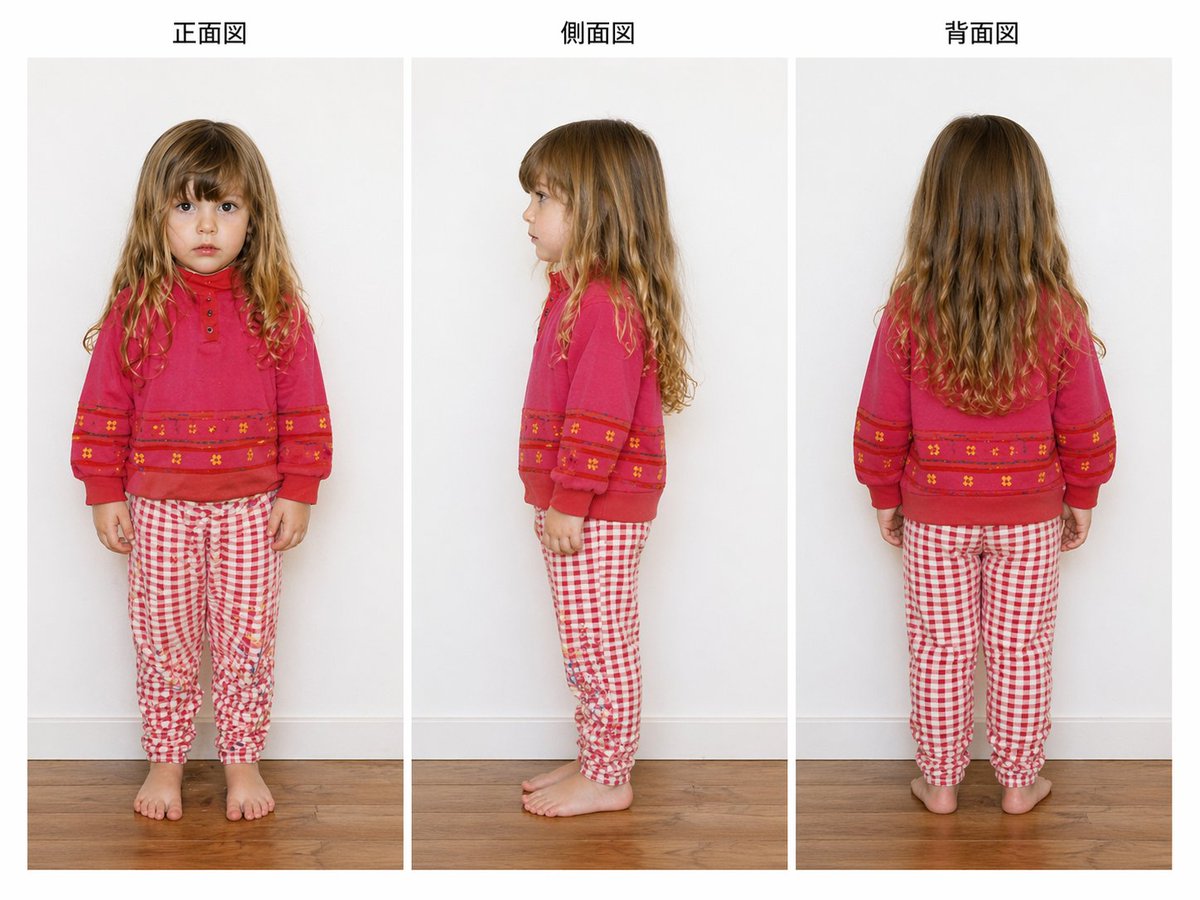
Referensi Pakaian Anak dari Tiga Sudut Pandang
Gambar referensi tiga tampilan bergaya studio yang bersih, menunjukkan seorang gadis muda dalam pose depan, samping, dan belakang untuk dokumentasi pakaian, ekstraksi model, atau analisis gaya putar balik.
Ini adalah contoh kasus GPT Image 2 untuk Produk & Komersial . Gunakan contoh siap salin di bawah ini untuk menghasilkan visual serupa, dan tinjau atribusi Awesome GPT Image 2 Prompts serta hak penggunaan komersial sebelum digunakan kembali.
Perintah ini dirancang untuk beberapa gambar referensi. Kita akan membuka Dovoo dengan perintah dan gambar pratinjau yang tersedia; tambahkan referensi yang tersisa di Dovoo sebelum menghasilkan gambar.
Free 1K preview
Generate one preview image instantly, no sign-up required.
Free text preview doesn’t preserve reference-image consistency.
Mengingatkan
Prompt siap salin
{
  "image_quality": {
    "camera": "straight-on eye-level fashion catalog framing",
    "lighting": "soft even studio lighting with minimal shadows",
    "render_intent": "accurate apparel and body-view documentation, similar to a garment fitting or model extraction reference image"
  },
  "layout": {
    "background": "plain light gray indoor wall with white baseboard and warm medium-tone wooden floor",
    "composition": "three evenly spaced full-body photos arranged in vertical panels across a landscape canvas",
    "figure_count": 3,
    "sections": [
      {
        "count": 1,
        "labels": [
          "front view"
        ],
        "position": "left",
        "title": "Front view"
      },
      {
        "count": 1,
        "labels": [
          "side view"
        ],
        "position": "center",
        "title": "Side view"
      },
      {
        "count": 1,
        "labels": [
          "back view"
        ],
        "position": "right",
        "title": "Back view"
      }
    ],
    "view_details": {
      "center": "left-facing side profile standing view",
      "left": "full frontal standing view",
      "right": "full back standing view"
    }
  },
  "outfit": {
    "bottom": {
      "color": "red and white",
      "fit": "slim jogger-style pajama or lounge pants with gathered ankles",
      "pattern": "small gingham check",
      "type": "pants"
    },
    "footwear": "barefoot",
    "top": {
      "color": "bright pink-red",
      "details": [
        "crew neckline",
        "long sleeves with cuffed wrists",
        "small button placket at upper chest",
        "horizontal decorative bands across lower chest and sleeves",
        "tiny floral motifs within the bands"
      ],
      "type": "sweatshirt"
    }
  },
  "style": "clean studio fashion documentation photo",
  "subject": {
    "age_appearance": "approximately 5 to 7 years old",
    "face": "Show every face clearly with natural, detailed facial features",
    "hair": {
      "color": "light brown to dark blonde",
      "style": "long loose wavy hair with a center part, slightly curlier toward the ends"
    },
    "person": "young girl",
    "pose_set": "standing naturally with arms relaxed"
  },
  "type": "children's clothing reference sheet"
}
Best for
- - Produk & Komersial visual exploration
- - Image generation and reference-image edits
- - Reusable briefs that keep source attribution visible
Change these parts
- - Subject, product, character, or scene
- - Aspect ratio, camera, lighting, and background
- - Brand, text, color, and output constraints
Recommended model and settings
- - Model: gpt-image-2
- - Input mode: Konversi Gambar Berganda ke Gambar
- - Aspect ratio: source
- - Commercial status: review original source
How to use this prompt
- 1. Copy the prompt and preserve its structure for the first test.
- 2. Replace the subject, context, and publishing channel.
- 3. Change one camera, lighting, or style variable per iteration.
- 4. Inspect the output, source, text, and rights before reuse.
Limitations, source, and reuse cautions
- - Generated output is an editable draft, not factual, legal, or rights evidence.
- - Review the linked source, people, brands, logos, text, and third-party media before commercial use.
Lebih banyak kasus dalam kategori ini
Diprioritaskan berdasarkan kategori, kompatibilitas mode input, kualitas, dan risiko yang lebih rendah.






Catatan penggunaan kembali dan sumber
Gunakan perintah ini dengan aman setelah melihat pratinjau kasus.
- 1.Salin perintah tersebut atau buka langsung di Dovoo dengan tombol pembuatan.
- 2.Sesuaikan variabel, rasio aspek, dan gambar referensi untuk kebutuhan Anda sendiri.
- 3.Sebelum mempublikasikan atau menggunakan untuk tujuan berbayar, verifikasi hak sumber, persyaratan atribusi, dan risiko merek atau citra.