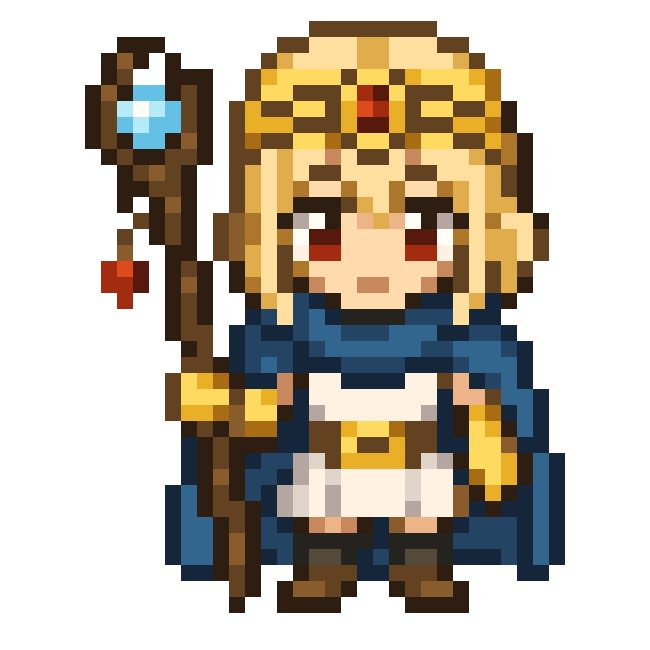
Chibi Fantasy Mage Pixel Sprite
Generates a simple front-facing 8-bit chibi mage sprite suitable for retro RPG character art or pixel icon design.
Ini adalah contoh kasus GPT Image 2 untuk Anime & Game . Gunakan contoh siap salin di bawah ini untuk menghasilkan visual serupa, dan tinjau atribusi Awesome GPT Image 2 Prompts serta hak penggunaan komersial sebelum digunakan kembali.
Butuh seluruh rangkaian prompt? Gunakan Anime & Game Untuk contoh terkait lainnya, kunjungi pusat topik, atau buka GPT Image 2 katalog cepat untuk indeks contoh lengkap, struktur yang dapat digunakan kembali, dan atribusi sumber.
Free 1K preview
Generate one preview image instantly, no sign-up required.
1362/4000
Mengingatkan
Prompt siap salin
Create a centered 8-bit pixel art sprite on a plain white background, showing exactly 1 chibi fantasy mage character standing front-facing with a neutral expression. The character is {argument name="character name" default="Astra"}, a small super-deformed sorceress with {argument name="hair color" default="golden blonde"} straight hair, pale skin, large dark red eyes, and a gold ornate headdress with a single red jewel centered on the forehead. Outfit: exactly 5 main clothing pieces, consisting of a dark blue scarf or short cape wrapped around the shoulders, a white tunic dress, a gold belt with a small central buckle, yellow-gold gloves or arm guards, and dark brown boots. Pose: arms relaxed at the sides, compact body proportions, feet slightly apart. Include exactly 1 tall wooden staff on the character’s left side, held upright; the staff has a crooked dark-brown shaft, exactly 1 blue diamond-shaped crystal set near the top in a dark frame, exactly 1 small red hanging charm below it, and a gold band near the lower grip. Use a crisp low-resolution pixel-art style with chunky square pixels, hard edges, no antialiasing, black and dark-brown outlines, warm gold highlights, navy shadows, and a simple retro RPG character-sprite look. Keep the composition isolated, symmetrical, and readable, with no text, no background scenery, and no watermark.Variabel perintah
Placeholder argumen yang dapat diedit ditemukan dalam prompt, beserta nilai defaultnya.
Variabel
character name
Bawaan
Astra
Variabel
hair color
Bawaan
golden blonde
Best for
- - Anime & Game visual exploration
- - Image generation and reference-image edits
- - Reusable briefs that keep source attribution visible
Change these parts
- - Subject, product, character, or scene
- - Aspect ratio, camera, lighting, and background
- - Brand, text, color, and output constraints
Recommended model and settings
- - Model: gpt-image-2
- - Input mode: Teks ke Gambar
- - Aspect ratio: source
- - Commercial status: review original source
How to use this prompt
- 1. Copy the prompt and preserve its structure for the first test.
- 2. Replace the subject, context, and publishing channel.
- 3. Change one camera, lighting, or style variable per iteration.
- 4. Inspect the output, source, text, and rights before reuse.
Limitations, source, and reuse cautions
- - Generated output is an editable draft, not factual, legal, or rights evidence.
- - Review the linked source, people, brands, logos, text, and third-party media before commercial use.
Diimpor dari Awesome GPT Image 2 Prompts . Atribusi diperlukan. Status penggunaan komersial adalah allowed ; tinjau hak sumber sebelum penggunaan berbayar.
Lebih banyak kasus dalam kategori ini
Diprioritaskan berdasarkan kategori, kompatibilitas mode input, kualitas, dan risiko yang lebih rendah.

Anime Girl Heterochromia Portrait
Teks ke Gambar

Hell Hound Character Sheet Infographic
Teks ke Gambar

Cute Speech Bubble Mascot Profile Icon
Teks ke Gambar

Autumn Cozy Casual Outfit Prompt
Teks ke Gambar

Cute Focus Desk Flat Lay and Kawaii Illustration
Teks ke Gambar

Street Selfie with Cat in Matching Cap
Teks ke Gambar
Catatan penggunaan kembali dan sumber
Gunakan perintah ini dengan aman setelah melihat pratinjau kasus.
- 1.Salin perintah tersebut atau buka langsung di Dovoo dengan tombol pembuatan.
- 2.Sesuaikan variabel, rasio aspek, dan gambar referensi untuk kebutuhan Anda sendiri.
- 3.Sebelum mempublikasikan atau menggunakan untuk tujuan berbayar, verifikasi hak sumber, persyaratan atribusi, dan risiko merek atau citra.