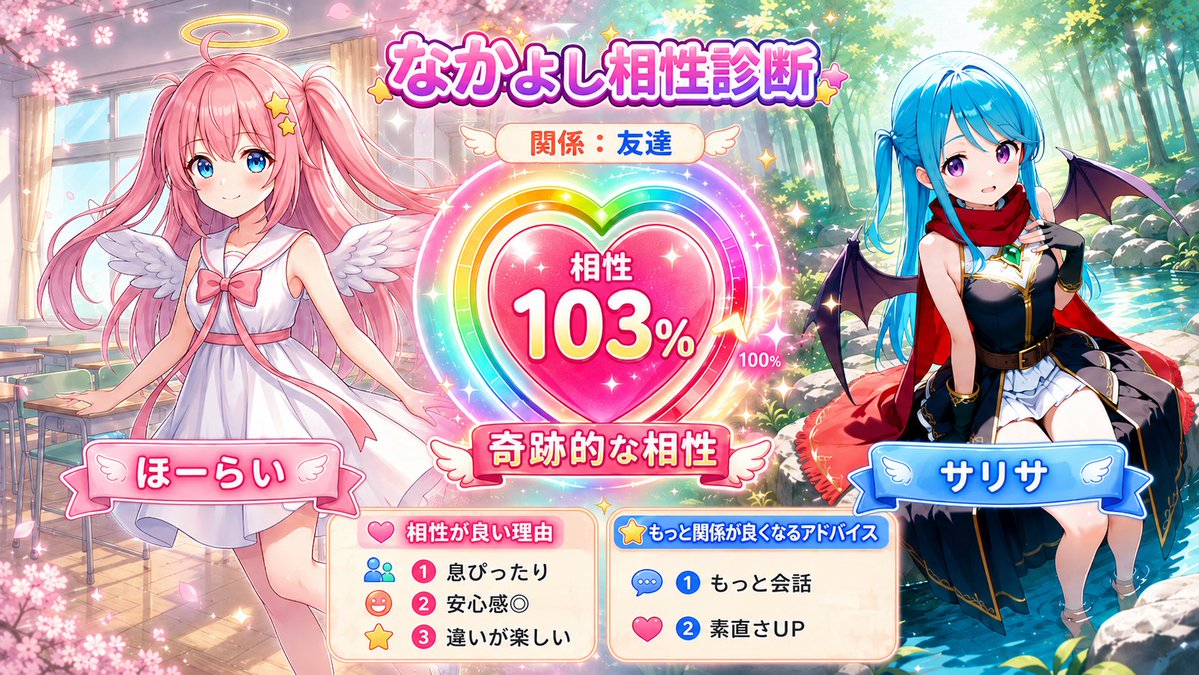
Character Compatibility Result UI Generator
A prompt for generating a game-style compatibility result screen featuring two characters with a UI meter and personalized diagnosis text.
Ini adalah contoh kasus GPT Image 2 untuk Anime & Game . Gunakan contoh siap salin di bawah ini untuk menghasilkan visual serupa, dan tinjau atribusi Awesome GPT Image 2 Prompts serta hak penggunaan komersial sebelum digunakan kembali.
Butuh seluruh rangkaian prompt? Gunakan Anime & Game Untuk contoh terkait lainnya, kunjungi pusat topik, atau buka GPT Image 2 katalog cepat untuk indeks contoh lengkap, struktur yang dapat digunakan kembali, dan atribusi sumber.
Free 1K preview
Generate one preview image instantly, no sign-up required.
3240/4000
Mengingatkan
Prompt siap salin
Referencing the two attached character images, generate a 16:9 horizontal illustration with the theme of 'Character Compatibility Diagnosis' for the two characters. Do not return the diagnosis results or prompts in text; instead, draw it as a single finished illustration. [Input Fields] Character A's Name: {argument name="Character A name" default="Character A"} Character B's Name: {argument name="Character B name" default="Character B"} Their Relationship: {argument name="relationship" default="Best Friends"} Free Memo: *Optional. Personality or typical relationship. If left blank, judge from the facial expressions, clothing, colors, and atmosphere of the attached images. [Content] A 16:9 game-style UI illustration. Place the two characters on the left and right, and place a large compatibility gauge, heart-shaped meter, or favorability result-style UI in the center. Faithfully reproduce Character A and B's hairstyles, hair colors, eyes, clothing, decorations, and atmosphere without mixing them. Match the art style, color usage, background, and UI design to the atmosphere of the two attached images. [Compatibility Diagnosis] Automatically diagnose compatibility from 0 to 120% based on the relationship, free memo, and personalities felt from the images, and display it within the image. Values over 100% should be expressed as 'Limit Break,' 'Miraculous Compatibility,' or 'Destined Compatibility,' using gauge-breaking, rainbow aura, or LIMIT BREAK style effects. Do not use low numbers for good relationships. Guidelines: Best friends 85-120%, friends 70-105%, partners 80-115%, childhood friends 75-110%, seniors/juniors 55-100%, rivals 45-105%, like cats and dogs 25-85%, more than friends 70-115%. Important: Do not fix the compatibility % every time. Even for the same relationship, do not use the same number; let it vary naturally according to the character's atmosphere. Do not use 112% every time for best friends. [Text in Screen] Text should be short and easy to read. Long sentences are prohibited. Mandatory: A's name, B's name, relationship, compatibility XX%, short diagnosis title. Optional: 3 reasons for good compatibility, 2 pieces of advice for improving the relationship. Display reasons or advice as short UI labels or mini panels with icons like 'Perfectly in sync,' 'Sense of security,' 'Matching vibes,' 'More conversation,' 'Improved honesty,' etc. [Composition] Characters should not touch each other. No holding hands, crossing arms, hugging, being in close contact, or overlapping bodies. Sandwich the central UI between the two people and leave an appropriate distance. Express closeness through facial expressions, gazes, poses, body direction, background icons, and UI effects rather than physical contact. [Finishing] A high-quality single picture for SNS that is bright and easy to see. Give both people equal presence. [To Avoid] Mixing faces or hairstyles, swapping clothes, changing eye color, adding people, one person disappearing, contact, hand-holding, close contact, body overlapping, broken hands/feet/fingers, extra arms, long text, garbled characters, unreadable text, cluttered UI, excessive background, low resolution, blurring, distortion, becoming a different character.Variabel perintah
Placeholder argumen yang dapat diedit ditemukan dalam prompt, beserta nilai defaultnya.
Variabel
Character A name
Bawaan
Character A
Variabel
Character B name
Bawaan
Character B
Variabel
relationship
Bawaan
Best Friends
Best for
- - Anime & Game visual exploration
- - Image generation and reference-image edits
- - Reusable briefs that keep source attribution visible
Change these parts
- - Subject, product, character, or scene
- - Aspect ratio, camera, lighting, and background
- - Brand, text, color, and output constraints
Recommended model and settings
- - Model: gpt-image-2
- - Input mode: Teks ke Gambar
- - Aspect ratio: source
- - Commercial status: review original source
How to use this prompt
- 1. Copy the prompt and preserve its structure for the first test.
- 2. Replace the subject, context, and publishing channel.
- 3. Change one camera, lighting, or style variable per iteration.
- 4. Inspect the output, source, text, and rights before reuse.
Limitations, source, and reuse cautions
- - Generated output is an editable draft, not factual, legal, or rights evidence.
- - Review the linked source, people, brands, logos, text, and third-party media before commercial use.
Diimpor dari Awesome GPT Image 2 Prompts . Atribusi diperlukan. Status penggunaan komersial adalah allowed ; tinjau hak sumber sebelum penggunaan berbayar.
Lebih banyak kasus dalam kategori ini
Diprioritaskan berdasarkan kategori, kompatibilitas mode input, kualitas, dan risiko yang lebih rendah.

Anime Girl Heterochromia Portrait
Teks ke Gambar

Cute Speech Bubble Mascot Profile Icon
Teks ke Gambar

Autumn Cozy Casual Outfit Prompt
Teks ke Gambar

Cute Focus Desk Flat Lay and Kawaii Illustration
Teks ke Gambar

Street Selfie with Cat in Matching Cap
Teks ke Gambar

Morning Bed Stretching Legs Prompt
Teks ke Gambar
Catatan penggunaan kembali dan sumber
Gunakan perintah ini dengan aman setelah melihat pratinjau kasus.
- 1.Salin perintah tersebut atau buka langsung di Dovoo dengan tombol pembuatan.
- 2.Sesuaikan variabel, rasio aspek, dan gambar referensi untuk kebutuhan Anda sendiri.
- 3.Sebelum mempublikasikan atau menggunakan untuk tujuan berbayar, verifikasi hak sumber, persyaratan atribusi, dan risiko merek atau citra.