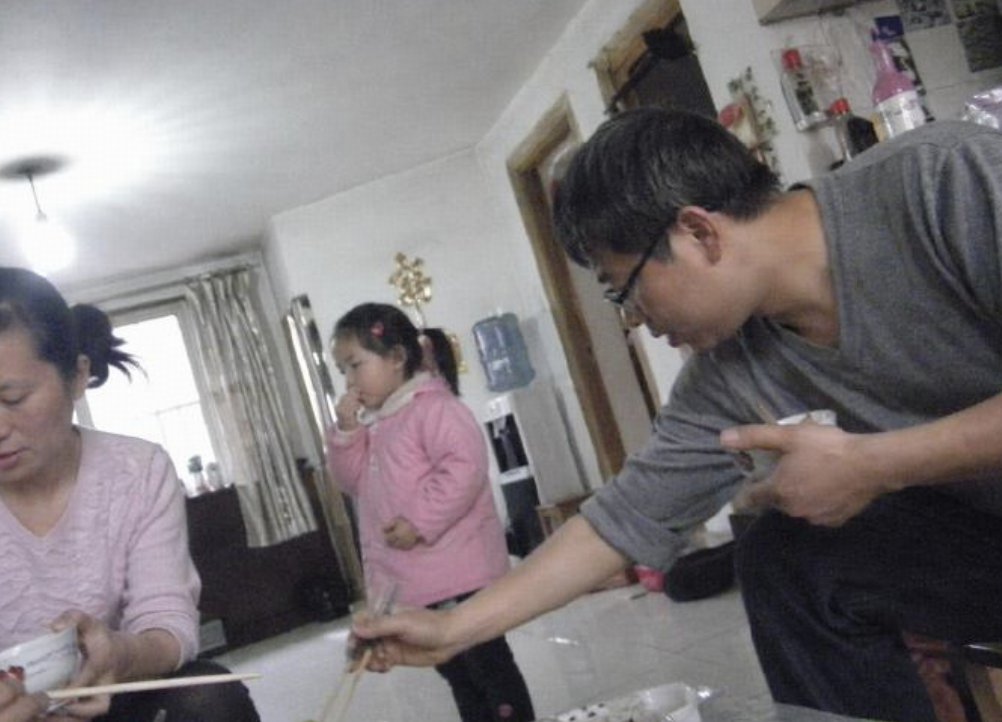
Censored Family Snapshot
Generates a tilted low-resolution candid apartment photo with three people whose faces are obscured by censor blocks, useful for uncanny realistic AI-image demonstrations.
Ini adalah contoh kasus GPT Image 2 untuk Potret & Karakter . Gunakan contoh siap salin di bawah ini untuk menghasilkan visual serupa, dan tinjau atribusi Awesome GPT Image 2 Prompts serta hak penggunaan komersial sebelum digunakan kembali.
Butuh seluruh rangkaian prompt? Gunakan Potret & Karakter Untuk contoh terkait lainnya, kunjungi pusat topik, atau buka GPT Image 2 katalog cepat untuk indeks contoh lengkap, struktur yang dapat digunakan kembali, dan atribusi sumber.
Free 1K preview
Generate one preview image instantly, no sign-up required.
1837/4000
Mengingatkan
Prompt siap salin
Create a low-resolution, candid indoor family snapshot with an unsettling hyper-realistic AI-photo feel, shot at a slight clockwise tilt with a wide-angle phone camera and harsh ceiling-light glare. The scene is a cramped apartment dining/living room with glossy white tile floor, white walls, a bright window with beige curtains in the back left, a dark sofa or cabinet near the window, a wall-mounted water dispenser in the center background, shelves and bottles cluttered in the upper right, and everyday household objects scattered around. Show exactly 3 people: on the left, a seated adult woman in a pale pink long-sleeve top holding a white bowl and chopsticks near the bottom edge; in the center background, a standing child wearing a puffy pink jacket and dark pants, holding something near the mouth; on the right foreground, a leaning adult man in a gray long-sleeve shirt and dark pants, reaching diagonally downward with chopsticks while pointing with his other hand. Cover all 3 faces with opaque rectangular pixelated blur censor blocks in muted brown-gray tones: one tall block over the woman’s face at the far left edge, one smaller block over the child’s face, and one large block over the man’s face. Keep the composition awkward and accidental, with motion blur, compression artifacts, soft focus, noisy shadows, washed-out colors, uneven exposure, and the feeling of an old compressed family photo. Use {argument name="room type" default="small Chinese apartment dining room"}, {argument name="number of people" default="3"}, {argument name="censor style" default="opaque rectangular pixelated blur blocks"}, {argument name="main clothing color" default="pink and gray"}, and {argument name="camera style" default="tilted low-resolution phone snapshot"}. Do not add readable text, logos, watermarks, or extra people.Variabel perintah
Placeholder argumen yang dapat diedit ditemukan dalam prompt, beserta nilai defaultnya.
Variabel
room type
Bawaan
small Chinese apartment dining room
Variabel
number of people
Bawaan
3
Variabel
censor style
Bawaan
opaque rectangular pixelated blur blocks
Variabel
main clothing color
Bawaan
pink and gray
Variabel
camera style
Bawaan
tilted low-resolution phone snapshot
Best for
- - Potret & Karakter visual exploration
- - Image generation and reference-image edits
- - Reusable briefs that keep source attribution visible
Change these parts
- - Subject, product, character, or scene
- - Aspect ratio, camera, lighting, and background
- - Brand, text, color, and output constraints
Recommended model and settings
- - Model: gpt-image-2
- - Input mode: Teks ke Gambar
- - Aspect ratio: source
- - Commercial status: review original source
How to use this prompt
- 1. Copy the prompt and preserve its structure for the first test.
- 2. Replace the subject, context, and publishing channel.
- 3. Change one camera, lighting, or style variable per iteration.
- 4. Inspect the output, source, text, and rights before reuse.
Limitations, source, and reuse cautions
- - Generated output is an editable draft, not factual, legal, or rights evidence.
- - Review the linked source, people, brands, logos, text, and third-party media before commercial use.
Diimpor dari Awesome GPT Image 2 Prompts . Atribusi diperlukan. Status penggunaan komersial adalah allowed ; tinjau hak sumber sebelum penggunaan berbayar.
Lebih banyak kasus dalam kategori ini
Diprioritaskan berdasarkan kategori, kompatibilitas mode input, kualitas, dan risiko yang lebih rendah.






Catatan penggunaan kembali dan sumber
Gunakan perintah ini dengan aman setelah melihat pratinjau kasus.
- 1.Salin perintah tersebut atau buka langsung di Dovoo dengan tombol pembuatan.
- 2.Sesuaikan variabel, rasio aspek, dan gambar referensi untuk kebutuhan Anda sendiri.
- 3.Sebelum mempublikasikan atau menggunakan untuk tujuan berbayar, verifikasi hak sumber, persyaratan atribusi, dan risiko merek atau citra.