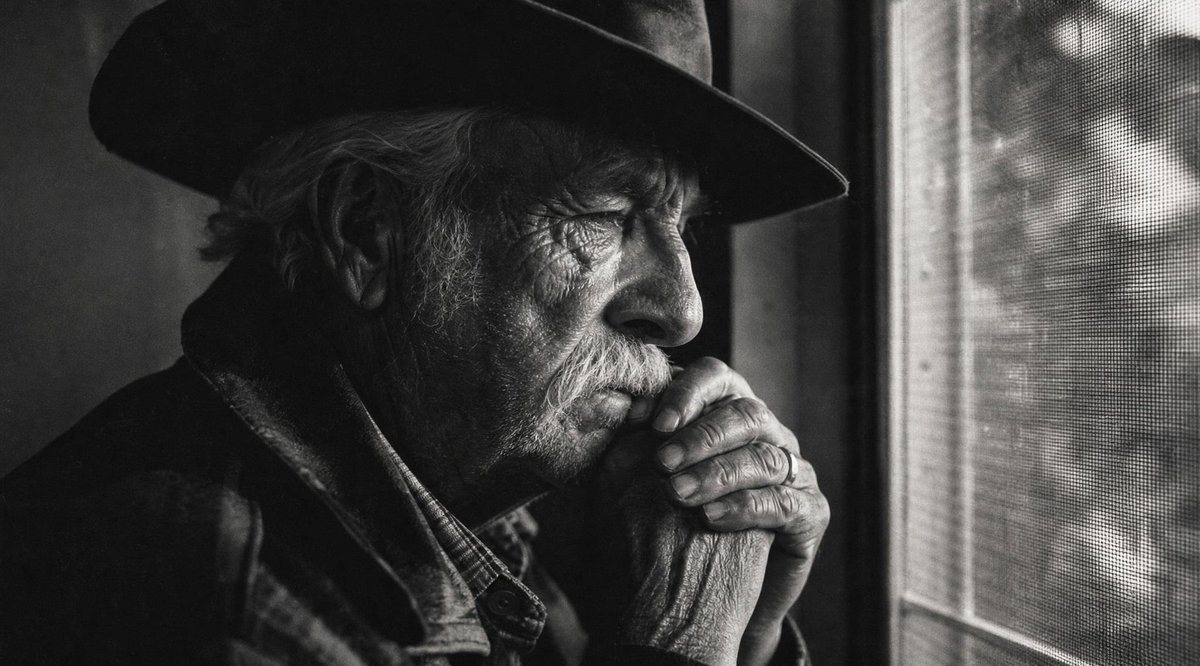
Potret Pria Tua yang Suram dan Disensor
Sebuah tantangan pembuatan potret sinematik monokrom untuk menciptakan sosok pria tua yang sedang merenung di dekat jendela dengan blok sensor gelap yang sengaja dibuat menutupi wajahnya.
Ini adalah contoh kasus GPT Image 2 untuk Potret & Karakter . Gunakan contoh siap salin di bawah ini untuk menghasilkan visual serupa, dan tinjau atribusi Awesome GPT Image 2 Prompts serta hak penggunaan komersial sebelum digunakan kembali.
Butuh seluruh rangkaian prompt? Gunakan Potret & Karakter Untuk contoh terkait lainnya, kunjungi pusat topik, atau buka GPT Image 2 katalog cepat untuk indeks contoh lengkap, struktur yang dapat digunakan kembali, dan atribusi sumber.
Free 1K preview
Generate one preview image instantly, no sign-up required.
1090/4000
Mengingatkan
Prompt siap salin
Create a cinematic black-and-white documentary photograph of {argument name="subject" default="an elderly man"} sitting indoors beside a window, shown in a tight side-profile composition from the chest up. He wears a dark wide-brim hat, a heavy dark coat or jacket over a plaid shirt, with long gray hair visible around his ear and deeply wrinkled hands clasped near his mouth in a contemplative pose. The lighting is low-key and moody, with strong shadow on the left side and soft daylight entering from the right through a textured mesh window screen. Include exactly 4 main visible elements: 1 elderly seated man, 1 wide-brim hat, 1 mesh-covered window, and 1 large opaque dark gray rectangular censor block covering the central face and upper torso area. The rectangle should be positioned slightly right of center, spanning much of the man's head and chest, with clean straight edges and no text. Use high contrast monochrome film grain, gritty texture, shallow depth of field, and an intimate quiet atmosphere, as if captured on vintage 35mm film. No captions, no watermark, no color.Variabel perintah
Placeholder argumen yang dapat diedit ditemukan dalam prompt, beserta nilai defaultnya.
Variabel
subject
Bawaan
an elderly man
Best for
- - Potret & Karakter visual exploration
- - Image generation and reference-image edits
- - Reusable briefs that keep source attribution visible
Change these parts
- - Subject, product, character, or scene
- - Aspect ratio, camera, lighting, and background
- - Brand, text, color, and output constraints
Recommended model and settings
- - Model: gpt-image-2
- - Input mode: Teks ke Gambar
- - Aspect ratio: source
- - Commercial status: review original source
How to use this prompt
- 1. Copy the prompt and preserve its structure for the first test.
- 2. Replace the subject, context, and publishing channel.
- 3. Change one camera, lighting, or style variable per iteration.
- 4. Inspect the output, source, text, and rights before reuse.
Limitations, source, and reuse cautions
- - Generated output is an editable draft, not factual, legal, or rights evidence.
- - Review the linked source, people, brands, logos, text, and third-party media before commercial use.
Diimpor dari Awesome GPT Image 2 Prompts . Atribusi diperlukan. Status penggunaan komersial adalah allowed ; tinjau hak sumber sebelum penggunaan berbayar.
Lebih banyak kasus dalam kategori ini
Diprioritaskan berdasarkan kategori, kompatibilitas mode input, kualitas, dan risiko yang lebih rendah.

Cinematic Blue Backlit Portrait
Teks ke Gambar

Playful Morning Selfie Portrait
Teks ke Gambar

Studio Portrait of Woman with Sunglasses
Teks ke Gambar

Morning Bed Stretching Legs Prompt
Teks ke Gambar

Hell Hound Character Sheet Infographic
Teks ke Gambar

GPT Image 2 Real-Life Character Street Snap
Teks ke Gambar
Catatan penggunaan kembali dan sumber
Gunakan perintah ini dengan aman setelah melihat pratinjau kasus.
- 1.Salin perintah tersebut atau buka langsung di Dovoo dengan tombol pembuatan.
- 2.Sesuaikan variabel, rasio aspek, dan gambar referensi untuk kebutuhan Anda sendiri.
- 3.Sebelum mempublikasikan atau menggunakan untuk tujuan berbayar, verifikasi hak sumber, persyaratan atribusi, dan risiko merek atau citra.