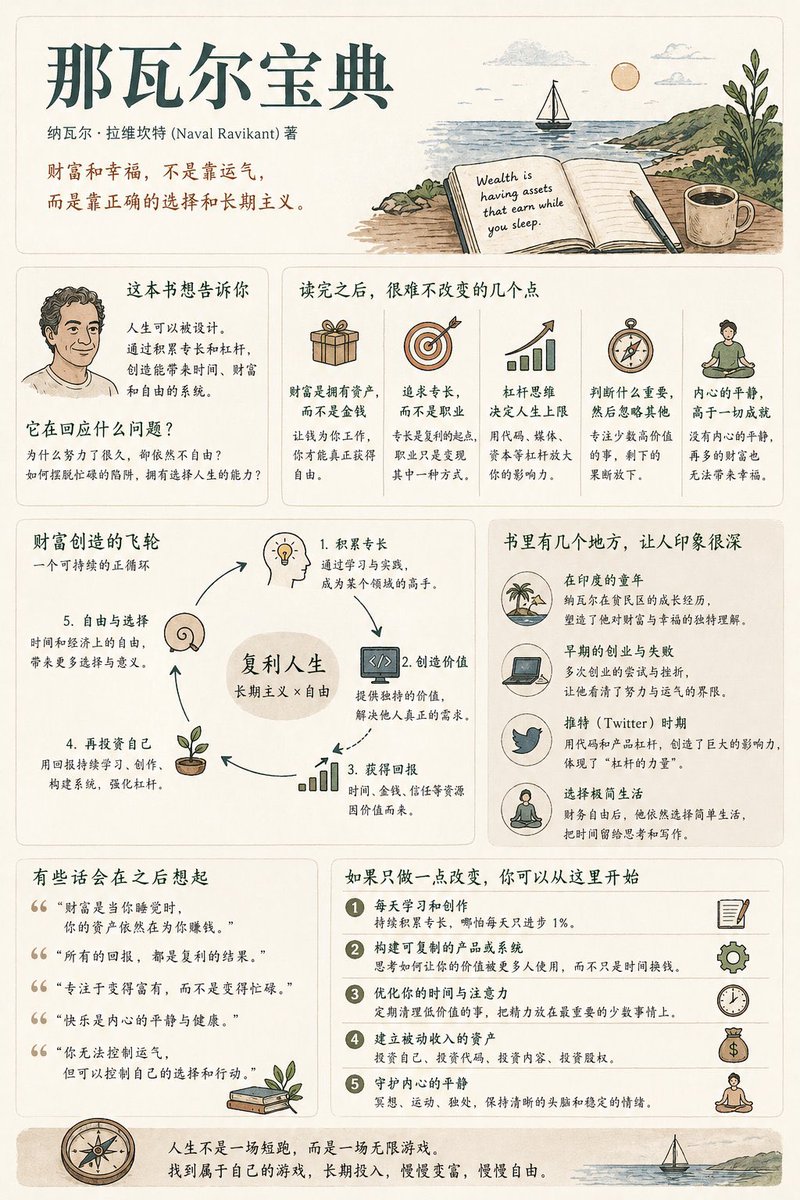
Poster Infografis Ringkasan Buku
Panduan komprehensif dan terstruktur untuk membuat poster ringkasan buku dengan kepadatan informasi sedang, antarmuka pengguna modern, dan gaya ilustrasi vintage.
Ini adalah contoh kasus GPT Image 2 untuk Grafis & Poster . Gunakan contoh siap salin di bawah ini untuk menghasilkan visual serupa, dan tinjau atribusi Awesome GPT Image 2 Prompts serta hak penggunaan komersial sebelum digunakan kembali.
Butuh seluruh rangkaian prompt? Gunakan Grafis & Poster Untuk contoh terkait lainnya, kunjungi pusat topik, atau buka GPT Image 2 katalog cepat untuk indeks contoh lengkap, struktur yang dapat digunakan kembali, dan atribusi sumber.
Free 1K preview
Generate one preview image instantly, no sign-up required.
1544/4000
Mengingatkan
Prompt siap salin
Generate a [medium information density] book summary infographic poster with the theme "{argument name="book title" default="Book Title"}".

---

Step 0 (Critical Pre-assessment)

Before starting generation, determine which category this book belongs to (multiple choice possible):
* Cognitive Growth (Thinking / Self-improvement)
* Business / Wealth (Earning / Career / Investment)
* Psychology / Emotion (Relationships / Inner Self / Human Nature)
* Novel / Story (Narrative / Character / Metaphor)

Adjust content logic based on category.

[Overall Style]
Modern Minimalist UI + Light Vintage Illustration style. Soft light backgrounds (Cream / Beige / Light Gray). Low saturation palette (Deep Green / Deep Blue / Brown).
Keywords: Quiet, Substantial, Readable.

[Core Principles]
Do not use fixed module titles. Do not force structural completeness. Organize information naturally based on book type.

[Content Modules]
1. Opening: Book Title, Author, One-sentence insight.
2. Core Understanding: "What this book is really saying is..."
3. Highlights: Key takeaways adjusted by category.
4. Visual Structure: Decision paths, leverage systems, or character maps.
5. Examples/Fragments: Memorable scenes or cases.
6. Quotes: Meaningful sentences.
7. Actions: Practical steps to take after reading.

[Design Details]
Adaptive grid layout, card-based info, 6:4 image-to-text ratio, unified illustration style, clear hierarchy.

[Tone of Voice]
Should sound like a human explaining the book with insight and realization, not like a dry summary.
Variabel perintah
Placeholder argumen yang dapat diedit ditemukan dalam prompt, beserta nilai defaultnya.
Variabel
book title
Bawaan
Book Title
Best for
- - Grafis & Poster visual exploration
- - Image generation and reference-image edits
- - Reusable briefs that keep source attribution visible
Change these parts
- - Subject, product, character, or scene
- - Aspect ratio, camera, lighting, and background
- - Brand, text, color, and output constraints
Recommended model and settings
- - Model: gpt-image-2
- - Input mode: Teks ke Gambar
- - Aspect ratio: source
- - Commercial status: review original source
How to use this prompt
- 1. Copy the prompt and preserve its structure for the first test.
- 2. Replace the subject, context, and publishing channel.
- 3. Change one camera, lighting, or style variable per iteration.
- 4. Inspect the output, source, text, and rights before reuse.
Limitations, source, and reuse cautions
- - Generated output is an editable draft, not factual, legal, or rights evidence.
- - Review the linked source, people, brands, logos, text, and third-party media before commercial use.
Diimpor dari Awesome GPT Image 2 Prompts . Atribusi diperlukan. Status penggunaan komersial adalah allowed ; tinjau hak sumber sebelum penggunaan berbayar.
Lebih banyak kasus dalam kategori ini
Diprioritaskan berdasarkan kategori, kompatibilitas mode input, kualitas, dan risiko yang lebih rendah.






Catatan penggunaan kembali dan sumber
Gunakan perintah ini dengan aman setelah melihat pratinjau kasus.
- 1.Salin perintah tersebut atau buka langsung di Dovoo dengan tombol pembuatan.
- 2.Sesuaikan variabel, rasio aspek, dan gambar referensi untuk kebutuhan Anda sendiri.
- 3.Sebelum mempublikasikan atau menggunakan untuk tujuan berbayar, verifikasi hak sumber, persyaratan atribusi, dan risiko merek atau citra.