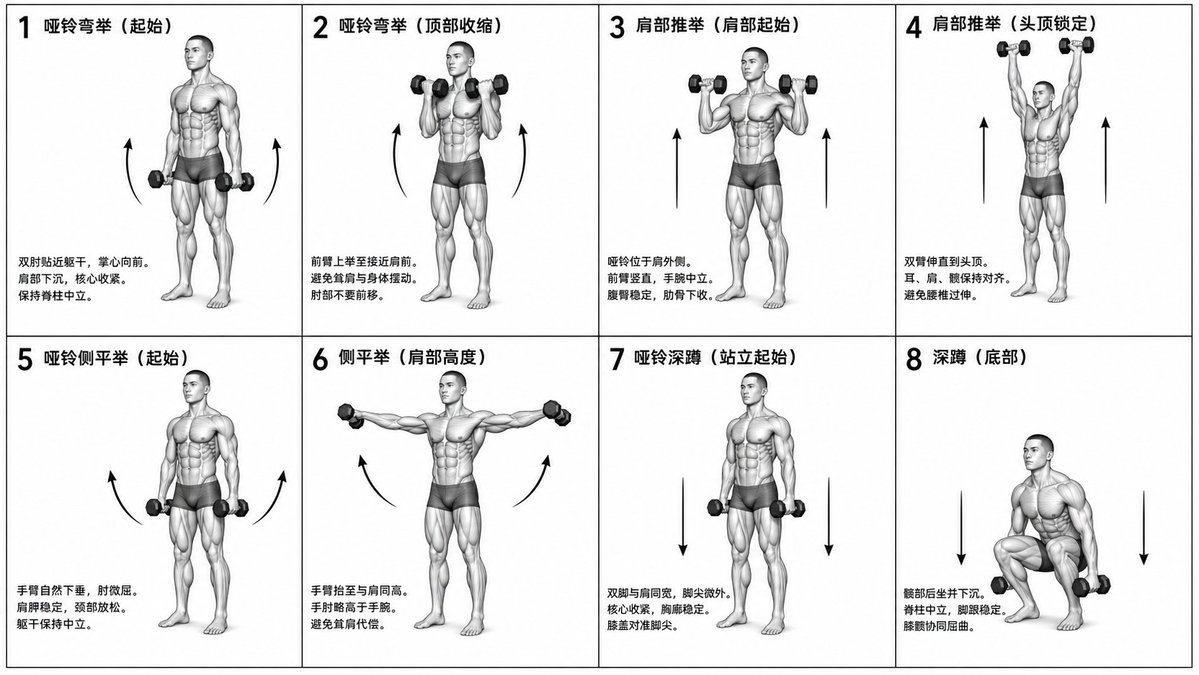
Bagan Instruksional Kebugaran Biomekanik
Sebuah tugas kompleks untuk membuat bagan kebugaran grid 2x4 monokromatik dan akurat secara ilmiah yang menunjukkan latihan spesifik dengan label dan gambar anatomi.
Ini adalah contoh kasus GPT Image 2 untuk Grafis & Poster . Gunakan contoh siap salin di bawah ini untuk menghasilkan visual serupa, dan tinjau atribusi Awesome GPT Image 2 Prompts serta hak penggunaan komersial sebelum digunakan kembali.
Free 1K preview
Generate one preview image instantly, no sign-up required.
Free text preview doesn’t preserve reference-image consistency.
Mengingatkan
Prompt siap salin
Generate a monochrome grayscale technical illustration, a biomechanically accurate fitness instruction sheet, clean 3D anatomical figures, scientific diagram aesthetics, minimalist style, no artistic exaggeration.

2x4 grid layout (total of 8 panels), perfectly aligned cells, equal spacing, thin black border, numbered 1 to 8.

Neutral athletic human body (gender-neutral), proportional anatomy, consistent figure across all panels.

{argument name="training sequence" default="Dumbbell training"} sequence (key positions only):
1. Dumbbell Curl (starting position)
2. Dumbbell Curl (top contraction)
3. Shoulder Press (start at shoulder height)
4. Shoulder Press (overhead lockout)
5. Lateral Raise (arms down)
6. Lateral Raise (arms to shoulder height)
7. Dumbbell Squat (standing start)
8. Squat (bottom position).

Top left corner: bold number + movement name (Chinese).
Center: full-body pose (clear joint positioning).
Bottom left corner: brief technical description (2–3 lines, correct posture cues).
Overlay: directional arrows showing the path of motion (up/down/arc).

Correct joint alignment, neutral spine, proper elbow and knee positioning, realistic weight distribution, no exaggerated movements.

Highly detailed grayscale shading, soft studio lighting, subtle shadows, clean lines, medical/sports science diagram quality.

Solid white background.

No color, no background environment, no extra elements, no stylization, no blur.
Variabel perintah
Placeholder argumen yang dapat diedit ditemukan dalam prompt, beserta nilai defaultnya.
Best for
- - Grafis & Poster visual exploration
- - Image generation and reference-image edits
- - Reusable briefs that keep source attribution visible
Change these parts
- - Subject, product, character, or scene
- - Aspect ratio, camera, lighting, and background
- - Brand, text, color, and output constraints
Recommended model and settings
- - Model: gpt-image-2
- - Input mode: Gambar ke Gambar
- - Aspect ratio: source
- - Commercial status: review original source
How to use this prompt
- 1. Copy the prompt and preserve its structure for the first test.
- 2. Replace the subject, context, and publishing channel.
- 3. Change one camera, lighting, or style variable per iteration.
- 4. Inspect the output, source, text, and rights before reuse.
Limitations, source, and reuse cautions
- - Generated output is an editable draft, not factual, legal, or rights evidence.
- - Review the linked source, people, brands, logos, text, and third-party media before commercial use.
Lebih banyak kasus dalam kategori ini
Diprioritaskan berdasarkan kategori, kompatibilitas mode input, kualitas, dan risiko yang lebih rendah.






Catatan penggunaan kembali dan sumber
Gunakan perintah ini dengan aman setelah melihat pratinjau kasus.
- 1.Salin perintah tersebut atau buka langsung di Dovoo dengan tombol pembuatan.
- 2.Sesuaikan variabel, rasio aspek, dan gambar referensi untuk kebutuhan Anda sendiri.
- 3.Sebelum mempublikasikan atau menggunakan untuk tujuan berbayar, verifikasi hak sumber, persyaratan atribusi, dan risiko merek atau citra.