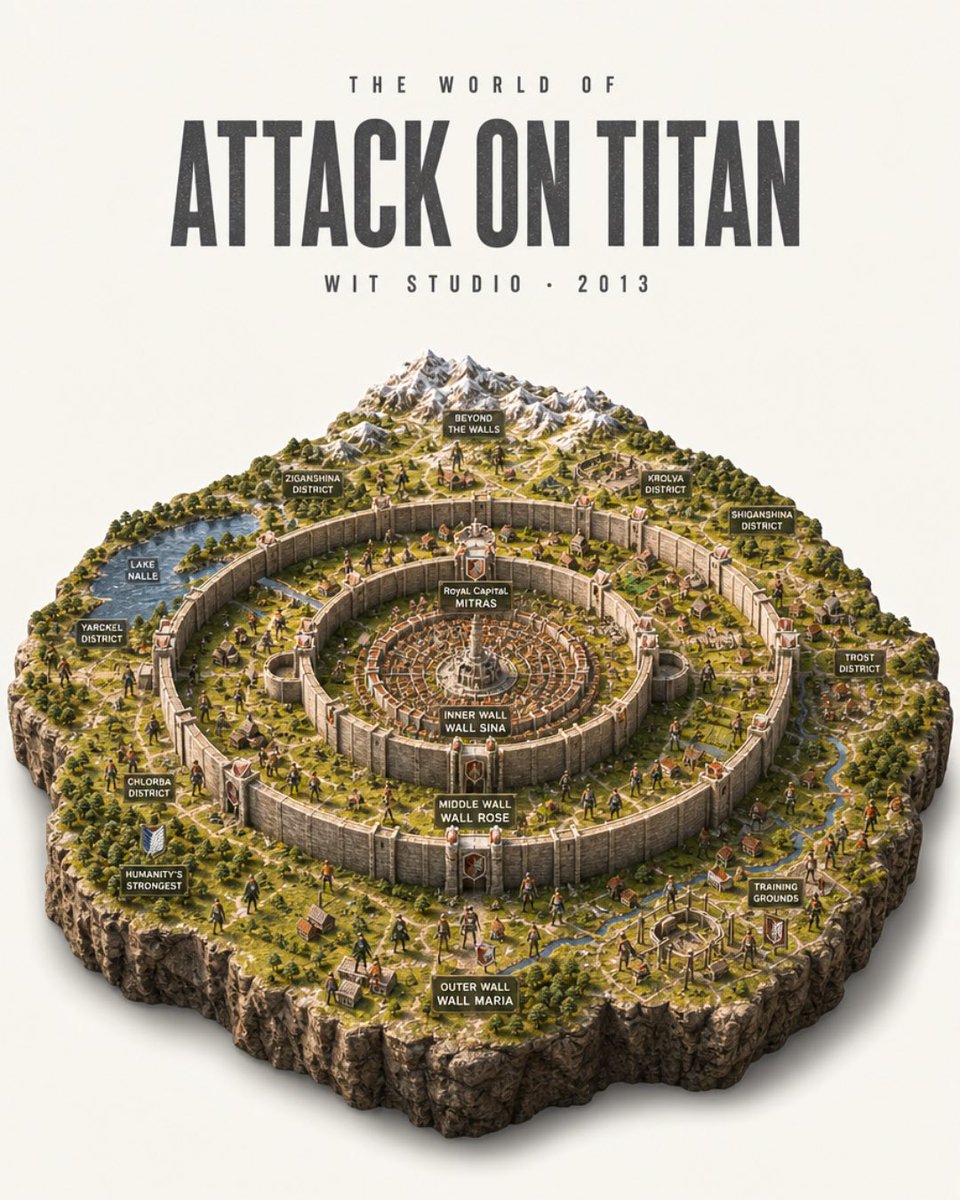
Attack on Titan Isometric Diorama Map
Creates a detailed poster-style isometric miniature map of the Attack on Titan world with concentric walls, districts, labels, and studio typography.
Ini adalah contoh kasus GPT Image 2 untuk Grafis & Poster . Gunakan contoh siap salin di bawah ini untuk menghasilkan visual serupa, dan tinjau atribusi Awesome GPT Image 2 Prompts serta hak penggunaan komersial sebelum digunakan kembali.
Butuh seluruh rangkaian prompt? Gunakan Grafis & Poster Untuk contoh terkait lainnya, kunjungi pusat topik, atau buka GPT Image 2 katalog cepat untuk indeks contoh lengkap, struktur yang dapat digunakan kembali, dan atribusi sumber.
Free 1K preview
Generate one preview image instantly, no sign-up required.
3151/4000
Mengingatkan
Prompt siap salin
Goal: Create an ultra-detailed photorealistic isometric miniature scale-model diorama poster of the world from {argument name="anime title" default="Attack on Titan"}, presented like a collectible museum map on a clean off-white studio background.

Canvas: Vertical 4:5 poster composition. The upper third is typography, the lower two-thirds is a floating square-cut terrain diorama with rugged rocky sides and a soft realistic shadow beneath.

Top typography: Centered at the top, use tall condensed bold distressed sans-serif lettering. Small spaced text above reads "THE WORLD OF". Main title reads "{argument name="main title text" default="ATTACK ON TITAN"}" in very large dark charcoal letters. Small spaced text below reads "{argument name="studio line" default="WIT STUDIO • 2013"}".

Diorama layout: Show the walled civilization as a high-angle isometric model with three enormous concentric circular stone walls and fortified gates. The center contains a dense circular royal city with radial streets and a white central monument. Surrounding rings contain miniature villages, farms, roads, rivers, forests, watchtowers, and tiny human figures. Beyond the walls at the back are snow-capped mountains, wilderness, scattered ruins, and open terrain. The outer edge of the model is a thick cliff-like cutaway rock base with grass on top.

Labeled signs: Include exactly 14 small dark rectangular map-label plaques with white uppercase text, placed around the diorama: 1) "BEYOND THE WALLS" near the mountains, 2) "ZIGANSHINA DISTRICT" on the upper-left wall area, 3) "KROLVA DISTRICT" on the upper-right wall area, 4) "SHIGANSHINA DISTRICT" on the far right, 5) "LAKE NALLE" by a blue lake on the left, 6) "YARCKEL DISTRICT" on the left outer area, 7) "CHLORBA DISTRICT" on the lower-left area, 8) "HUMANITY'S STRONGEST" beside a small military crest on the lower-left, 9) "TROST DISTRICT" on the right outer area, 10) "TRAINING GROUNDS" on the lower-right, 11) "ROYAL CAPITAL MITRAS" at the central city, 12) "INNER WALL WALL SINA" on the innermost wall, 13) "MIDDLE WALL WALL ROSE" on the middle wall, 14) "OUTER WALL WALL MARIA" on the front outer wall.

Subject details: Make the wall rings tall, pale stone, weathered, and segmented with massive gates and red-roofed towers. Populate the landscape with tiny soldiers, civilians, horses, tiled-roof houses, roads, farmland plots, bridges, streams, and forests. Add a few tiny Titan-like humanoid silhouettes outside and near the walls for scale, but keep the scene map-like rather than action-focused.

Visual style: Hyper-realistic miniature model photography mixed with anime-world cartography, crisp isometric perspective, warm daylight, realistic shadows, high texture detail, tiny hand-painted model figures, natural greens and browns, pale stone walls, snowy gray mountains, cinematic depth of field but all important labels legible.

Constraints: Keep the image as a single poster, no border, no watermark, no extra logos. Preserve the exact 14 map labels listed above and the three wall labels. Use an off-white background and a centered floating diorama with clean studio lighting.
Variabel perintah
Placeholder argumen yang dapat diedit ditemukan dalam prompt, beserta nilai defaultnya.
Variabel
anime title
Bawaan
Attack on Titan
Variabel
main title text
Bawaan
ATTACK ON TITAN
Variabel
studio line
Bawaan
WIT STUDIO • 2013
Best for
- - Grafis & Poster visual exploration
- - Image generation and reference-image edits
- - Reusable briefs that keep source attribution visible
Change these parts
- - Subject, product, character, or scene
- - Aspect ratio, camera, lighting, and background
- - Brand, text, color, and output constraints
Recommended model and settings
- - Model: gpt-image-2
- - Input mode: Teks ke Gambar
- - Aspect ratio: source
- - Commercial status: review original source
How to use this prompt
- 1. Copy the prompt and preserve its structure for the first test.
- 2. Replace the subject, context, and publishing channel.
- 3. Change one camera, lighting, or style variable per iteration.
- 4. Inspect the output, source, text, and rights before reuse.
Limitations, source, and reuse cautions
- - Generated output is an editable draft, not factual, legal, or rights evidence.
- - Review the linked source, people, brands, logos, text, and third-party media before commercial use.
Diimpor dari Awesome GPT Image 2 Prompts . Atribusi diperlukan. Status penggunaan komersial adalah allowed ; tinjau hak sumber sebelum penggunaan berbayar.
Lebih banyak kasus dalam kategori ini
Diprioritaskan berdasarkan kategori, kompatibilitas mode input, kualitas, dan risiko yang lebih rendah.



Catatan penggunaan kembali dan sumber
Gunakan perintah ini dengan aman setelah melihat pratinjau kasus.
- 1.Salin perintah tersebut atau buka langsung di Dovoo dengan tombol pembuatan.
- 2.Sesuaikan variabel, rasio aspek, dan gambar referensi untuk kebutuhan Anda sendiri.
- 3.Sebelum mempublikasikan atau menggunakan untuk tujuan berbayar, verifikasi hak sumber, persyaratan atribusi, dan risiko merek atau citra.