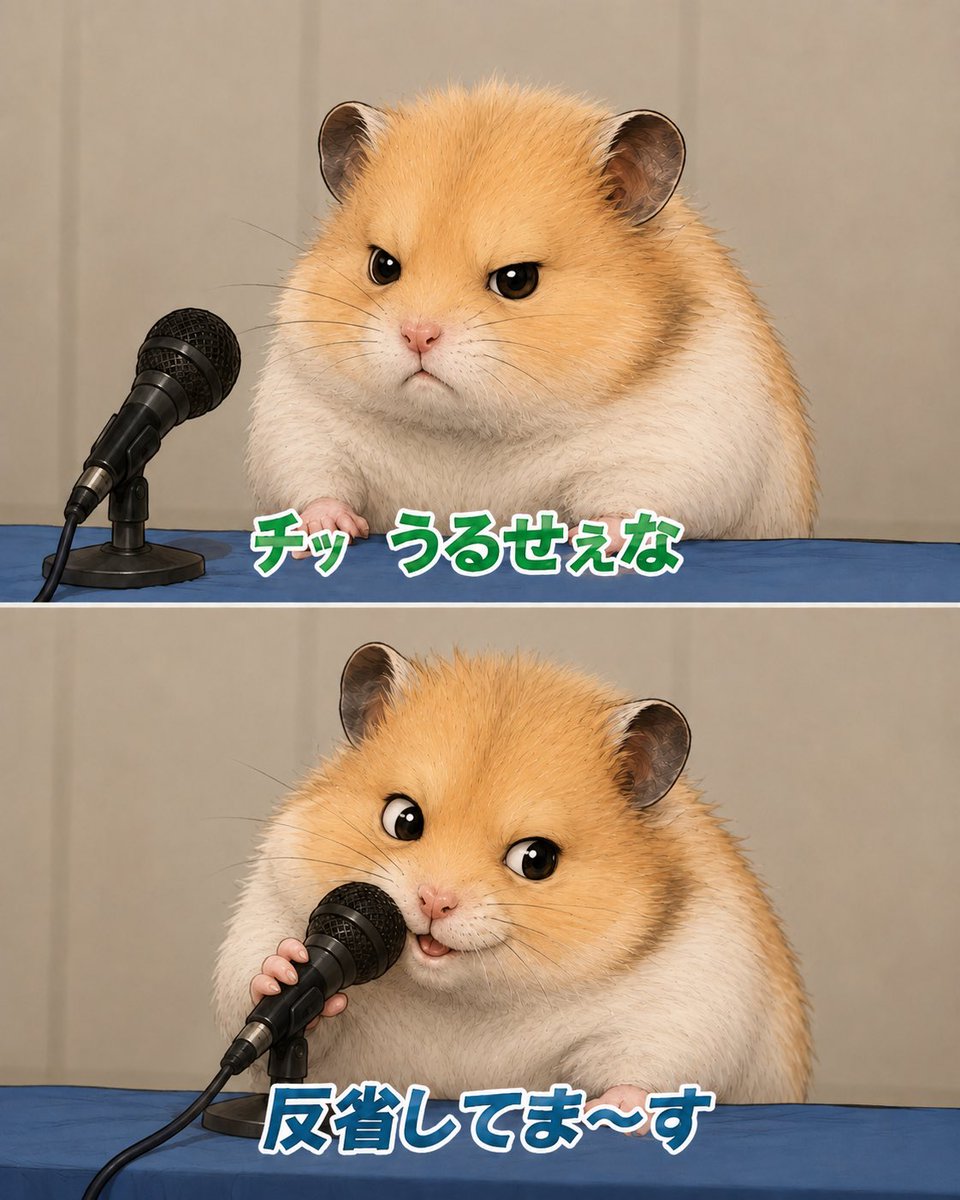
Apologizing Hamster Meme
Creates a two-panel Japanese meme-style image of a fluffy hamster giving a sarcastic press conference apology.
Ini adalah contoh kasus GPT Image 2 untuk Ilustrasi & Seni . Gunakan contoh siap salin di bawah ini untuk menghasilkan visual serupa, dan tinjau atribusi Awesome GPT Image 2 Prompts serta hak penggunaan komersial sebelum digunakan kembali.
Butuh seluruh rangkaian prompt? Gunakan Ilustrasi & Seni Untuk contoh terkait lainnya, kunjungi pusat topik, atau buka GPT Image 2 katalog cepat untuk indeks contoh lengkap, struktur yang dapat digunakan kembali, dan atribusi sumber.
Free 1K preview
Generate one preview image instantly, no sign-up required.
2236/4000
Mengingatkan
Prompt siap salin
Goal: Create a cute two-panel vertical meme image featuring the same fluffy golden-and-white hamster at a press conference table, apologizing into a microphone.

Canvas: Square-to-portrait social media format, about 4:5 ratio, split horizontally into exactly 2 equal panels with a thin white divider line between them. Use realistic-but-adorable animal rendering with soft studio lighting, shallow depth of field, and a beige curtain backdrop.

Layout: Both panels show a blue tablecloth across the bottom third, beige curtain background, and a black wired handheld microphone on a small desk stand at the left side. The hamster is centered-right, large and close-up, with golden fur on the head and back, white cheeks and body, round ears, glossy black eyes, tiny pink nose, and visible little paws resting on the table.

Panel 1: The hamster looks annoyed and unimpressed, facing forward with narrowed eyes and a small stern mouth. The microphone sits to the hamster’s left, angled toward it but not being touched. Add bold Japanese meme text along the lower center of this panel reading {argument name="top caption" default="チッ うるせぇな"}. Style the text as thick rounded characters, green fill, white outline, subtle dark shadow.

Panel 2: The same hamster now leans toward the microphone and holds it with one tiny paw, looking performatively cheerful and apologetic with wide eyes and a small open smiling mouth. Add bold Japanese meme text along the lower center reading {argument name="bottom caption" default="反省してま〜す"}. Style this text as thick rounded characters, blue fill, white outline, subtle dark shadow.

Subject details: Use a hamster with {argument name="fur color" default="golden orange and white"} plush fur, highly detailed individual hairs, small whiskers, soft chubby body, and expressive cartoon-like eyes while keeping the rest photorealistic. The microphone is black with a metal mesh grille, cable trailing off the lower left, and a compact black stand.

Visual style: Japanese internet meme screenshot, realistic cute animal parody of a press apology conference, crisp focus on hamster and microphone, clean composition, no extra characters, no logos, no watermark, no additional text beyond the two captions.
Variabel perintah
Placeholder argumen yang dapat diedit ditemukan dalam prompt, beserta nilai defaultnya.
Variabel
top caption
Bawaan
チッ うるせぇな
Variabel
bottom caption
Bawaan
反省してま〜す
Variabel
fur color
Bawaan
golden orange and white
Best for
- - Ilustrasi & Seni visual exploration
- - Image generation and reference-image edits
- - Reusable briefs that keep source attribution visible
Change these parts
- - Subject, product, character, or scene
- - Aspect ratio, camera, lighting, and background
- - Brand, text, color, and output constraints
Recommended model and settings
- - Model: gpt-image-2
- - Input mode: Teks ke Gambar
- - Aspect ratio: source
- - Commercial status: review original source
How to use this prompt
- 1. Copy the prompt and preserve its structure for the first test.
- 2. Replace the subject, context, and publishing channel.
- 3. Change one camera, lighting, or style variable per iteration.
- 4. Inspect the output, source, text, and rights before reuse.
Limitations, source, and reuse cautions
- - Generated output is an editable draft, not factual, legal, or rights evidence.
- - Review the linked source, people, brands, logos, text, and third-party media before commercial use.
Diimpor dari Awesome GPT Image 2 Prompts . Atribusi diperlukan. Status penggunaan komersial adalah allowed ; tinjau hak sumber sebelum penggunaan berbayar.
Lebih banyak kasus dalam kategori ini
Diprioritaskan berdasarkan kategori, kompatibilitas mode input, kualitas, dan risiko yang lebih rendah.



Catatan penggunaan kembali dan sumber
Gunakan perintah ini dengan aman setelah melihat pratinjau kasus.
- 1.Salin perintah tersebut atau buka langsung di Dovoo dengan tombol pembuatan.
- 2.Sesuaikan variabel, rasio aspek, dan gambar referensi untuk kebutuhan Anda sendiri.
- 3.Sebelum mempublikasikan atau menggunakan untuk tujuan berbayar, verifikasi hak sumber, persyaratan atribusi, dan risiko merek atau citra.