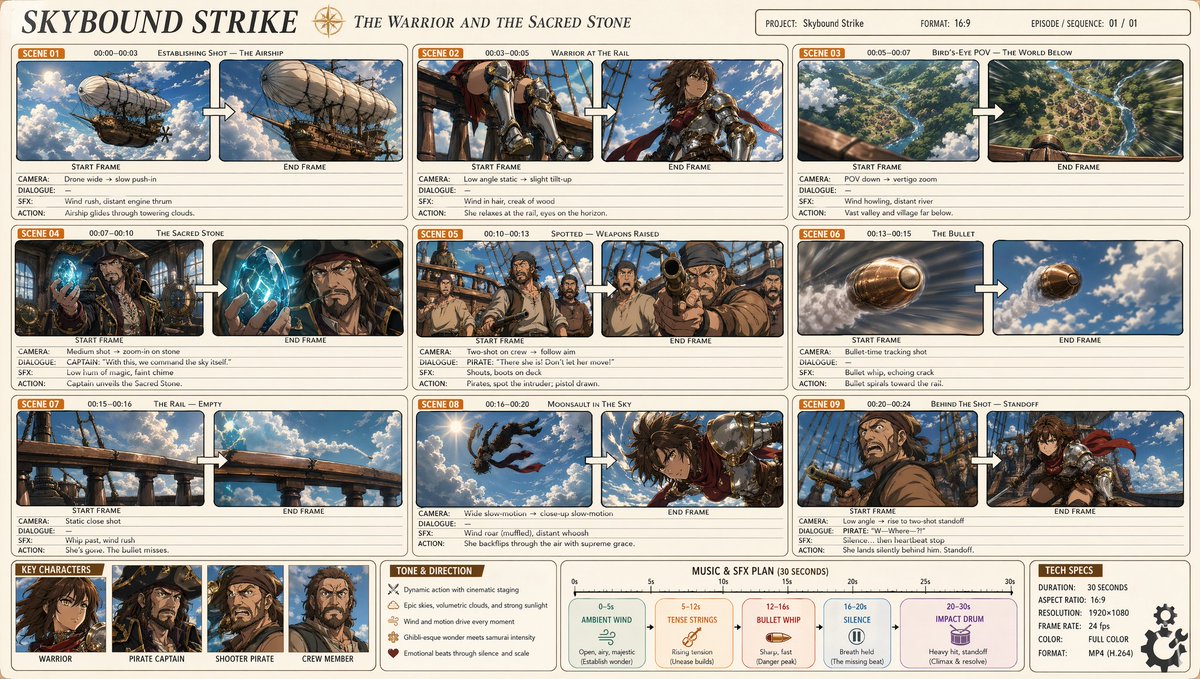
Storyboard Sinematik Anime Profesional
Sebuah panduan yang sangat detail untuk menghasilkan storyboard anime 9 panel profesional, menampilkan aksi karakter yang kompleks, arahan kamera, dan estetika yang terinspirasi oleh Makoto Shinkai.
Ini adalah contoh kasus GPT Image 2 untuk Anime & Game . Gunakan contoh siap salin di bawah ini untuk menghasilkan visual serupa, dan tinjau atribusi Awesome GPT Image 2 Prompts serta hak penggunaan komersial sebelum digunakan kembali.
Butuh seluruh rangkaian prompt? Gunakan Anime & Game Untuk contoh terkait lainnya, kunjungi pusat topik, atau buka GPT Image 2 katalog cepat untuk indeks contoh lengkap, struktur yang dapat digunakan kembali, dan atribusi sumber.
Free 1K preview
Generate one preview image instantly, no sign-up required.
1060/4000
Mengingatkan
Prompt siap salin
A professional anime cinematic storyboard (16:9), titled '{argument name="title" default="Sky Strike"}' with the subtitle '{argument name="subtitle" default="Warriors and the Holy Stone"}'. Clean light beige background, rounded rectangular panels arranged in a three-column grid, totaling 9 scenes. Each scene panel shows: an orange 'Scene XX' label, timecode, scene title, then two side-by-side frames labeled 'Start Frame' → 'End Frame', connected by a white arrow, with annotations below (shot/dialogue/VFX/action). Art style: Crisp cel-shading {argument name="art style" default="Makoto Shinkai x Studio Wit, x Attack on Titan"} — soft lighting, volumetric clouds, warm golden sunlight, cinematic wide-angle shots, dynamic action poses, rich sky blue and emerald green tones, with brass and copper accents. Scenes to depict: 1. Wide shot - a majestic steampunk airship... [detailed scene descriptions]... Layout: Clean infographic, thin borders, pastel grids, highly detailed anime key visuals within each frame, professional production document aesthetic.Variabel perintah
Placeholder argumen yang dapat diedit ditemukan dalam prompt, beserta nilai defaultnya.
Variabel
title
Bawaan
Sky Strike
Variabel
subtitle
Bawaan
Warriors and the Holy Stone
Variabel
art style
Bawaan
Makoto Shinkai x Studio Wit, x Attack on Titan
Best for
- - Anime & Game visual exploration
- - Image generation and reference-image edits
- - Reusable briefs that keep source attribution visible
Change these parts
- - Subject, product, character, or scene
- - Aspect ratio, camera, lighting, and background
- - Brand, text, color, and output constraints
Recommended model and settings
- - Model: gpt-image-2
- - Input mode: Teks ke Gambar
- - Aspect ratio: source
- - Commercial status: review original source
How to use this prompt
- 1. Copy the prompt and preserve its structure for the first test.
- 2. Replace the subject, context, and publishing channel.
- 3. Change one camera, lighting, or style variable per iteration.
- 4. Inspect the output, source, text, and rights before reuse.
Limitations, source, and reuse cautions
- - Generated output is an editable draft, not factual, legal, or rights evidence.
- - Review the linked source, people, brands, logos, text, and third-party media before commercial use.
Diimpor dari Awesome GPT Image 2 Prompts . Atribusi diperlukan. Status penggunaan komersial adalah allowed ; tinjau hak sumber sebelum penggunaan berbayar.
Lebih banyak kasus dalam kategori ini
Diprioritaskan berdasarkan kategori, kompatibilitas mode input, kualitas, dan risiko yang lebih rendah.

Manga Desert Radio Telescope Road Trip
Teks ke Gambar

Female Clown Cyborg Portrait
Teks ke Gambar

Imperial Research Bunker on Volcanic Planet
Teks ke Gambar

Greyscale Puzzle Portrait with Color Accent
Teks ke Gambar

Grumpy Rhino Storybook Illustration
Teks ke Gambar

Surreal 3D Chess Match Artwork
Teks ke Gambar
Catatan penggunaan kembali dan sumber
Gunakan perintah ini dengan aman setelah melihat pratinjau kasus.
- 1.Salin perintah tersebut atau buka langsung di Dovoo dengan tombol pembuatan.
- 2.Sesuaikan variabel, rasio aspek, dan gambar referensi untuk kebutuhan Anda sendiri.
- 3.Sebelum mempublikasikan atau menggunakan untuk tujuan berbayar, verifikasi hak sumber, persyaratan atribusi, dan risiko merek atau citra.