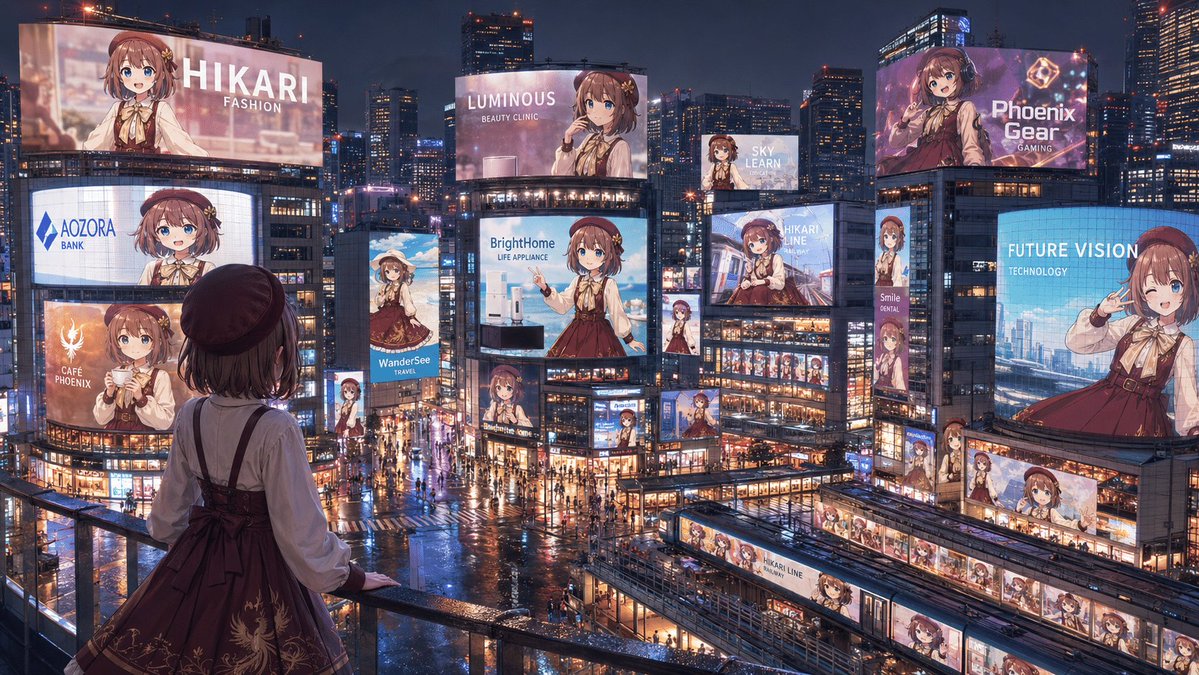
Anime Idol Advertising Takeover City
A wide cinematic prompt for generating a rainy neon city filled with coordinated billboard ads of one anime idol character.
Ini adalah contoh kasus GPT Image 2 untuk Anime & Game . Gunakan contoh siap salin di bawah ini untuk menghasilkan visual serupa, dan tinjau atribusi Awesome GPT Image 2 Prompts serta hak penggunaan komersial sebelum digunakan kembali.
Butuh seluruh rangkaian prompt? Gunakan Anime & Game Untuk contoh terkait lainnya, kunjungi pusat topik, atau buka GPT Image 2 katalog cepat untuk indeks contoh lengkap, struktur yang dapat digunakan kembali, dan atribusi sumber.
Free 1K preview
Generate one preview image instantly, no sign-up required.
2681/4000
Mengingatkan
Prompt siap salin
Create a cinematic wide 16:9 anime-style nighttime cityscape showing a full “advertising takeover” of a futuristic Tokyo-like entertainment district by one idol character, {argument name="character name" default="Hikari"}. View from a high pedestrian balcony in the foreground, looking down over a rainy neon plaza packed with tiny pedestrians, wet reflective streets, glass buildings, trains, skybridges, and dense skyscrapers under a dark blue evening sky. In the foreground, place the same character seen from behind at the railing: a young anime girl with short brown hair, a dark beret, cream blouse, burgundy jumper dress with ribbon bow and subtle gold embroidery, looking out at the city. Fill the city with exactly 18 visible advertisements featuring the same girl in different poses and crops: 1) giant top-left billboard reading “HIKARI / FASHION,” 2) curved mid-left screen reading “AOZORA / BANK,” 3) lower-left orange cafe ad reading “CAFÉ PHOENIX,” 4) slim vertical travel ad reading “WanderSee / TRAVEL,” 5) large central billboard reading “LUMINOUS / BEAUTY CLINIC,” 6) central appliance billboard reading “BrightHome / LIFE APPLIANCE,” 7) small high billboard reading “SKY LEARN,” 8) large upper-right purple gaming ad reading “Phoenix Gear / GAMING,” 9) right-side blue technology billboard reading “FUTURE VISION / TECHNOLOGY,” 10) center-right transit ad reading “HIKARI LINE,” 11) narrow vertical sign reading “Smile / DENTAL,” 12) small vertical character sign beneath the central screens, 13) small character billboard near the lower center intersection, 14) small character sign on a mid-right building corner, 15) long horizontal station-front banner with repeated Hikari portraits, 16) train-side wrap ad labeled “HIKARI LINE,” 17) another train or platform wrap with repeated portraits in the lower-right transit area, and 18) small rooftop or facade screen near the center-right showing her portrait. Make every ad visually consistent but branded differently, with clean white sans-serif English text, glossy LED glow, and no extra unreadable copy. Use rich cyberpunk-commercial lighting, rain reflections, warm shop windows, blue and pink neon, highly detailed architecture, and a grand sense of scale. Some distant character faces on billboards may be softly blurred by glow and distance, but the overall impression must be clear: one beloved character has taken over the entire city’s advertising landscape. Use {argument name="primary outfit color" default="burgundy"}, {argument name="hair color" default="brown"}, {argument name="city mood" default="rainy neon night"}, and {argument name="main brand theme" default="idol fashion and lifestyle"}.Variabel perintah
Placeholder argumen yang dapat diedit ditemukan dalam prompt, beserta nilai defaultnya.
Variabel
character name
Bawaan
Hikari
Variabel
primary outfit color
Bawaan
burgundy
Variabel
hair color
Bawaan
brown
Variabel
city mood
Bawaan
rainy neon night
Variabel
main brand theme
Bawaan
idol fashion and lifestyle
Best for
- - Anime & Game visual exploration
- - Image generation and reference-image edits
- - Reusable briefs that keep source attribution visible
Change these parts
- - Subject, product, character, or scene
- - Aspect ratio, camera, lighting, and background
- - Brand, text, color, and output constraints
Recommended model and settings
- - Model: gpt-image-2
- - Input mode: Teks ke Gambar
- - Aspect ratio: source
- - Commercial status: review original source
How to use this prompt
- 1. Copy the prompt and preserve its structure for the first test.
- 2. Replace the subject, context, and publishing channel.
- 3. Change one camera, lighting, or style variable per iteration.
- 4. Inspect the output, source, text, and rights before reuse.
Limitations, source, and reuse cautions
- - Generated output is an editable draft, not factual, legal, or rights evidence.
- - Review the linked source, people, brands, logos, text, and third-party media before commercial use.
Diimpor dari Awesome GPT Image 2 Prompts . Atribusi diperlukan. Status penggunaan komersial adalah allowed ; tinjau hak sumber sebelum penggunaan berbayar.
Lebih banyak kasus dalam kategori ini
Diprioritaskan berdasarkan kategori, kompatibilitas mode input, kualitas, dan risiko yang lebih rendah.

Manga Desert Radio Telescope Road Trip
Teks ke Gambar

Female Clown Cyborg Portrait
Teks ke Gambar

Imperial Research Bunker on Volcanic Planet
Teks ke Gambar

Surreal 3D Chess Match Artwork
Teks ke Gambar

Android Quantum Lab Workstation
Teks ke Gambar

Fashion Studio Portrait with Blue Rim Lighting
Teks ke Gambar
Catatan penggunaan kembali dan sumber
Gunakan perintah ini dengan aman setelah melihat pratinjau kasus.
- 1.Salin perintah tersebut atau buka langsung di Dovoo dengan tombol pembuatan.
- 2.Sesuaikan variabel, rasio aspek, dan gambar referensi untuk kebutuhan Anda sendiri.
- 3.Sebelum mempublikasikan atau menggunakan untuk tujuan berbayar, verifikasi hak sumber, persyaratan atribusi, dan risiko merek atau citra.