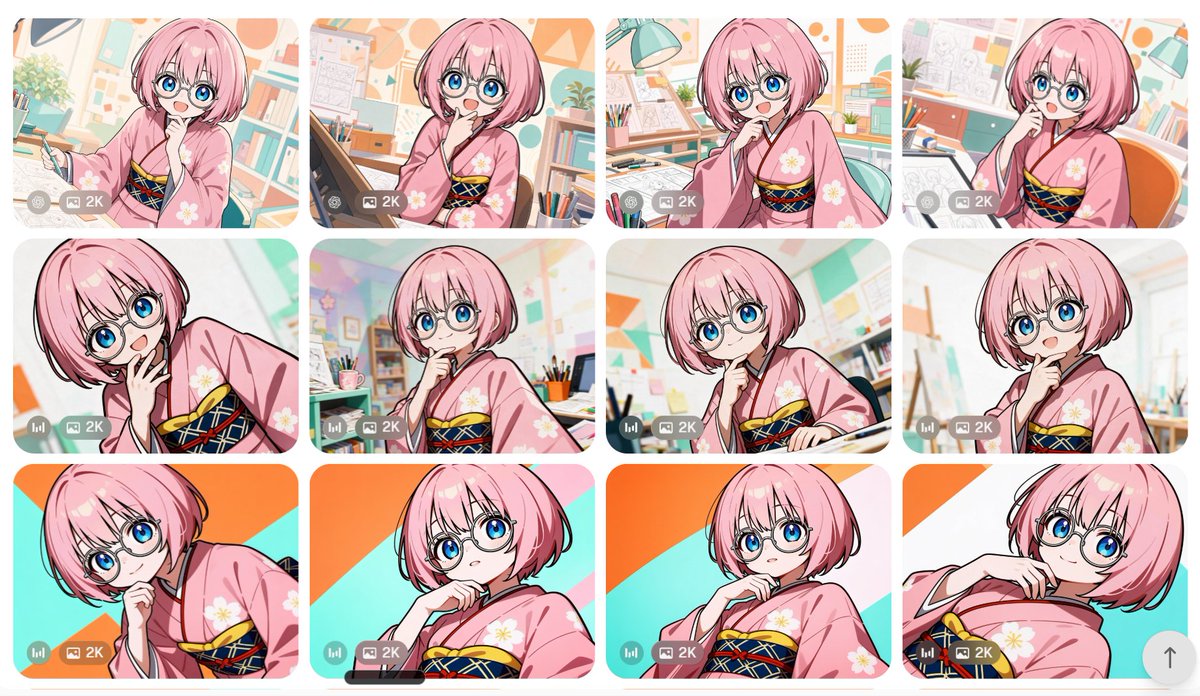
Anime Girl Generation Grid
Creates a 12-card comparison gallery of a pink-haired anime girl in kimono variations for showcasing image-generation outputs.
Ini adalah contoh kasus GPT Image 2 untuk Anime & Game . Gunakan contoh siap salin di bawah ini untuk menghasilkan visual serupa, dan tinjau atribusi Awesome GPT Image 2 Prompts serta hak penggunaan komersial sebelum digunakan kembali.
Butuh seluruh rangkaian prompt? Gunakan Anime & Game Untuk contoh terkait lainnya, kunjungi pusat topik, atau buka GPT Image 2 katalog cepat untuk indeks contoh lengkap, struktur yang dapat digunakan kembali, dan atribusi sumber.
Free 1K preview
Generate one preview image instantly, no sign-up required.
3096/4000
Mengingatkan
Prompt siap salin
Goal: Create a contact-sheet style comparison grid of anime image generations featuring the same character in multiple variations.

Canvas: Wide landscape canvas, approximately 16:9, with a clean off-white page background and generous margins. Arrange exactly 12 rounded-rectangle image cards in a 4-column by 3-row grid with narrow white gutters between cards.

Subject details: Each card shows the same cute anime girl, {argument name="character name" default="a pink-haired manga artist girl"}, with a short fluffy bob haircut, large bright blue eyes, round wire-frame glasses, pale skin, and a cheerful curious expression. She wears a soft pink kimono with white flower motifs and a dark navy obi decorated with red and yellow crisscross cords. Her poses vary slightly but keep a consistent thoughtful gesture: hand near chin, cheek, mouth, or collar, with occasional leaning or tilted framing.

Card count and visible variations: Include exactly 12 generated-image thumbnails. Row 1 has 4 cards: 1) girl holding a drawing pen in a bright studio, 2) girl at a drafting tablet with hand near mouth, 3) girl leaning forward in an art room with desk lamp, 4) girl seated beside an orange chair with sketch papers behind her. Row 2 has 4 cards: 5) close-up tilted pose with hand near mouth, 6) centered pose in a colorful classroom-like studio, 7) thoughtful pose beside a drawing desk, 8) bright close-up with a softly blurred art-room background. Row 3 has 4 cards: 9) dramatic diagonal close-up against orange and turquoise graphic background, 10) low-angle portrait with hand at chin, 11) centered portrait against the same orange/turquoise diagonal background, 12) reclining tilted portrait with hand near collar.

Backgrounds: Use a cheerful manga studio or art classroom setting in most cards: bookshelves, pencils in cups, drafting tables, sketch sheets, lamps, bulletin boards, pastel geometric wall decorations, plants, and warm daylight. For the bottom row, use a flatter bold graphic backdrop with turquoise and orange diagonal shapes in at least three cards.

Visual style: Polished modern anime illustration, crisp black line art, glossy eyes, soft cel shading, pastel color palette, clean high-resolution look, bright and friendly. Make each thumbnail feel like a separate generation with small differences in crop, pose, and background, while maintaining character consistency.

Interface overlays: On every card, add a small semi-transparent gray control strip near the lower-left corner. The strip contains tiny round utility icons and a visible label reading {argument name="quality label" default="2K"}. Some cards may include a small bar-chart style icon at the far left of the strip. Add a subtle rounded up-arrow floating button near the lower-right edge of the overall canvas.

Constraints: Preserve the exact 4 by 3 grid and exactly 12 cards. Do not add extra characters. Avoid text other than the repeated small {argument name="quality label" default="2K"} overlay. Keep rounded corners, consistent spacing, and the feel of a screenshot from an image-generation gallery.
Variabel perintah
Placeholder argumen yang dapat diedit ditemukan dalam prompt, beserta nilai defaultnya.
Variabel
character name
Bawaan
a pink-haired manga artist girl
Variabel
quality label
Bawaan
2K
Best for
- - Anime & Game visual exploration
- - Image generation and reference-image edits
- - Reusable briefs that keep source attribution visible
Change these parts
- - Subject, product, character, or scene
- - Aspect ratio, camera, lighting, and background
- - Brand, text, color, and output constraints
Recommended model and settings
- - Model: gpt-image-2
- - Input mode: Teks ke Gambar
- - Aspect ratio: source
- - Commercial status: review original source
How to use this prompt
- 1. Copy the prompt and preserve its structure for the first test.
- 2. Replace the subject, context, and publishing channel.
- 3. Change one camera, lighting, or style variable per iteration.
- 4. Inspect the output, source, text, and rights before reuse.
Limitations, source, and reuse cautions
- - Generated output is an editable draft, not factual, legal, or rights evidence.
- - Review the linked source, people, brands, logos, text, and third-party media before commercial use.
Diimpor dari Awesome GPT Image 2 Prompts . Atribusi diperlukan. Status penggunaan komersial adalah allowed ; tinjau hak sumber sebelum penggunaan berbayar.
Lebih banyak kasus dalam kategori ini
Diprioritaskan berdasarkan kategori, kompatibilitas mode input, kualitas, dan risiko yang lebih rendah.






Catatan penggunaan kembali dan sumber
Gunakan perintah ini dengan aman setelah melihat pratinjau kasus.
- 1.Salin perintah tersebut atau buka langsung di Dovoo dengan tombol pembuatan.
- 2.Sesuaikan variabel, rasio aspek, dan gambar referensi untuk kebutuhan Anda sendiri.
- 3.Sebelum mempublikasikan atau menggunakan untuk tujuan berbayar, verifikasi hak sumber, persyaratan atribusi, dan risiko merek atau citra.