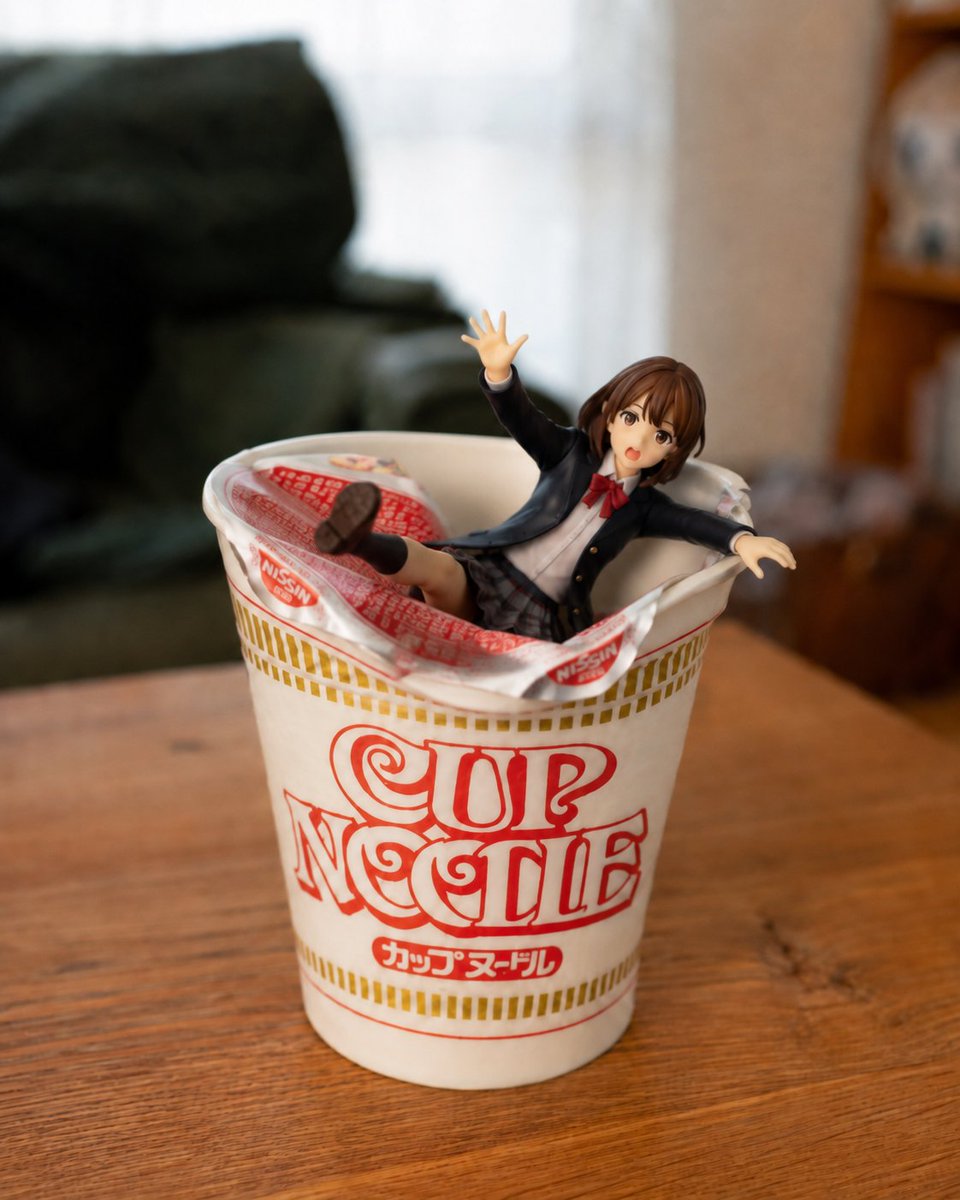
Anime Figurine Falling Into Cup Noodle
A photorealistic humorous tabletop scene of a schoolgirl anime figurine tumbling into an opened instant noodle cup.
Ini adalah contoh kasus GPT Image 2 untuk Produk & Komersial . Gunakan contoh siap salin di bawah ini untuk menghasilkan visual serupa, dan tinjau atribusi Awesome GPT Image 2 Prompts serta hak penggunaan komersial sebelum digunakan kembali.
Butuh seluruh rangkaian prompt? Gunakan Produk & Komersial Untuk contoh terkait lainnya, kunjungi pusat topik, atau buka GPT Image 2 katalog cepat untuk indeks contoh lengkap, struktur yang dapat digunakan kembali, dan atribusi sumber.
Free 1K preview
Generate one preview image instantly, no sign-up required.
1410/4000
Mengingatkan
Prompt siap salin
Create a photorealistic close-up tabletop scene in a cozy living room: a white instant noodle cup with the red logo text {argument name="cup logo text" default="CUP NOODLE"} and small Japanese lettering on the front sits centered on a warm wooden table. The opened foil lid is peeled back and crumpled around the rim, revealing a small anime schoolgirl figurine that has just fallen into the cup as if she had been holding the lid down a moment ago. Use exactly 1 noodle cup, 1 peeled foil lid, and 1 figurine. The figurine is a cute Japanese-style anime girl with short brown bobbed hair, large brown eyes, an open surprised mouth, and a startled falling pose: one arm raised upward with an open hand, the other arm stretched sideways, one leg kicked up with the shoe sole visible, the other leg partly hidden inside the cup. She wears a black school blazer, white shirt, red bow tie, plaid skirt, dark socks, and brown loafers. Make the cup large in the foreground and the figurine small like a collectible toy, half-submerged among the opened packaging. Use shallow depth of field, soft natural window light, realistic plastic and paper textures, a slightly humorous accidental moment, and a blurred background with a dark green sofa on the left and a wooden shelf on the right. Shoot from a slightly high front angle with realistic lens blur, warm indoor colors, and no extra text beyond the cup packaging.Variabel perintah
Placeholder argumen yang dapat diedit ditemukan dalam prompt, beserta nilai defaultnya.
Variabel
cup logo text
Bawaan
CUP NOODLE
Best for
- - Produk & Komersial visual exploration
- - Image generation and reference-image edits
- - Reusable briefs that keep source attribution visible
Change these parts
- - Subject, product, character, or scene
- - Aspect ratio, camera, lighting, and background
- - Brand, text, color, and output constraints
Recommended model and settings
- - Model: gpt-image-2
- - Input mode: Teks ke Gambar
- - Aspect ratio: source
- - Commercial status: review original source
How to use this prompt
- 1. Copy the prompt and preserve its structure for the first test.
- 2. Replace the subject, context, and publishing channel.
- 3. Change one camera, lighting, or style variable per iteration.
- 4. Inspect the output, source, text, and rights before reuse.
Limitations, source, and reuse cautions
- - Generated output is an editable draft, not factual, legal, or rights evidence.
- - Review the linked source, people, brands, logos, text, and third-party media before commercial use.
Diimpor dari Awesome GPT Image 2 Prompts . Atribusi diperlukan. Status penggunaan komersial adalah allowed ; tinjau hak sumber sebelum penggunaan berbayar.
Lebih banyak kasus dalam kategori ini
Diprioritaskan berdasarkan kategori, kompatibilitas mode input, kualitas, dan risiko yang lebih rendah.
Catatan penggunaan kembali dan sumber
Gunakan perintah ini dengan aman setelah melihat pratinjau kasus.
- 1.Salin perintah tersebut atau buka langsung di Dovoo dengan tombol pembuatan.
- 2.Sesuaikan variabel, rasio aspek, dan gambar referensi untuk kebutuhan Anda sendiri.
- 3.Sebelum mempublikasikan atau menggunakan untuk tujuan berbayar, verifikasi hak sumber, persyaratan atribusi, dan risiko merek atau citra.