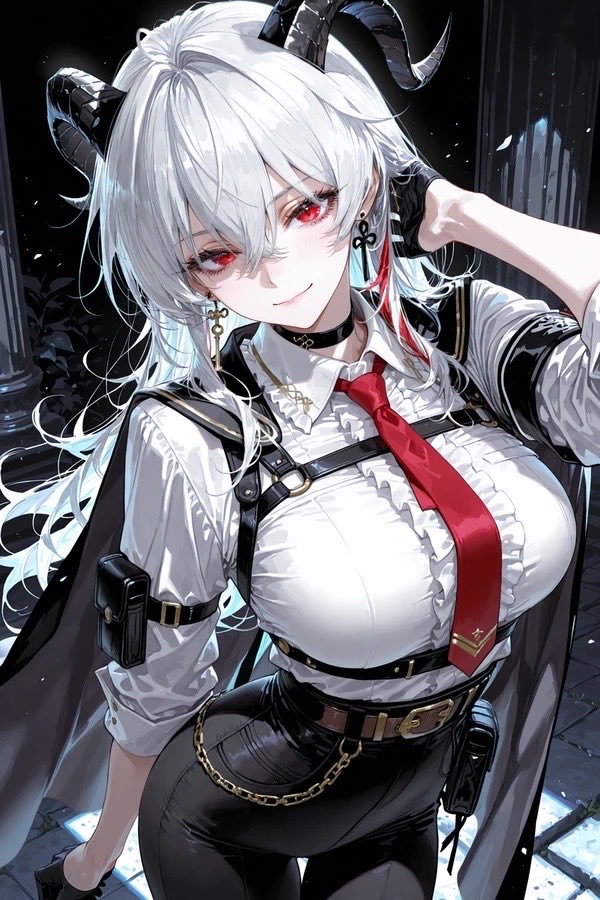
Penggambaran Ulang Anime dari Karakter Bertanduk Asli
Tugas ini mengubah sketsa karakter asli yang kasar menjadi ilustrasi anime yang lebih halus dan detail, sambil tetap mempertahankan pakaian dan pose intinya.
Ini adalah contoh kasus GPT Image 2 untuk Potret & Karakter . Gunakan contoh siap salin di bawah ini untuk menghasilkan visual serupa, dan tinjau atribusi Awesome GPT Image 2 Prompts serta hak penggunaan komersial sebelum digunakan kembali.
Butuh seluruh rangkaian prompt? Gunakan Potret & Karakter Untuk contoh terkait lainnya, kunjungi pusat topik, atau buka GPT Image 2 katalog cepat untuk indeks contoh lengkap, struktur yang dapat digunakan kembali, dan atribusi sumber.
Free 1K preview
Generate one preview image instantly, no sign-up required.
873/4000
Mengingatkan
Prompt siap salin
Using REFERENCE_0 as the character base, redraw the same original character as a polished modern anime illustration instead of a rough sketch. Keep the core design intact: white hair, black curved horns, red accent strand near the ear, white shirt, red tie with a small gold mark near the tip, black harness straps, brown belt, black pants, gold waist chain, cape-like dark outer panels, choker, dangling cross earring, and the same confident pose with one hand behind the head. Upgrade everything to high-detail, glossy rendering with clean linework, dramatic lighting, rich fabric folds, shiny black leather textures, and a more mature, stylish proportions. Place the character in a dark nighttime stone-column setting with cool rim light and a slightly low-angle, close-up half-body composition. Make it feel like a high-end character repaint of an old original drawing.
Best for
- - Potret & Karakter visual exploration
- - Image generation and reference-image edits
- - Reusable briefs that keep source attribution visible
Change these parts
- - Subject, product, character, or scene
- - Aspect ratio, camera, lighting, and background
- - Brand, text, color, and output constraints
Recommended model and settings
- - Model: gpt-image-2
- - Input mode: Teks ke Gambar
- - Aspect ratio: source
- - Commercial status: review original source
How to use this prompt
- 1. Copy the prompt and preserve its structure for the first test.
- 2. Replace the subject, context, and publishing channel.
- 3. Change one camera, lighting, or style variable per iteration.
- 4. Inspect the output, source, text, and rights before reuse.
Limitations, source, and reuse cautions
- - Generated output is an editable draft, not factual, legal, or rights evidence.
- - Review the linked source, people, brands, logos, text, and third-party media before commercial use.
Diimpor dari Awesome GPT Image 2 Prompts . Atribusi diperlukan. Status penggunaan komersial adalah allowed ; tinjau hak sumber sebelum penggunaan berbayar.
Lebih banyak kasus dalam kategori ini
Diprioritaskan berdasarkan kategori, kompatibilitas mode input, kualitas, dan risiko yang lebih rendah.

Female Clown Cyborg Portrait
Teks ke Gambar

Greyscale Puzzle Portrait with Color Accent
Teks ke Gambar

Glitch Aesthetic Surreal Portrait
Teks ke Gambar

Asymmetrical Realistic Human Face
Teks ke Gambar

Martial Arts Legend Character Bible Sheet
Teks ke Gambar

Manga Desert Radio Telescope Road Trip
Teks ke Gambar
Catatan penggunaan kembali dan sumber
Gunakan perintah ini dengan aman setelah melihat pratinjau kasus.
- 1.Salin perintah tersebut atau buka langsung di Dovoo dengan tombol pembuatan.
- 2.Sesuaikan variabel, rasio aspek, dan gambar referensi untuk kebutuhan Anda sendiri.
- 3.Sebelum mempublikasikan atau menggunakan untuk tujuan berbayar, verifikasi hak sumber, persyaratan atribusi, dan risiko merek atau citra.