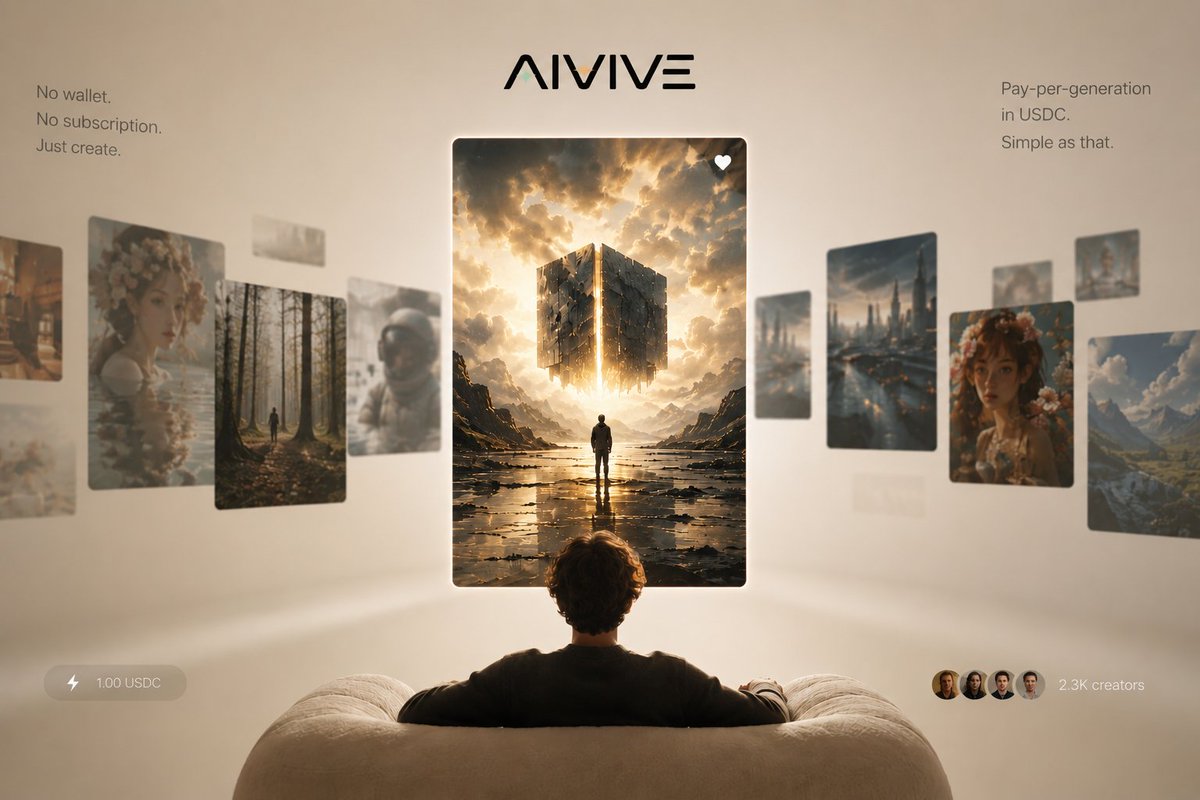
AIVIVE Immersive AI Gallery Hero
Generates a premium startup landing-page hero for an AI image generation platform with floating feed cards, USDC pricing, and minimalist onboarding messaging.
Ini adalah contoh kasus GPT Image 2 untuk Produk & Komersial . Gunakan contoh siap salin di bawah ini untuk menghasilkan visual serupa, dan tinjau atribusi Awesome GPT Image 2 Prompts serta hak penggunaan komersial sebelum digunakan kembali.
Butuh seluruh rangkaian prompt? Gunakan Produk & Komersial Untuk contoh terkait lainnya, kunjungi pusat topik, atau buka GPT Image 2 katalog cepat untuk indeks contoh lengkap, struktur yang dapat digunakan kembali, dan atribusi sumber.
Free 1K preview
Generate one preview image instantly, no sign-up required.
3064/4000
Mengingatkan
Prompt siap salin
Goal: Create a premium landing-page hero image for {argument name="brand name" default="AIVIVE"}, presenting an AI image-generation social feed as an immersive gallery viewed from behind a seated user.

Canvas: Wide 16:9 composition, 1200×768 style, warm beige studio background with soft vignette, shallow depth of field, cinematic lighting, minimal luxury tech aesthetic.

Layout: Center the stylized black {argument name="brand name" default="AIVIVE"} logo at the top. Below it, place one large vertical featured image card in the exact center, floating in front of the viewer. Show the back of a person seated on a cream, rounded sofa in the bottom foreground, arms resting along the couch, looking toward the central card. Arrange a curved horizontal carousel of floating image cards receding into depth on both sides, with the side cards slightly blurred and angled to imply a social feed gallery.

Text content: Add a small left copy block near the upper left reading exactly: “No wallet. / No subscription. / Just create.” Add a small right copy block near the upper right reading exactly: “Pay-per-generation / in USDC. / Simple as that.” Add a bottom-left translucent pill with a lightning icon and the text “1.00 USDC”. Add a bottom-right social proof element with four small circular creator avatars and the text “2.3K creators”.

Image card count and subjects: Use exactly 14 floating image cards total: 1 central featured card, 7 left-side cards, and 6 right-side cards. The central featured card is a crisp vertical fantasy/sci-fi image of a lone figure standing in a reflective rocky landscape beneath a glowing fragmented cube suspended in dramatic golden clouds, with a small white heart icon in the top-right corner of the card. The 7 left-side cards are: 1 partial warm city/street image at the far left edge, 1 large floral portrait card, 1 forest path card with a tiny walking figure, 1 small pale abstract card near the upper middle, 1 blurred pale landscape card behind the forest, 1 astronaut helmet portrait card, and 1 faint low blurred card near the lower left. The 6 right-side cards are: 1 tall futuristic rainy city skyline card, 1 small blurred vertical card behind it, 1 large floral portrait card, 1 mountain valley landscape card at the far right, 1 small card near the upper right edge, and 1 faint small distant card between the city and portrait cards.

Visual style: Photorealistic 3D product advertising render, warm cream and gold palette, soft global illumination, floating glassy cards with rounded corners and subtle shadows, elegant minimal typography, slight background blur, premium startup launch campaign look. The central card should be the sharpest and brightest element, while surrounding cards are softer and more atmospheric.

Constraints: No clutter, no browser chrome, no visible app interface beyond the logo, text blocks, price pill, creator avatars, and heart icon. Keep all text legible and spelled exactly. Avoid adding extra cards, extra buttons, watermarks, or decorative icons beyond those specified.
Variabel perintah
Placeholder argumen yang dapat diedit ditemukan dalam prompt, beserta nilai defaultnya.
Variabel
brand name
Bawaan
AIVIVE
Best for
- - Produk & Komersial visual exploration
- - Image generation and reference-image edits
- - Reusable briefs that keep source attribution visible
Change these parts
- - Subject, product, character, or scene
- - Aspect ratio, camera, lighting, and background
- - Brand, text, color, and output constraints
Recommended model and settings
- - Model: gpt-image-2
- - Input mode: Teks ke Gambar
- - Aspect ratio: source
- - Commercial status: review original source
How to use this prompt
- 1. Copy the prompt and preserve its structure for the first test.
- 2. Replace the subject, context, and publishing channel.
- 3. Change one camera, lighting, or style variable per iteration.
- 4. Inspect the output, source, text, and rights before reuse.
Limitations, source, and reuse cautions
- - Generated output is an editable draft, not factual, legal, or rights evidence.
- - Review the linked source, people, brands, logos, text, and third-party media before commercial use.
Diimpor dari Awesome GPT Image 2 Prompts . Atribusi diperlukan. Status penggunaan komersial adalah allowed ; tinjau hak sumber sebelum penggunaan berbayar.
Lebih banyak kasus dalam kategori ini
Diprioritaskan berdasarkan kategori, kompatibilitas mode input, kualitas, dan risiko yang lebih rendah.






Catatan penggunaan kembali dan sumber
Gunakan perintah ini dengan aman setelah melihat pratinjau kasus.
- 1.Salin perintah tersebut atau buka langsung di Dovoo dengan tombol pembuatan.
- 2.Sesuaikan variabel, rasio aspek, dan gambar referensi untuk kebutuhan Anda sendiri.
- 3.Sebelum mempublikasikan atau menggunakan untuk tujuan berbayar, verifikasi hak sumber, persyaratan atribusi, dan risiko merek atau citra.