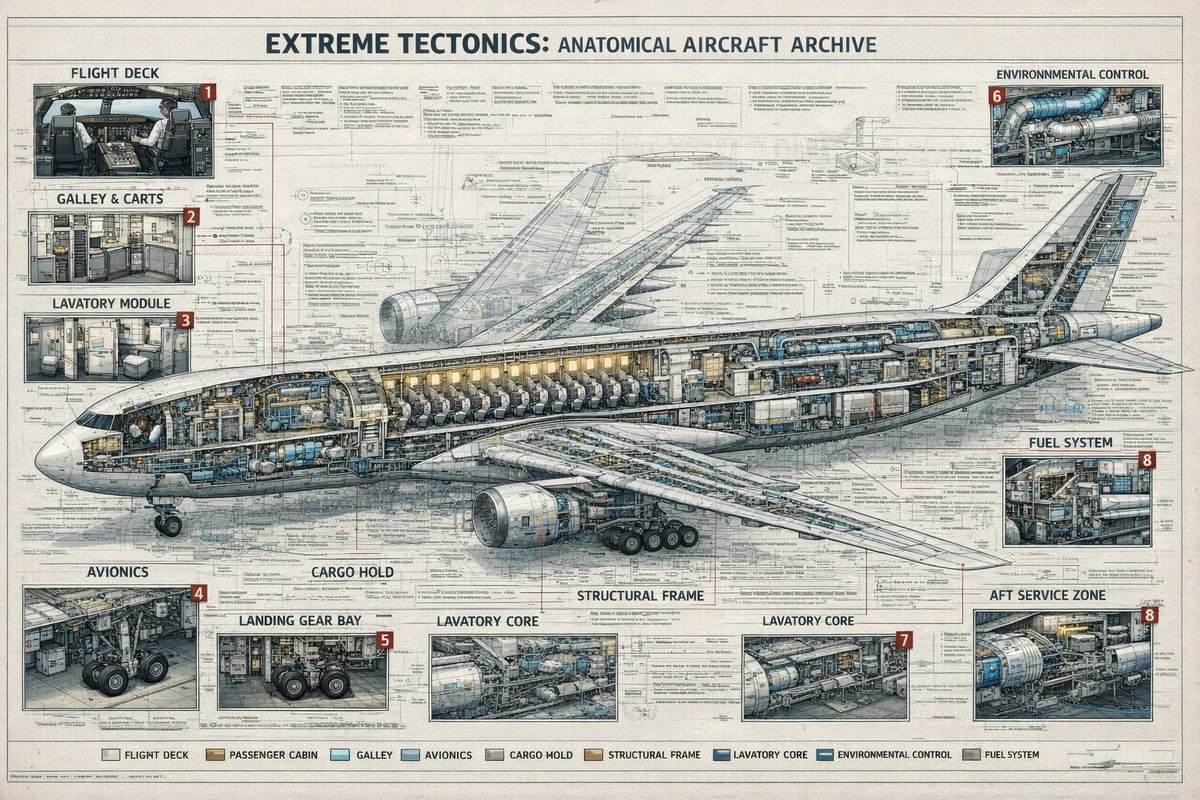
Poster Arsip Penampang Pesawat
Poster bergaya teknik yang sangat detail, menampilkan penampang melintang pesawat jet komersial dengan sembilan kategori sistem berlabel dan beberapa panel sisipan teknis, ideal untuk menghasilkan karya seni infografis premium.
Ini adalah contoh kasus GPT Image 2 untuk Grafis & Poster . Gunakan contoh siap salin di bawah ini untuk menghasilkan visual serupa, dan tinjau atribusi Awesome GPT Image 2 Prompts serta hak penggunaan komersial sebelum digunakan kembali.
Free 1K preview
Generate one preview image instantly, no sign-up required.
Mengingatkan
Prompt siap salin
{
  "type": "technical aircraft cutaway infographic poster",
  "subject": {
    "title": "{argument name=\"headline text\" default=\"EXTREME TECTONICS: ANATOMICAL AIRCRAFT ARCHIVE\"}",
    "aircraft": "wide-body commercial passenger jet in side cutaway view, nose facing left, tail to the right, landing gear deployed, one large underwing engine visible, internal cabin and systems exposed",
    "style": "ultra-detailed aerospace engineering blueprint mixed with architectural archive plate, precise cross-section drawing, dense annotation lines, clean readable microtext, muted ink-and-wash rendering, off-white aged paper texture, blue-gray graphite linework, subtle tan and steel accents"
  },
  "layout": {
    "format": "single large landscape poster",
    "background": "full-page engineering schematic with layered orthographic outlines, measurement marks, callout leaders, technical notes, and faint drafting grids",
    "centerpiece": "one enormous airplane cross-section spanning nearly the full width of the page, showing cockpit, passenger seating rows, service compartments, internal ducts, cargo spaces, structural frame, and tail systems",
    "sections": [
      {
        "title": "FLIGHT DECK",
        "position": "top left",
        "count": 1,
        "labels": [
          "1"
        ],
        "description": "cockpit interior inset with pilots' seats, instrument panels, windows, and surrounding avionics"
      },
      {
        "title": "GALLEY & CARTS",
        "position": "upper left below flight deck",
        "count": 1,
        "labels": [
          "2"
        ],
        "description": "service galley inset with storage racks, ovens, trolleys, cabinets, and narrow aisle"
      },
      {
        "title": "LAVATORY MODULE",
        "position": "left middle below galley",
        "count": 1,
        "labels": [
          "3"
        ],
        "description": "small restroom inset with toilet, sink, wall panels, and door"
      },
      {
        "title": "ENVIRONMENTAL CONTROL",
        "position": "top right",
        "count": 1,
        "labels": [
          "6"
        ],
        "description": "mechanical systems inset with ducts, pipes, turbines, and cylindrical equipment"
      },
      {
        "title": "FUEL SYSTEM",
        "position": "right middle",
        "count": 1,
        "labels": [
          "8"
        ],
        "description": "compact machinery inset showing tanks, pumps, and pipework"
      },
      {
        "title": "AVIONICS",
        "position": "bottom left",
        "count": 1,
        "labels": [
          "4"
        ],
        "description": "electronics bay inset with wiring, cabinets, equipment racks, and landing gear nearby"
      },
      {
        "title": "LANDING GEAR BAY",
        "position": "lower left-center",
        "count": 1,
        "labels": [
          "5"
        ],
        "description": "gear compartment inset focused on wheel assemblies, struts, and surrounding structure"
      },
      {
        "title": "LAVATORY CORE",
        "position": "bottom center",
        "count": 2,
        "labels": [
          "LAVATORY CORE",
          "LAVATORY CORE"
        ],
        "description": "2 separate service-core insets with exposed cylindrical tanks, ducting, and interior support systems; the right inset carries label number 7"
      },
      {
        "title": "AFT SERVICE ZONE",
        "position": "bottom right",
        "count": 1,
        "labels": [
          "8"
        ],
        "description": "rear technical compartment inset with large blue cylindrical unit, pipes, service access, and structural framing"
      }
    ],
    "additional_labels": [
      {
        "text": "CARGO HOLD",
        "position": "lower center-left"
      },
      {
        "text": "STRUCTURAL FRAME",
        "position": "lower center"
      }
    ],
    "legend": {
      "position": "bottom center",
      "count": 9,
      "labels": [
        "FLIGHT DECK",
        "PASSENGER CABIN",
        "GALLEY",
        "AVIONICS",
        "CARGO HOLD",
        "STRUCTURAL FRAME",
        "LAVATORY CORE",
        "ENVIRONMENTAL CONTROL",
        "FUEL SYSTEM"
      ]
    }
  },
  "composition": {
    "camera": "orthographic side elevation",
    "poster_margins": "thin border around the entire sheet",
    "text_density": "very high, with many tiny notes, arrows, and part labels distributed across the page",
    "lighting": "flat archival illustration lighting, not photographic, optimized for legibility",
    "finish": "crisp 4K infographic print quality, no gibberish text, authentic typography, meticulous line precision"
  }
}
Variabel perintah
Placeholder argumen yang dapat diedit ditemukan dalam prompt, beserta nilai defaultnya.
Best for
- - Grafis & Poster visual exploration
- - Image generation and reference-image edits
- - Reusable briefs that keep source attribution visible
Change these parts
- - Subject, product, character, or scene
- - Aspect ratio, camera, lighting, and background
- - Brand, text, color, and output constraints
Recommended model and settings
- - Model: gpt-image-2
- - Input mode: Teks ke Gambar
- - Aspect ratio: source
- - Commercial status: review original source
How to use this prompt
- 1. Copy the prompt and preserve its structure for the first test.
- 2. Replace the subject, context, and publishing channel.
- 3. Change one camera, lighting, or style variable per iteration.
- 4. Inspect the output, source, text, and rights before reuse.
Limitations, source, and reuse cautions
- - Generated output is an editable draft, not factual, legal, or rights evidence.
- - Review the linked source, people, brands, logos, text, and third-party media before commercial use.
Lebih banyak kasus dalam kategori ini
Diprioritaskan berdasarkan kategori, kompatibilitas mode input, kualitas, dan risiko yang lebih rendah.






Catatan penggunaan kembali dan sumber
Gunakan perintah ini dengan aman setelah melihat pratinjau kasus.
- 1.Salin perintah tersebut atau buka langsung di Dovoo dengan tombol pembuatan.
- 2.Sesuaikan variabel, rasio aspek, dan gambar referensi untuk kebutuhan Anda sendiri.
- 3.Sebelum mempublikasikan atau menggunakan untuk tujuan berbayar, verifikasi hak sumber, persyaratan atribusi, dan risiko merek atau citra.