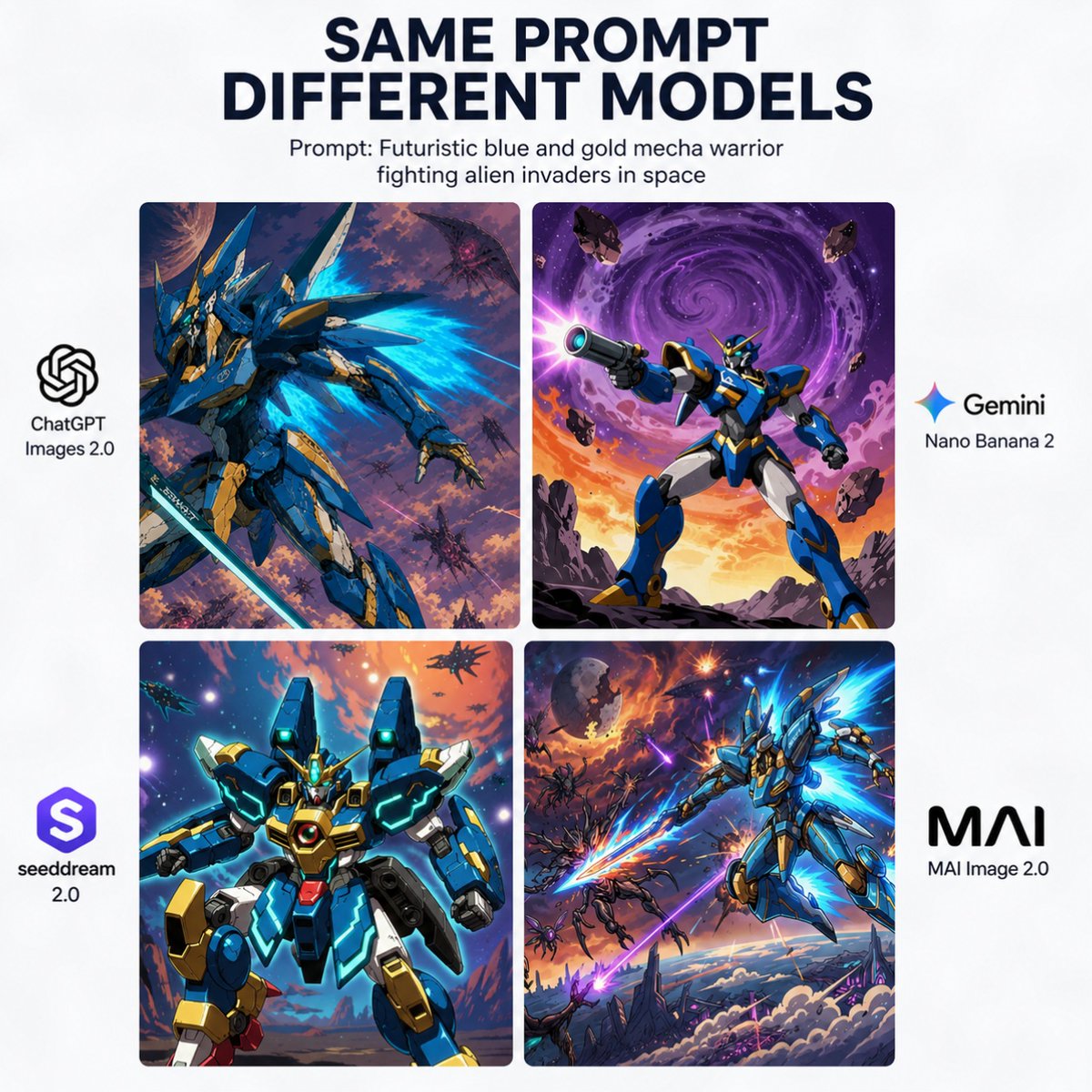
Poster Perbandingan Mecha Model AI
Grafik perbandingan media sosial berbentuk persegi yang menunjukkan tema mecha fiksi ilmiah yang sama yang diinterpretasikan oleh empat model gambar berbeda, berguna untuk postingan tolok ukur atau pengumuman.
Ini adalah contoh kasus GPT Image 2 untuk Grafis & Poster . Gunakan contoh siap salin di bawah ini untuk menghasilkan visual serupa, dan tinjau atribusi Awesome GPT Image 2 Prompts serta hak penggunaan komersial sebelum digunakan kembali.
Butuh seluruh rangkaian prompt? Gunakan Grafis & Poster Untuk contoh terkait lainnya, kunjungi pusat topik, atau buka GPT Image 2 katalog cepat untuk indeks contoh lengkap, struktur yang dapat digunakan kembali, dan atribusi sumber.
Free 1K preview
Generate one preview image instantly, no sign-up required.
3621/4000
Mengingatkan
Prompt siap salin
{
  "type": "comparison poster",
  "style": "clean social-media infographic with white background and bold editorial typography",
  "canvas": {
    "aspect_ratio": "1:1",
    "background": "solid white"
  },
  "headline": {
    "title": "SAME PROMPT\nDIFFERENT MODELS",
    "subtitle": "Prompt: {argument name=\"prompt text\" default=\"Futuristic blue and gold mecha warrior fighting alien invaders in space\"}",
    "title_style": "large bold all-caps sans-serif in very dark navy, centered at top",
    "subtitle_style": "smaller black sans-serif, centered below title"
  },
  "layout": {
    "grid": {
      "position": "center",
      "rows": 2,
      "columns": 2,
      "count": 4,
      "gap": "narrow even spacing",
      "corner_radius": "slightly rounded image panels"
    },
    "side_labels": {
      "left": 2,
      "right": 2
    }
  },
  "images": [
    {
      "position": "top-left",
      "model_name": "ChatGPT Images 2.0",
      "scene": "dynamic blue and gold humanoid mecha in a three-quarter action pose, surrounded by glowing cyan energy wings or thruster flares, holding a long sword, set in a chaotic purple-orange outer-space battlefield with multiple small alien craft and debris",
      "style": "high-detail anime mecha illustration, dramatic lighting, painterly sci-fi background"
    },
    {
      "position": "top-right",
      "model_name": "Gemini Nano Banana 2",
      "scene": "blue and gold mecha standing heroically on rocky ground, aiming a large futuristic blaster toward the viewer, with a huge swirling purple galaxy vortex in the sky, orange sunset glow at the horizon, and floating asteroids around it",
      "style": "bold comic-anime sci-fi illustration, vivid contrast, poster-like composition"
    },
    {
      "position": "bottom-left",
      "model_name": "seeddream 2.0",
      "scene": "front-facing bulky blue and gold mecha with teal glowing accents and a central chest core, posed like a character card portrait against a bright cosmic sky with stars, planets, and distant ships",
      "style": "clean glossy mecha render with anime influence, symmetrical framing, saturated neon highlights"
    },
    {
      "position": "bottom-right",
      "model_name": "MAI Image 2.0",
      "scene": "sleek blue and gold mecha flying diagonally through the sky with bright cyan energy wings and a glowing energy blade, battling multiple alien enemies above clouds and jagged sci-fi terrain under an explosive purple-orange sky",
      "style": "cinematic anime action art, intense motion, high energy effects"
    }
  ],
  "branding": {
    "left_side": [
      {
        "position": "mid-left beside top-left panel",
        "label": "ChatGPT Images 2.0",
        "icon": "OpenAI knot logo in black",
        "count": 1
      },
      {
        "position": "lower-left beside bottom-left panel",
        "label": "seeddream 2.0",
        "icon": "purple rounded-square emblem with white stylized S",
        "count": 1
      }
    ],
    "right_side": [
      {
        "position": "mid-right beside top-right panel",
        "label": "Gemini Nano Banana 2",
        "icon": "multicolor four-point spark icon",
        "count": 1
      },
      {
        "position": "lower-right beside bottom-right panel",
        "label": "MAI Image 2.0",
        "icon": "bold black MAI wordmark",
        "count": 1
      }
    ]
  },
  "composition_notes": "keep all four artwork panels visually distinct but thematically consistent with the same prompt, centered in a balanced square comparison layout suitable for a viral social media post comparing image generation models"
}
Variabel perintah
Placeholder argumen yang dapat diedit ditemukan dalam prompt, beserta nilai defaultnya.
Variabel
prompt text
Bawaan
Futuristic blue and gold mecha warrior fighting alien invaders in space
Best for
- - Grafis & Poster visual exploration
- - Image generation and reference-image edits
- - Reusable briefs that keep source attribution visible
Change these parts
- - Subject, product, character, or scene
- - Aspect ratio, camera, lighting, and background
- - Brand, text, color, and output constraints
Recommended model and settings
- - Model: gpt-image-2
- - Input mode: Teks ke Gambar
- - Aspect ratio: source
- - Commercial status: review original source
How to use this prompt
- 1. Copy the prompt and preserve its structure for the first test.
- 2. Replace the subject, context, and publishing channel.
- 3. Change one camera, lighting, or style variable per iteration.
- 4. Inspect the output, source, text, and rights before reuse.
Limitations, source, and reuse cautions
- - Generated output is an editable draft, not factual, legal, or rights evidence.
- - Review the linked source, people, brands, logos, text, and third-party media before commercial use.
Diimpor dari Awesome GPT Image 2 Prompts . Atribusi diperlukan. Status penggunaan komersial adalah allowed ; tinjau hak sumber sebelum penggunaan berbayar.
Lebih banyak kasus dalam kategori ini
Diprioritaskan berdasarkan kategori, kompatibilitas mode input, kualitas, dan risiko yang lebih rendah.






Catatan penggunaan kembali dan sumber
Gunakan perintah ini dengan aman setelah melihat pratinjau kasus.
- 1.Salin perintah tersebut atau buka langsung di Dovoo dengan tombol pembuatan.
- 2.Sesuaikan variabel, rasio aspek, dan gambar referensi untuk kebutuhan Anda sendiri.
- 3.Sebelum mempublikasikan atau menggunakan untuk tujuan berbayar, verifikasi hak sumber, persyaratan atribusi, dan risiko merek atau citra.