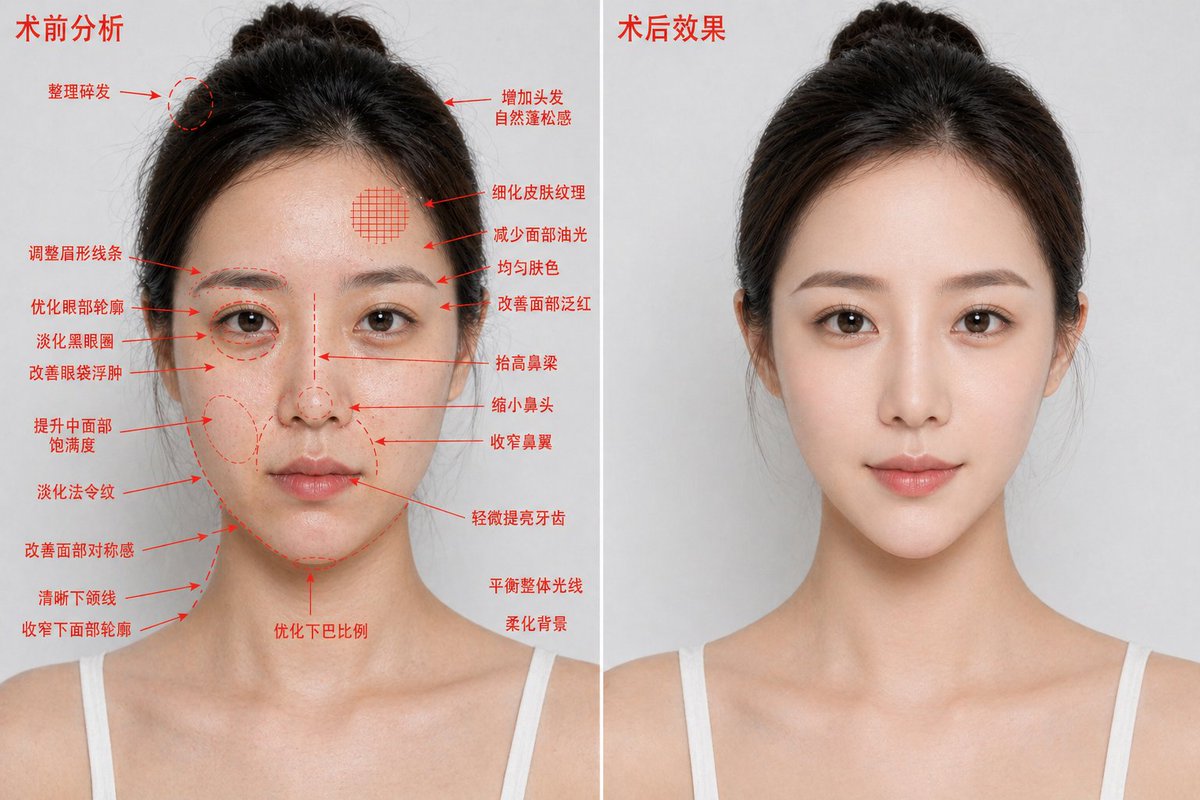
Poster Sebelum dan Sesudah Operasi Estetika
Perintah ini menghasilkan gambar perbandingan peningkatan kosmetik dua panel fotorealistik untuk iklan kecantikan medis atau visualisasi perawatan.
Ini adalah contoh kasus GPT Image 2 untuk Produk & Komersial . Gunakan contoh siap salin di bawah ini untuk menghasilkan visual serupa, dan tinjau atribusi Awesome GPT Image 2 Prompts serta hak penggunaan komersial sebelum digunakan kembali.
Butuh seluruh rangkaian prompt? Gunakan Produk & Komersial Untuk contoh terkait lainnya, kunjungi pusat topik, atau buka GPT Image 2 katalog cepat untuk indeks contoh lengkap, struktur yang dapat digunakan kembali, dan atribusi sumber.
Free 1K preview
Generate one preview image instantly, no sign-up required.
2685/4000
Mengingatkan
Prompt siap salin
{
  "type": "medical aesthetic before-and-after comparison poster",
  "style": "photorealistic high-definition cosmetic surgery analysis blueprint, premium clinic advertising look",
  "subject": {
    "gender_presentation": "female",
    "age_appearance": "young adult",
    "ethnicity": "East Asian",
    "pose": "front-facing bust portrait, shoulders visible, same angle and same neutral expression on both sides",
    "hair": {
      "color": "dark brown to black",
      "style": "center-parted hair pulled back into a loose bun with a few flyaways"
    },
    "clothing": "white thin-strap camisole",
    "identity_masking": "large rectangular mosaic blur covering the full face area in both panels"
  },
  "composition": {
    "aspect_ratio": "16:9 horizontal",
    "background": "clean light gray studio background",
    "divider": "1 vertical white dividing line centered between the two panels",
    "panels": [
      {
        "title": "Preoperative analysis",
        "position": "left",
        "count": 1,
        "image": "same woman with slightly rougher, shinier, less refined appearance",
        "annotations": {
          "color": "red",
          "count": 19,
          "items": [
            "Tidy up flyaway hairs",
            "Adjust eyebrow shape",
            "Optimize the eye contour",
            "Reduce dark circles",
            "Improve puffy eyes",
            "Enhance mid-face volume",
            "Diminish nasolabial folds",
            "Improve facial symmetry",
            "Define jawline",
            "Slim lower facial contour",
            "Add natural volume to hair",
            "Refine skin texture",
            "Reduce facial oiliness",
            "Evens skin tone",
            "Improve facial redness",
            "Raise the bridge of the nose",
            "Reduce the size of the nose",
            "Narrow the nostrils",
            "Slightly brighten teeth"
          ]
        },
        "extra_notes": {
          "count": 3,
          "items": [
            "Optimize chin proportions",
            "Balance overall lighting",
            "Soften background"
          ]
        }
      },
      {
        "title": "Post-operative effect",
        "position": "right",
        "count": 1,
        "image": "same woman, same lighting and same framing, but cleaner and more polished, smoother skin, subtly lifted features, more refined contour and nose, brighter overall complexion, no annotation arrows"
      }
    ]
  },
  "rendering": {
    "lighting": "soft even studio lighting",
    "detail_level": "sharp skin texture but naturally retouched",
    "camera": "85mm portrait lens look, straight-on, chest-up crop"
  }
}
Best for
- - Produk & Komersial visual exploration
- - Image generation and reference-image edits
- - Reusable briefs that keep source attribution visible
Change these parts
- - Subject, product, character, or scene
- - Aspect ratio, camera, lighting, and background
- - Brand, text, color, and output constraints
Recommended model and settings
- - Model: gpt-image-2
- - Input mode: Teks ke Gambar
- - Aspect ratio: source
- - Commercial status: review original source
How to use this prompt
- 1. Copy the prompt and preserve its structure for the first test.
- 2. Replace the subject, context, and publishing channel.
- 3. Change one camera, lighting, or style variable per iteration.
- 4. Inspect the output, source, text, and rights before reuse.
Limitations, source, and reuse cautions
- - Generated output is an editable draft, not factual, legal, or rights evidence.
- - Review the linked source, people, brands, logos, text, and third-party media before commercial use.
Diimpor dari Awesome GPT Image 2 Prompts . Atribusi diperlukan. Status penggunaan komersial adalah allowed ; tinjau hak sumber sebelum penggunaan berbayar.
Lebih banyak kasus dalam kategori ini
Diprioritaskan berdasarkan kategori, kompatibilitas mode input, kualitas, dan risiko yang lebih rendah.






Catatan penggunaan kembali dan sumber
Gunakan perintah ini dengan aman setelah melihat pratinjau kasus.
- 1.Salin perintah tersebut atau buka langsung di Dovoo dengan tombol pembuatan.
- 2.Sesuaikan variabel, rasio aspek, dan gambar referensi untuk kebutuhan Anda sendiri.
- 3.Sebelum mempublikasikan atau menggunakan untuk tujuan berbayar, verifikasi hak sumber, persyaratan atribusi, dan risiko merek atau citra.