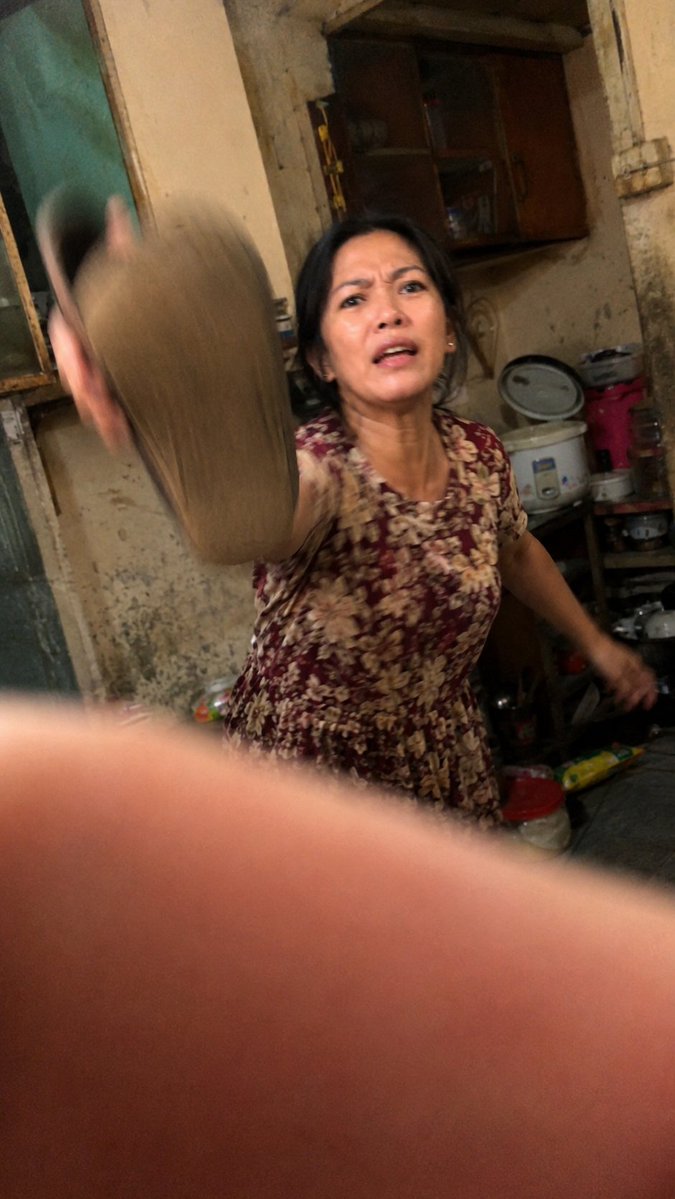
Realistis Candid di Dapur yang Tak Sengaja
Menghasilkan adegan candid mentah ala smartphone kelas bawah dengan efek blur gerakan, pembingkaian yang canggung, dan realisme domestik yang tidak sempurna.
Ini adalah contoh kasus GPT Image 2 untuk Inspirasi Lainnya . Gunakan contoh siap salin di bawah ini untuk menghasilkan visual serupa, dan tinjau atribusi Awesome GPT Image 2 Prompts serta hak penggunaan komersial sebelum digunakan kembali.
Butuh seluruh rangkaian prompt? Gunakan Inspirasi Lainnya Untuk contoh terkait lainnya, kunjungi pusat topik, atau buka GPT Image 2 katalog cepat untuk indeks contoh lengkap, struktur yang dapat digunakan kembali, dan atribusi sumber.
Free 1K preview
Generate one preview image instantly, no sign-up required.
1433/4000
Mengingatkan
Prompt siap salin
Create an ultra-realistic accidental candid photo shot on a low-end Android phone inside a cramped, old, messy kitchen at night. The image should feel like a badly timed snapshot: tilted framing, harsh warm indoor lighting, high ISO noise, compression artifacts, imperfect autofocus, motion blur, and a large out-of-focus finger partially covering the bottom half of the lens. In the center-right, show {argument name="subject" default="an older woman"} wearing {argument name="dress pattern" default="a burgundy floral short-sleeve house dress"}, caught mid-motion as she aggressively swings {argument name="object being swung" default="a slipper or sandal"} toward the camera; the swung object is very close to the lens on the left side and heavily motion-blurred. Show every face clearly with natural, detailed facial features, while her body remains visible. The background is a worn domestic kitchen with stained beige walls, peeling paint, a dark wooden wall cabinet, an old window or door frame on the left, a rice cooker, stacked pots, plastic containers, a red bucket, cluttered shelves, and scattered household items. Make the composition awkward and imperfect, as if the photographer panicked and accidentally captured the moment, with the camera slightly rotated, uneven exposure, soft focus, dirty textures, and raw documentary realism. Use vertical smartphone aspect ratio {argument name="aspect ratio" default="9:16"}.Variabel perintah
Placeholder argumen yang dapat diedit ditemukan dalam prompt, beserta nilai defaultnya.
Variabel
subject
Bawaan
an older woman
Variabel
dress pattern
Bawaan
a burgundy floral short-sleeve house dress
Variabel
object being swung
Bawaan
a slipper or sandal
Variabel
aspect ratio
Bawaan
9:16
Best for
- - Inspirasi Lainnya visual exploration
- - Image generation and reference-image edits
- - Reusable briefs that keep source attribution visible
Change these parts
- - Subject, product, character, or scene
- - Aspect ratio, camera, lighting, and background
- - Brand, text, color, and output constraints
Recommended model and settings
- - Model: gpt-image-2
- - Input mode: Teks ke Gambar
- - Aspect ratio: source
- - Commercial status: review original source
How to use this prompt
- 1. Copy the prompt and preserve its structure for the first test.
- 2. Replace the subject, context, and publishing channel.
- 3. Change one camera, lighting, or style variable per iteration.
- 4. Inspect the output, source, text, and rights before reuse.
Limitations, source, and reuse cautions
- - Generated output is an editable draft, not factual, legal, or rights evidence.
- - Review the linked source, people, brands, logos, text, and third-party media before commercial use.
Diimpor dari Awesome GPT Image 2 Prompts . Atribusi diperlukan. Status penggunaan komersial adalah allowed ; tinjau hak sumber sebelum penggunaan berbayar.
Lebih banyak kasus dalam kategori ini
Diprioritaskan berdasarkan kategori, kompatibilitas mode input, kualitas, dan risiko yang lebih rendah.






Catatan penggunaan kembali dan sumber
Gunakan perintah ini dengan aman setelah melihat pratinjau kasus.
- 1.Salin perintah tersebut atau buka langsung di Dovoo dengan tombol pembuatan.
- 2.Sesuaikan variabel, rasio aspek, dan gambar referensi untuk kebutuhan Anda sendiri.
- 3.Sebelum mempublikasikan atau menggunakan untuk tujuan berbayar, verifikasi hak sumber, persyaratan atribusi, dan risiko merek atau citra.