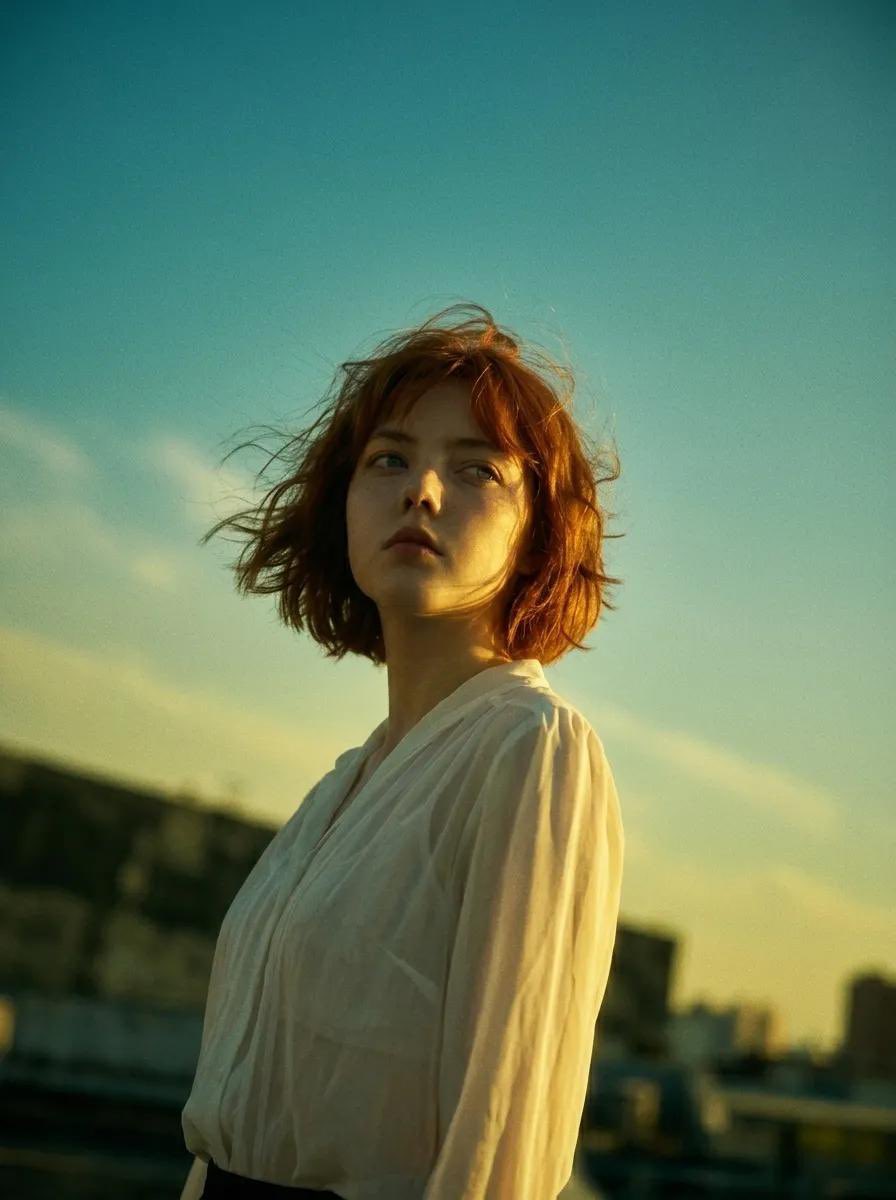
Potret Sinema Hong Kong Era 90-an
Mengubah gambar referensi menjadi estetika film tahun 90-an yang terinspirasi oleh Wong Kar-wai dengan bayangan yang pekat dan gradasi warna kuning kehijauan.
Ini adalah contoh kasus GPT Image 2 untuk Potret & Karakter . Gunakan contoh siap salin di bawah ini untuk menghasilkan visual serupa, dan tinjau atribusi Awesome GPT Image 2 Prompts serta hak penggunaan komersial sebelum digunakan kembali.
Free 1K preview
Generate one preview image instantly, no sign-up required.
Free text preview doesn’t preserve reference-image consistency.
Mengingatkan
Prompt siap salin
modify image : use the subject from uploaded image as base main subject foundation, perserve facial detail and body figure shape . ignore any other unrelated element. Preserve the facial features and pose of the subject, but completely overhaul the visual follow this Prompt: A cinematic low-angle medium shot, {argument name="style" default="1990s Hong Kong cinema style (Wong Kar-wai)"}. Subject: [Uploaded Image Base], preserving her exact facial features, body figure, and contemplative expression. She stands against a tilted horizon. Visuals: She wears a {argument name="outfit" default="white vintage blouse"} with a dreamy glamour glow. Heavy chiaroscuro lighting; a sharp golden light hits her jawline, creating deep shadows. Her dark, wind-swept hair has intense rim-lighting and soft CCD bloom. Atmosphere: {argument name="color grading" default="Desaturated midground, sickly-sweet yellow-green color grading"}, 35mm film grain, teal-tinted sky. The low angle makes her look isolated yet monumental, searching for a phantom presence. Shallow depth of field, chromatic aberration.Variabel perintah
Placeholder argumen yang dapat diedit ditemukan dalam prompt, beserta nilai defaultnya.
Best for
- - Potret & Karakter visual exploration
- - Image generation and reference-image edits
- - Reusable briefs that keep source attribution visible
Change these parts
- - Subject, product, character, or scene
- - Aspect ratio, camera, lighting, and background
- - Brand, text, color, and output constraints
Recommended model and settings
- - Model: gpt-image-2
- - Input mode: Gambar ke Gambar
- - Aspect ratio: source
- - Commercial status: review original source
How to use this prompt
- 1. Copy the prompt and preserve its structure for the first test.
- 2. Replace the subject, context, and publishing channel.
- 3. Change one camera, lighting, or style variable per iteration.
- 4. Inspect the output, source, text, and rights before reuse.
Limitations, source, and reuse cautions
- - Generated output is an editable draft, not factual, legal, or rights evidence.
- - Review the linked source, people, brands, logos, text, and third-party media before commercial use.
Lebih banyak kasus dalam kategori ini
Diprioritaskan berdasarkan kategori, kompatibilitas mode input, kualitas, dan risiko yang lebih rendah.






Catatan penggunaan kembali dan sumber
Gunakan perintah ini dengan aman setelah melihat pratinjau kasus.
- 1.Salin perintah tersebut atau buka langsung di Dovoo dengan tombol pembuatan.
- 2.Sesuaikan variabel, rasio aspek, dan gambar referensi untuk kebutuhan Anda sendiri.
- 3.Sebelum mempublikasikan atau menggunakan untuk tujuan berbayar, verifikasi hak sumber, persyaratan atribusi, dan risiko merek atau citra.