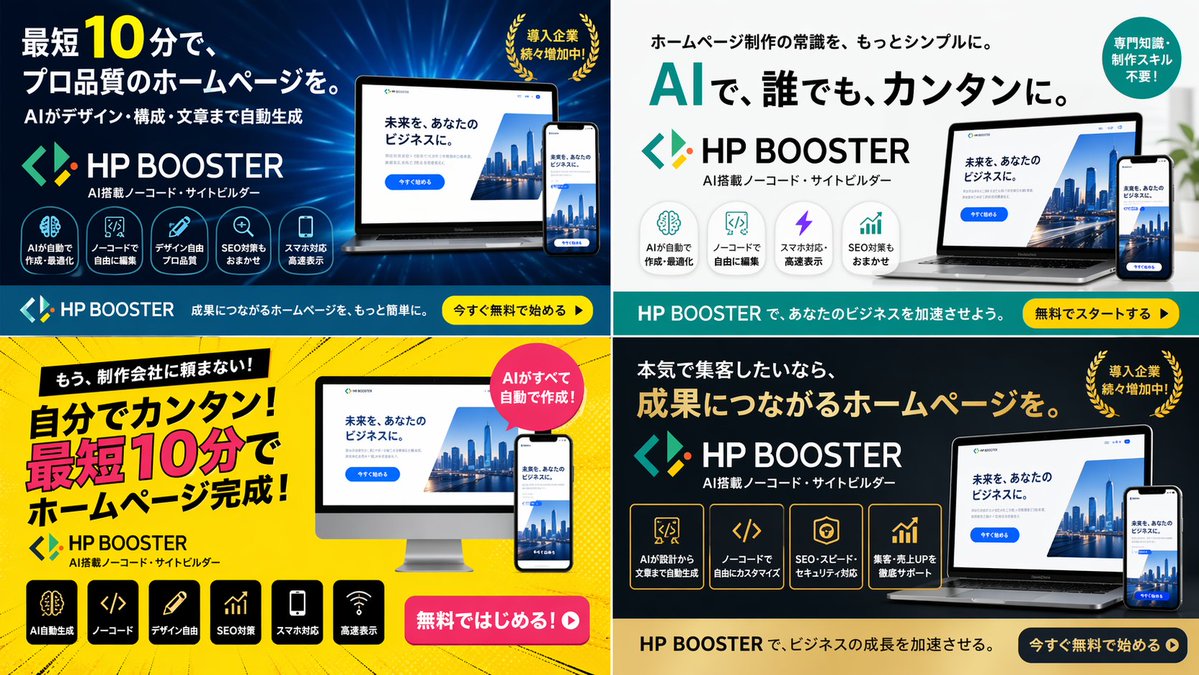
Variasi Banner Iklan SaaS 4 Panel
Menghasilkan grid 2x2 berupa banner iklan digital untuk produk perangkat lunak, menampilkan berbagai tema warna, tata letak, dan variasi teks pemasaran.
Ini adalah contoh kasus GPT Image 2 untuk Produk & Komersial . Gunakan contoh siap salin di bawah ini untuk menghasilkan visual serupa, dan tinjau atribusi Awesome GPT Image 2 Prompts serta hak penggunaan komersial sebelum digunakan kembali.
Butuh seluruh rangkaian prompt? Gunakan Produk & Komersial Untuk contoh terkait lainnya, kunjungi pusat topik, atau buka GPT Image 2 katalog cepat untuk indeks contoh lengkap, struktur yang dapat digunakan kembali, dan atribusi sumber.
Free 1K preview
Generate one preview image instantly, no sign-up required.
2793/4000
Mengingatkan
Prompt siap salin
{
  "type": "4-panel ad banner variation grid",
  "product": {
    "name": "{argument name=\"product name\" default=\"HP BOOSTER\"}",
    "subtitle": "AI搭載ノーコード・サイトビルダー",
    "logo": "blue and green angle brackets with a diamond"
  },
  "common_elements": {
    "device_mockups": "laptop and smartphone (desktop monitor in bottom-left panel) displaying a website with a city skyline, text '未来を、あなたのビジネスに。', and a blue '今すぐ始める' button"
  },
  "layout": {
    "grid": "2x2",
    "panels": [
      {
        "position": "top-left",
        "theme": "dark blue gradient with tech lines",
        "headline": "{argument name=\"main headline 1\" default=\"最短10分で、プロ品質のホームページを。\"}",
        "sub_headline": "AIがデザイン・構成・文章まで自動生成",
        "badge": "Golden laurel wreath with the text “The number of companies being introduced is steadily increasing!”",
        "icon_count": 5,
        "icon_labels": [
          "AIが自動で作成・最適化",
          "ノーコードで自由に編集",
          "デザイン自由プロ品質",
          "SEO対策もおまかせ",
          "スマホ対応高速表示"
        ],
        "bottom_bar": "teal background, yellow button '今すぐ無料で始める ▶'"
      },
      {
        "position": "top-right",
        "theme": "white and light gray",
        "headline": "{argument name=\"main headline 2\" default=\"AIで、誰でも、カンタンに。\"}",
        "pre_headline": "ホームページ制作の常識を、もっとシンプルに。",
        "badge": "teal circle with text '専門知識・制作スキル不要!'",
        "icon_count": 4,
        "icon_labels": [
          "AIが自動で作成・最適化",
          "ノーコードで自由に編集",
          "スマホ対応高速表示",
          "SEO対策もおまかせ"
        ],
        "bottom_bar": "teal background, yellow button '無料でスタートする ▶'"
      },
      {
        "position": "bottom-left",
        "theme": "bright yellow with comic-book action lines",
        "headline": "{argument name=\"main headline 3\" default=\"自分でカンタン!最短10分でホームページ完成!\"}",
        "pre_headline": "もう、制作会社に頼まない!",
        "badge": "pink circle with text 'AIがすべて自動で作成!'",
        "icon_count": 6,
        "icon_labels": [
          "AI automatic generation",
          "ノーコード",
          "デザイン自由",
          "SEO optimization",
          "スマホ対応",
          "Fast loading"
        ],
        "call_to_action": "pink pill button '無料ではじめる!▶'"
      },
      {
        "position": "bottom-right",
        "theme": "dark gray and black",
        "headline": "{argument name=\"main headline 4\" default=\"成果につながるホームページを。\"}",
        "pre_headline": "本気で集客したいなら、",
        "badge": "Golden laurel wreath with the text “The number of companies being introduced is steadily increasing!”",
        "icon_count": 4,
        "icon_labels": [
          "AIが設計から文章まで自動生成",
          "ノーコードで自由にカスタマイズ",
          "SEO・スピード・セキュリティ対応",
          "集客・売上UPを徹底サポート"
        ],
        "bottom_bar": "gold background, dark blue button '今すぐ無料で始める ▶'"
      }
    ]
  }
}
Variabel perintah
Placeholder argumen yang dapat diedit ditemukan dalam prompt, beserta nilai defaultnya.
Variabel
product name
Bawaan
HP BOOSTER
Variabel
main headline 1
Bawaan
最短10分で、プロ品質のホームページを。
Variabel
main headline 2
Bawaan
AIで、誰でも、カンタンに。
Variabel
main headline 3
Bawaan
自分でカンタン!最短10分でホームページ完成!
Variabel
main headline 4
Bawaan
成果につながるホームページを。
Best for
- - Produk & Komersial visual exploration
- - Image generation and reference-image edits
- - Reusable briefs that keep source attribution visible
Change these parts
- - Subject, product, character, or scene
- - Aspect ratio, camera, lighting, and background
- - Brand, text, color, and output constraints
Recommended model and settings
- - Model: gpt-image-2
- - Input mode: Teks ke Gambar
- - Aspect ratio: source
- - Commercial status: review original source
How to use this prompt
- 1. Copy the prompt and preserve its structure for the first test.
- 2. Replace the subject, context, and publishing channel.
- 3. Change one camera, lighting, or style variable per iteration.
- 4. Inspect the output, source, text, and rights before reuse.
Limitations, source, and reuse cautions
- - Generated output is an editable draft, not factual, legal, or rights evidence.
- - Review the linked source, people, brands, logos, text, and third-party media before commercial use.
Diimpor dari Awesome GPT Image 2 Prompts . Atribusi diperlukan. Status penggunaan komersial adalah allowed ; tinjau hak sumber sebelum penggunaan berbayar.
Lebih banyak kasus dalam kategori ini
Diprioritaskan berdasarkan kategori, kompatibilitas mode input, kualitas, dan risiko yang lebih rendah.






Catatan penggunaan kembali dan sumber
Gunakan perintah ini dengan aman setelah melihat pratinjau kasus.
- 1.Salin perintah tersebut atau buka langsung di Dovoo dengan tombol pembuatan.
- 2.Sesuaikan variabel, rasio aspek, dan gambar referensi untuk kebutuhan Anda sendiri.
- 3.Sebelum mempublikasikan atau menggunakan untuk tujuan berbayar, verifikasi hak sumber, persyaratan atribusi, dan risiko merek atau citra.