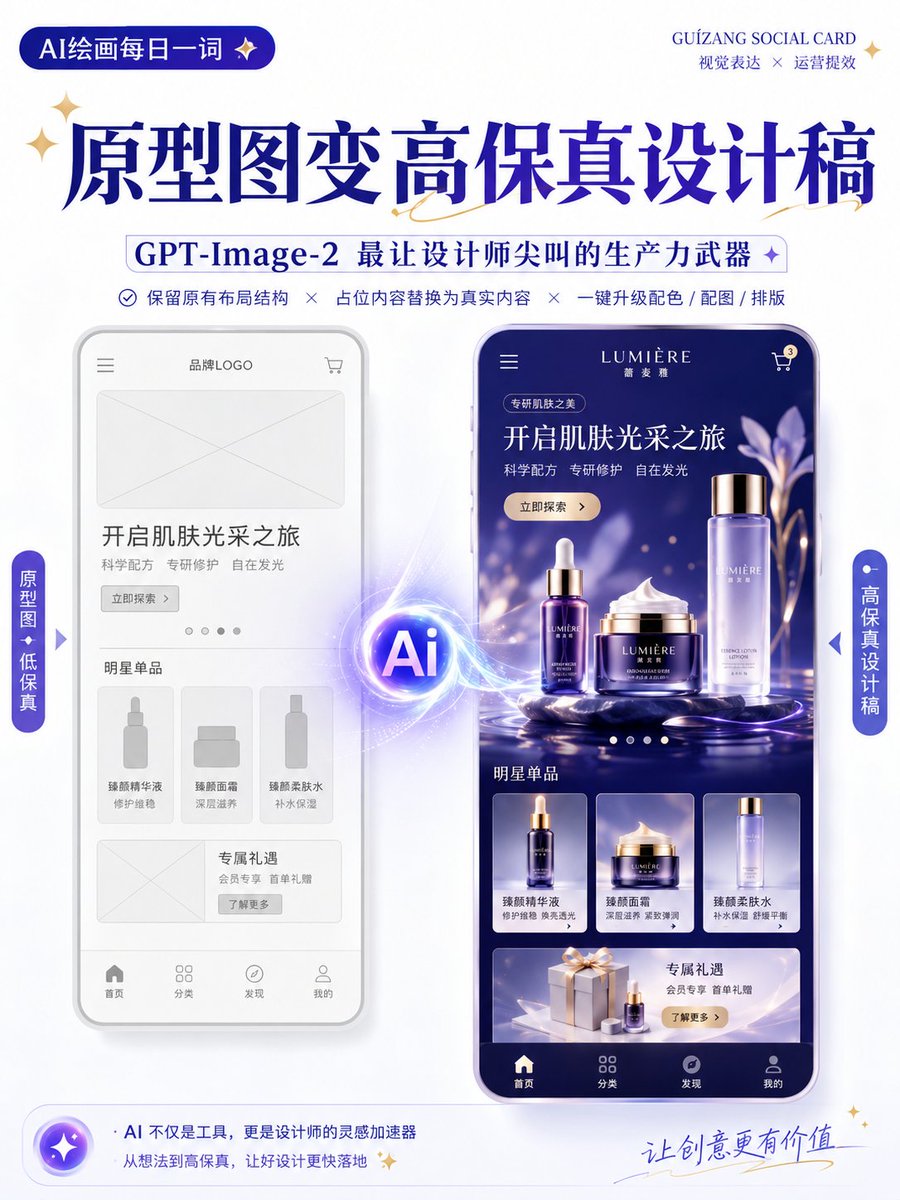
Wireframe to High-Fidelity UI Design
A specialized prompt for GPT-Image-2 that transforms low-fidelity wireframes or prototypes into high-fidelity, presentation-ready design mockups while maintaining the original layout and structure.
यह ग्राफिक और पोस्टर के लिए एक GPT Image 2 प्रॉम्प्ट केस है। इसी तरह के विज़ुअल बनाने के लिए नीचे दिए गए कॉपी-रेडी प्रॉम्प्ट का उपयोग करें, और पुनः उपयोग करने से पहले Awesome GPT Image 2 Prompts एट्रिब्यूशन और व्यावसायिक उपयोग अधिकारों की समीक्षा करें।
Free 1K preview
Generate one preview image instantly, no sign-up required.
Free text preview doesn’t preserve reference-image consistency.
प्रॉम्प्ट
प्रतिलिपि के लिए तैयार संकेत
Generate a high-fidelity design draft based on the uploaded wireframe/prototype as a reference.

Design Type: {argument name="design type" default="Promotion Page / App Interface / H5 Page / E-commerce Detail Page / Official Website / Infographic"}

Requirements:
1. Retain the original layout structure, information hierarchy, and module division of the page.
2. Replace placeholders in the wireframe with actual content.
3. Automatically add color schemes, images, icons, and typography details.
4. Enhance the visual hierarchy, white space, alignment, and module relationships of the page.
5. Output as a complete, high-fidelity design draft.

Visual Style: {argument name="visual style" default="Minimalist Modern / Tech / Skeuomorphic / Fresh / Brand Identity / Premium"}
Primary Color: {argument name="primary color" default="blue"}
Secondary Color: [Enter color]
Aspect Ratio: [e.g., 9:16 / 4:3 / 16:9]

Note:
Keep the original structure and do not disrupt the order of modules.
Focus on optimizing visual presentation and realistic content to make it look like a complete design draft ready for proposal presentations.

Keep the original information architecture of the wireframe unchanged, only enhancing visual completeness and realism.
प्रॉम्प्ट वैरिएबल
प्रॉम्प्ट में पाए जाने वाले संपादन योग्य तर्क प्लेसहोल्डर, उनके डिफ़ॉल्ट मानों के साथ।
Best for
- - ग्राफिक और पोस्टर visual exploration
- - Image generation and reference-image edits
- - Reusable briefs that keep source attribution visible
Change these parts
- - Subject, product, character, or scene
- - Aspect ratio, camera, lighting, and background
- - Brand, text, color, and output constraints
Recommended model and settings
- - Model: gpt-image-2
- - Input mode: छवि से छवि
- - Aspect ratio: source
- - Commercial status: review original source
How to use this prompt
- 1. Copy the prompt and preserve its structure for the first test.
- 2. Replace the subject, context, and publishing channel.
- 3. Change one camera, lighting, or style variable per iteration.
- 4. Inspect the output, source, text, and rights before reuse.
Limitations, source, and reuse cautions
- - Generated output is an editable draft, not factual, legal, or rights evidence.
- - Review the linked source, people, brands, logos, text, and third-party media before commercial use.
इस श्रेणी में और भी मामले
श्रेणी, इनपुट मोड अनुकूलता, गुणवत्ता और कम जोखिम को प्राथमिकता दी गई है।






पुनः उपयोग और स्रोत नोट्स
केस का पूर्वावलोकन करने के बाद इस प्रॉम्प्ट का सुरक्षित रूप से उपयोग करें।
- 1.प्रॉम्प्ट को कॉपी करें या जनरेशन बटन का उपयोग करके इसे सीधे डोवू में खोलें।
- 2.अपने उपयोग के अनुसार वैरिएबल, आस्पेक्ट रेशियो और संदर्भ छवियों को समायोजित करें।
- 3.प्रकाशन या सशुल्क उपयोग से पहले, स्रोत अधिकारों, श्रेय देने की आवश्यकताओं और ब्रांड या छवि से जुड़े जोखिमों की पुष्टि करें।