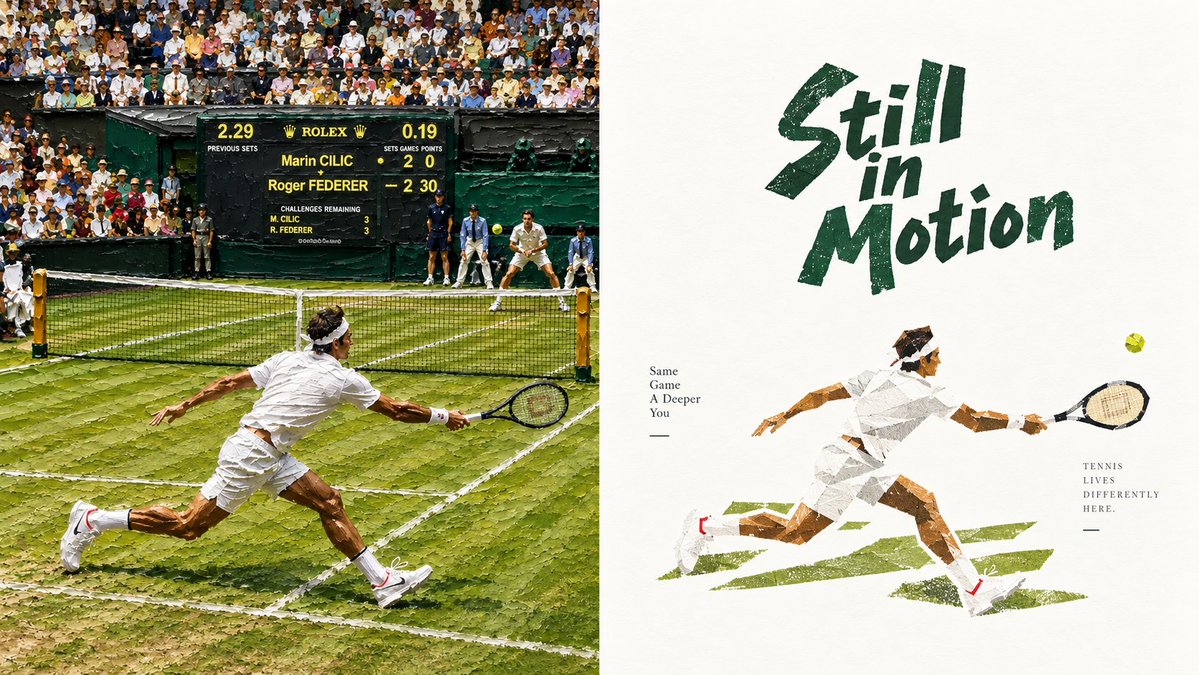
Wimbledon Motion Diptych Poster
Generates a split-screen tennis artwork combining a realistic Wimbledon rally with a distressed editorial poster illustration.
यह ग्राफिक और पोस्टर के लिए एक GPT Image 2 प्रॉम्प्ट केस है। इसी तरह के विज़ुअल बनाने के लिए नीचे दिए गए कॉपी-रेडी प्रॉम्प्ट का उपयोग करें, और पुनः उपयोग करने से पहले Awesome GPT Image 2 Prompts एट्रिब्यूशन और व्यावसायिक उपयोग अधिकारों की समीक्षा करें।
क्या आपको प्रॉम्प्ट्स का पूरा सेट चाहिए? इसका उपयोग करें ग्राफिक और पोस्टर अधिक संबंधित उदाहरणों के लिए विषय हब देखें, या खोलें GPT Image 2 त्वरित सूची संपूर्ण उदाहरण अनुक्रमणिका, पुन: प्रयोज्य संरचनाओं और स्रोत श्रेय के लिए।
Free 1K preview
Generate one preview image instantly, no sign-up required.
2977/4000
प्रॉम्प्ट
प्रतिलिपि के लिए तैयार संकेत
Objective: Create a wide-format sports diptych about the Wimbledon tennis tournament, with a realistic match scene on the left and a rough cut-paper style illustration poster on the right.

Canvas: 16:9 landscape composition, precisely divided into 2 equal vertical panels. The left panel is a crowded outdoor grass tennis court in bright sunlight; the right panel is a textured off-white poster page with ample negative space.

Left Panel: Showcase a realistic, slightly oil-painting-esque photographic-style Wimbledon grass tennis rally. The scene contains 2 visible tennis players: 1 player in the foreground wearing all-white sportswear, sprinting and diving towards the right net, racket extended; and 1 opponent in the background wearing white sportswear, waiting near the far baseline. Include a black net spanning the lower-middle of the frame, worn green grass with white court lines, dark green court walls, ball boys and a referee in dark uniforms, and a dense crowd of spectators in the stands. Add a central dark green scoreboard with the Rolex brand logo and readable match details: “Marin CILIC” above “Roger FEDERER”, with the score showing Cilic 2 0 and Federer 2 30, and a smaller row of match data. Keep the foreground player dynamic, with a low center of gravity, wearing a white headband, white shirt and shorts, white socks and shoes with small red accents.

Right Panel: Create a minimalist retro tennis poster on textured cream paper. In the upper-right center, place a huge, rough brushstroke font {argument name="headline text" default="Still in Motion"} in deep forest green, with a slant and hand-drawn distressed edges. Below, draw a single-sided collage-style white tennis player sprinting to the right, body stretched horizontally, one arm back, and the racket arm extended towards a small yellow tennis ball. Use angular torn paper shapes, visible paper texture, sepia-toned skin fragments, gray shadows, and deep green grass brushstrokes underfoot. Add 2 small typography blocks: to the left of the illustrated player, stack the text {argument name="left small text" default="Same\nGame\nA Deeper\nYou"} below a short dash; to the right of the illustrated player, stack the text {argument name="right small text" default="TENNIS\nLIVES\nDIFFERENTLY\nHERE."} below a short dash.

Visual Style: The left side contrasts with detailed documentary tennis photography, while the right side adopts a rugged illustration aesthetic. Use Wimbledon color schemes: deep green, grass green, white, cream, soft yellow, sepia, and black. Emphasize motion, competitive tension, textured grass, distressed paper, imperfect brushstroke typography, and collage-like geometry.

Constraints: The realistic left panel must contain 2 main tennis players, and the right panel must contain 1 illustrated tennis player. Maintain a clear split-screen layout, no additional logos except for the Rolex-style scoreboard on the left, no watermarks, and no modern UI elements.
प्रॉम्प्ट वैरिएबल
प्रॉम्प्ट में पाए जाने वाले संपादन योग्य तर्क प्लेसहोल्डर, उनके डिफ़ॉल्ट मानों के साथ।
चर
headline text
गलती करना
Still in Motion
चर
left small text
गलती करना
Same\nGame\nA Deeper\nYou
चर
right small text
गलती करना
TENNIS\nLIVES\nDIFFERENTLY\nHERE.
Best for
- - ग्राफिक और पोस्टर visual exploration
- - Image generation and reference-image edits
- - Reusable briefs that keep source attribution visible
Change these parts
- - Subject, product, character, or scene
- - Aspect ratio, camera, lighting, and background
- - Brand, text, color, and output constraints
Recommended model and settings
- - Model: gpt-image-2
- - Input mode: टेक्स्ट से छवि
- - Aspect ratio: source
- - Commercial status: review original source
How to use this prompt
- 1. Copy the prompt and preserve its structure for the first test.
- 2. Replace the subject, context, and publishing channel.
- 3. Change one camera, lighting, or style variable per iteration.
- 4. Inspect the output, source, text, and rights before reuse.
Limitations, source, and reuse cautions
- - Generated output is an editable draft, not factual, legal, or rights evidence.
- - Review the linked source, people, brands, logos, text, and third-party media before commercial use.
Awesome GPT Image 2 Prompts से आयातित। श्रेय देना आवश्यक है। वाणिज्यिक उपयोग की allowed ; सशुल्क उपयोग से पहले स्रोत अधिकारों की समीक्षा करें।
इस श्रेणी में और भी मामले
श्रेणी, इनपुट मोड अनुकूलता, गुणवत्ता और कम जोखिम को प्राथमिकता दी गई है।

GPT Image 2 Real-Life Character Street Snap
टेक्स्ट से छवि

MotoGP POV Cornering Shot
टेक्स्ट से छवि

Orange Rooftop Fashion Photo Prompt
टेक्स्ट से छवि

Luxury Travel Fashion Portrait Prompt
टेक्स्ट से छवि

Cute Focus Desk Flat Lay and Kawaii Illustration
टेक्स्ट से छवि

Street Selfie with Cat in Matching Cap
टेक्स्ट से छवि
पुनः उपयोग और स्रोत नोट्स
केस का पूर्वावलोकन करने के बाद इस प्रॉम्प्ट का सुरक्षित रूप से उपयोग करें।
- 1.प्रॉम्प्ट को कॉपी करें या जनरेशन बटन का उपयोग करके इसे सीधे डोवू में खोलें।
- 2.अपने उपयोग के अनुसार वैरिएबल, आस्पेक्ट रेशियो और संदर्भ छवियों को समायोजित करें।
- 3.प्रकाशन या सशुल्क उपयोग से पहले, स्रोत अधिकारों, श्रेय देने की आवश्यकताओं और ब्रांड या छवि से जुड़े जोखिमों की पुष्टि करें।