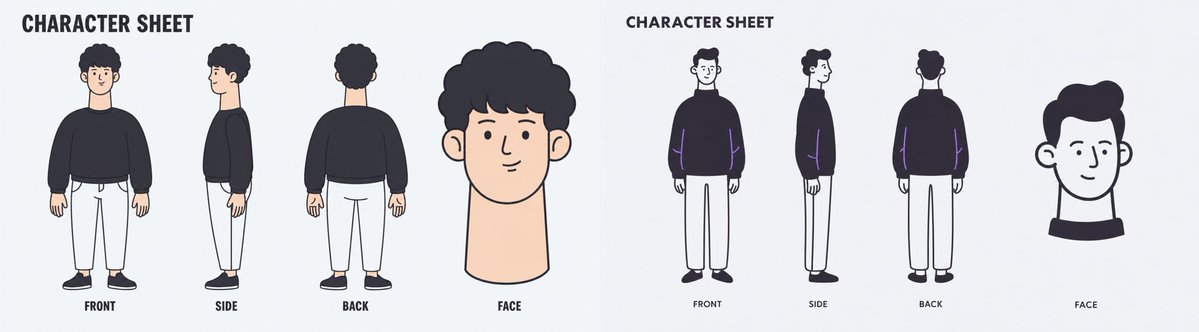
Wide Minimal Character Sheet
Generates a clean panoramic character turnaround sheet with two side-by-side design styles and controlled text labels.
यह चित्र और चरित्र के लिए एक GPT Image 2 प्रॉम्प्ट केस है। इसी तरह के विज़ुअल बनाने के लिए नीचे दिए गए कॉपी-रेडी प्रॉम्प्ट का उपयोग करें, और पुनः उपयोग करने से पहले Awesome GPT Image 2 Prompts एट्रिब्यूशन और व्यावसायिक उपयोग अधिकारों की समीक्षा करें।
क्या आपको प्रॉम्प्ट्स का पूरा सेट चाहिए? इसका उपयोग करें चित्र और चरित्र अधिक संबंधित उदाहरणों के लिए विषय हब देखें, या खोलें GPT Image 2 त्वरित सूची संपूर्ण उदाहरण अनुक्रमणिका, पुन: प्रयोज्य संरचनाओं और स्रोत श्रेय के लिए।
Free 1K preview
Generate one preview image instantly, no sign-up required.
2413/4000
प्रॉम्प्ट
प्रतिलिपि के लिए तैयार संकेत
Goal: Create a wide minimalist character sheet illustration for {argument name="character name" default="a young man with curly black hair"}, showing two separate character sheet designs side by side on one horizontal canvas.

Canvas: Very wide panoramic aspect ratio, about 4:1, pale light gray background, clean empty margins, no borders, no shadows, no watermark.

Layout: Split the canvas into two equal halves. Each half is its own character sheet with the same basic layout: a bold title at the top, three full-body turnaround poses arranged left to right, and one larger face/head close-up on the far right. Use exactly 2 character sheet panels total.

Left panel details: Use a soft flat cartoon style with warm skin tone and muted colors. Show exactly 4 character drawings: 1 front full-body view, 1 side full-body view, 1 back full-body view, and 1 large face close-up. The character has rounded curly black hair, a simple friendly face, a long neck in the close-up, a loose dark navy/black sweatshirt, cropped white pants, and black shoes. Place the full-body poses evenly spaced, with the face close-up larger than the body poses.

Right panel details: Use a thinner, more monochrome sketch-like flat style with dark navy outlines and minimal color accents. Show exactly 4 character drawings: 1 front full-body view, 1 side full-body view, 1 back full-body view, and 1 large face close-up. The same character wears a dark oversized sweater, white straight pants, and dark shoes. Add subtle purple accent lines on the sweater sleeves. The face close-up is simplified, with short dark hair, ears visible, and a black collar shape beneath the head.

Text content: Draw only the following text labels, each spelled exactly as written. In the left panel: CHARACTER SHEET, FRONT, SIDE, BACK, FACE. In the right panel: CHARACTER SHEET, FRONT, SIDE, BACK, FACE. Use bold uppercase hand-drawn sans-serif text for the titles and small uppercase labels under each view.

Visual style: Clean vector-like illustration, simple rounded forms, slightly imperfect hand-drawn lines, limited palette of black, dark navy, white, pale peach skin, and light gray background. Keep the composition airy and balanced.

Constraints: Do not add any other letters, symbols, logos, signatures, dates, URLs, watermarks, or decorative text. Keep exactly 8 character drawings total: 6 full-body turnaround views and 2 face close-ups.
प्रॉम्प्ट वैरिएबल
प्रॉम्प्ट में पाए जाने वाले संपादन योग्य तर्क प्लेसहोल्डर, उनके डिफ़ॉल्ट मानों के साथ।
चर
character name
गलती करना
a young man with curly black hair
Best for
- - चित्र और चरित्र visual exploration
- - Image generation and reference-image edits
- - Reusable briefs that keep source attribution visible
Change these parts
- - Subject, product, character, or scene
- - Aspect ratio, camera, lighting, and background
- - Brand, text, color, and output constraints
Recommended model and settings
- - Model: gpt-image-2
- - Input mode: टेक्स्ट से छवि
- - Aspect ratio: source
- - Commercial status: review original source
How to use this prompt
- 1. Copy the prompt and preserve its structure for the first test.
- 2. Replace the subject, context, and publishing channel.
- 3. Change one camera, lighting, or style variable per iteration.
- 4. Inspect the output, source, text, and rights before reuse.
Limitations, source, and reuse cautions
- - Generated output is an editable draft, not factual, legal, or rights evidence.
- - Review the linked source, people, brands, logos, text, and third-party media before commercial use.
Awesome GPT Image 2 Prompts से आयातित। श्रेय देना आवश्यक है। वाणिज्यिक उपयोग की allowed ; सशुल्क उपयोग से पहले स्रोत अधिकारों की समीक्षा करें।
इस श्रेणी में और भी मामले
श्रेणी, इनपुट मोड अनुकूलता, गुणवत्ता और कम जोखिम को प्राथमिकता दी गई है।

पुनः उपयोग और स्रोत नोट्स
केस का पूर्वावलोकन करने के बाद इस प्रॉम्प्ट का सुरक्षित रूप से उपयोग करें।
- 1.प्रॉम्प्ट को कॉपी करें या जनरेशन बटन का उपयोग करके इसे सीधे डोवू में खोलें।
- 2.अपने उपयोग के अनुसार वैरिएबल, आस्पेक्ट रेशियो और संदर्भ छवियों को समायोजित करें।
- 3.प्रकाशन या सशुल्क उपयोग से पहले, स्रोत अधिकारों, श्रेय देने की आवश्यकताओं और ब्रांड या छवि से जुड़े जोखिमों की पुष्टि करें।