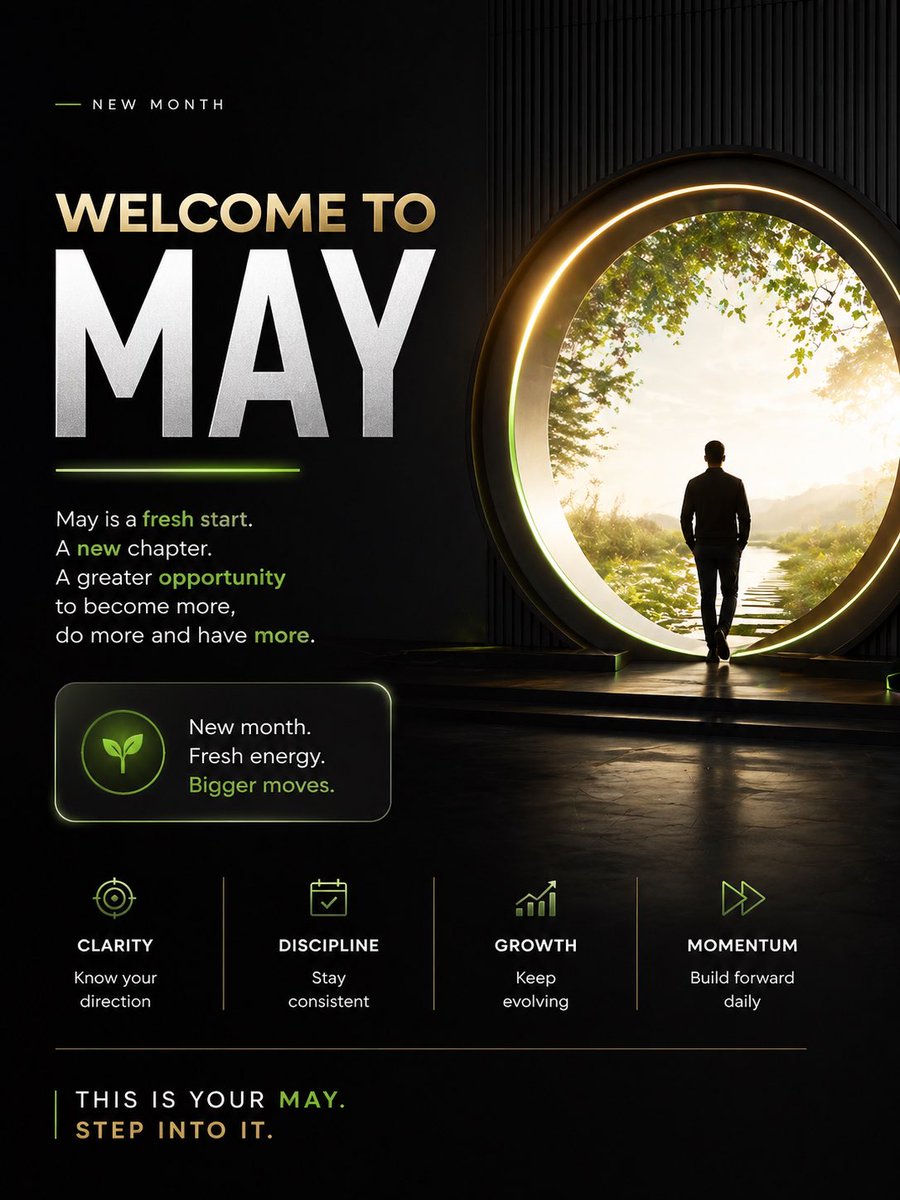
मई माह के लिए प्रेरक स्वागत पोस्टर
नए महीने की प्रेरणा के लिए एक सिनेमाई, डार्क थीम वाला प्रेरणादायक पोस्टर, जो सोशल मीडिया पोस्ट, पर्सनल ब्रांडिंग और माइंडसेट कंटेंट के लिए आदर्श है।
यह ग्राफिक और पोस्टर के लिए एक GPT Image 2 प्रॉम्प्ट केस है। इसी तरह के विज़ुअल बनाने के लिए नीचे दिए गए कॉपी-रेडी प्रॉम्प्ट का उपयोग करें, और पुनः उपयोग करने से पहले Awesome GPT Image 2 Prompts एट्रिब्यूशन और व्यावसायिक उपयोग अधिकारों की समीक्षा करें।
क्या आपको प्रॉम्प्ट्स का पूरा सेट चाहिए? इसका उपयोग करें ग्राफिक और पोस्टर अधिक संबंधित उदाहरणों के लिए विषय हब देखें, या खोलें GPT Image 2 त्वरित सूची संपूर्ण उदाहरण अनुक्रमणिका, पुन: प्रयोज्य संरचनाओं और स्रोत श्रेय के लिए।
Free 1K preview
Generate one preview image instantly, no sign-up required.
3117/4000
प्रॉम्प्ट
प्रतिलिपि के लिए तैयार संकेत
Design a premium motivational social media poster in a dark cinematic editorial style, vertical 4:5 format. The composition is split into 2 main zones: a left text-heavy layout and a right aspirational visual scene. Use a black to deep charcoal background with subtle texture, faint vertical ribbed wall detail on the right, glossy floor reflections, and elegant neon-lime accent lighting mixed with warm gold highlights.

On the right side, show 1 human figure: a man in silhouette from behind, wearing a fitted dark jacket and pants, walking toward a giant circular portal doorway. The portal should be large, glowing with a warm golden ring and soft inner halo, positioned slightly right of center. Beyond the portal is a bright peaceful nature scene with 1 narrow stepping-stone path leading forward through grass, soft sunlight, distant haze, and leafy green tree branches framing the upper edge. The figure should feel purposeful and contemplative, stepping into a new beginning.

On the left side, create a clean motivational typography layout. At the top, include a small header reading "NEW MONTH" in spaced uppercase sans serif, with a short thin lime line to its left. Below it, place the main headline in 2 lines: "WELCOME TO" in large warm beige uppercase, and "{argument name="headline text" default="MAY"}" in extremely large bold white uppercase, dominating the left half. Add a short glowing lime underline beneath the large month word.

Under the headline, add a motivational paragraph in white sans serif with selected words highlighted in lime green: "May is a fresh start. A new chapter. A greater opportunity to become more, do more and have more." Highlight the words "fresh start," "new," "opportunity," and "more" in lime green.

Below that, place 1 rounded rectangular callout card with a subtle border glow. Inside the card, put 1 circular icon badge containing a simple leaf symbol in lime green. To the right of the icon, add 3 stacked lines of text: "New month.", "Fresh energy.", and "Bigger moves." with the last line in lime green.

Across the lower middle, create 4 evenly spaced value pillars separated by thin vertical dividers. Each pillar contains 1 minimalist lime icon, 1 uppercase title, and 1 short caption. Use these exact 4 items from left to right: 1) target icon, title "CLARITY", caption "Know your direction". 2) calendar icon, title "DISCIPLINE", caption "Stay consistent". 3) upward bar chart icon, title "GROWTH", caption "Keep evolving". 4) fast-forward arrows icon, title "MOMENTUM", caption "Build forward daily".

At the bottom, add a thin horizontal divider line. Under it, place a closing statement in uppercase: "THIS IS YOUR {argument name="month name" default="MAY"}." on one line and "{argument name="closing line" default="STEP INTO IT."}" on the next line. Render most text in white or warm beige, with "MAY" and select accents in lime green.

Overall mood: inspirational, modern, luxurious, focused, forward-moving, social-media-ready, with crisp sans serif typography, high contrast, cinematic glow, and a polished personal development brand aesthetic.
प्रॉम्प्ट वैरिएबल
प्रॉम्प्ट में पाए जाने वाले संपादन योग्य तर्क प्लेसहोल्डर, उनके डिफ़ॉल्ट मानों के साथ।
चर
headline text
गलती करना
MAY
चर
month name
गलती करना
MAY
चर
closing line
गलती करना
STEP INTO IT.
Best for
- - ग्राफिक और पोस्टर visual exploration
- - Image generation and reference-image edits
- - Reusable briefs that keep source attribution visible
Change these parts
- - Subject, product, character, or scene
- - Aspect ratio, camera, lighting, and background
- - Brand, text, color, and output constraints
Recommended model and settings
- - Model: gpt-image-2
- - Input mode: टेक्स्ट से छवि
- - Aspect ratio: source
- - Commercial status: review original source
How to use this prompt
- 1. Copy the prompt and preserve its structure for the first test.
- 2. Replace the subject, context, and publishing channel.
- 3. Change one camera, lighting, or style variable per iteration.
- 4. Inspect the output, source, text, and rights before reuse.
Limitations, source, and reuse cautions
- - Generated output is an editable draft, not factual, legal, or rights evidence.
- - Review the linked source, people, brands, logos, text, and third-party media before commercial use.
Awesome GPT Image 2 Prompts से आयातित। श्रेय देना आवश्यक है। वाणिज्यिक उपयोग की allowed ; सशुल्क उपयोग से पहले स्रोत अधिकारों की समीक्षा करें।
इस श्रेणी में और भी मामले
श्रेणी, इनपुट मोड अनुकूलता, गुणवत्ता और कम जोखिम को प्राथमिकता दी गई है।

Manga Desert Radio Telescope Road Trip
टेक्स्ट से छवि

Female Clown Cyborg Portrait
टेक्स्ट से छवि

Transparent Earbuds on Stone Pedestal
टेक्स्ट से छवि

Imperial Research Bunker on Volcanic Planet
टेक्स्ट से छवि

Pink Hijab Mirror Selfie Portrait
टेक्स्ट से छवि

Greyscale Puzzle Portrait with Color Accent
टेक्स्ट से छवि
पुनः उपयोग और स्रोत नोट्स
केस का पूर्वावलोकन करने के बाद इस प्रॉम्प्ट का सुरक्षित रूप से उपयोग करें।
- 1.प्रॉम्प्ट को कॉपी करें या जनरेशन बटन का उपयोग करके इसे सीधे डोवू में खोलें।
- 2.अपने उपयोग के अनुसार वैरिएबल, आस्पेक्ट रेशियो और संदर्भ छवियों को समायोजित करें।
- 3.प्रकाशन या सशुल्क उपयोग से पहले, स्रोत अधिकारों, श्रेय देने की आवश्यकताओं और ब्रांड या छवि से जुड़े जोखिमों की पुष्टि करें।