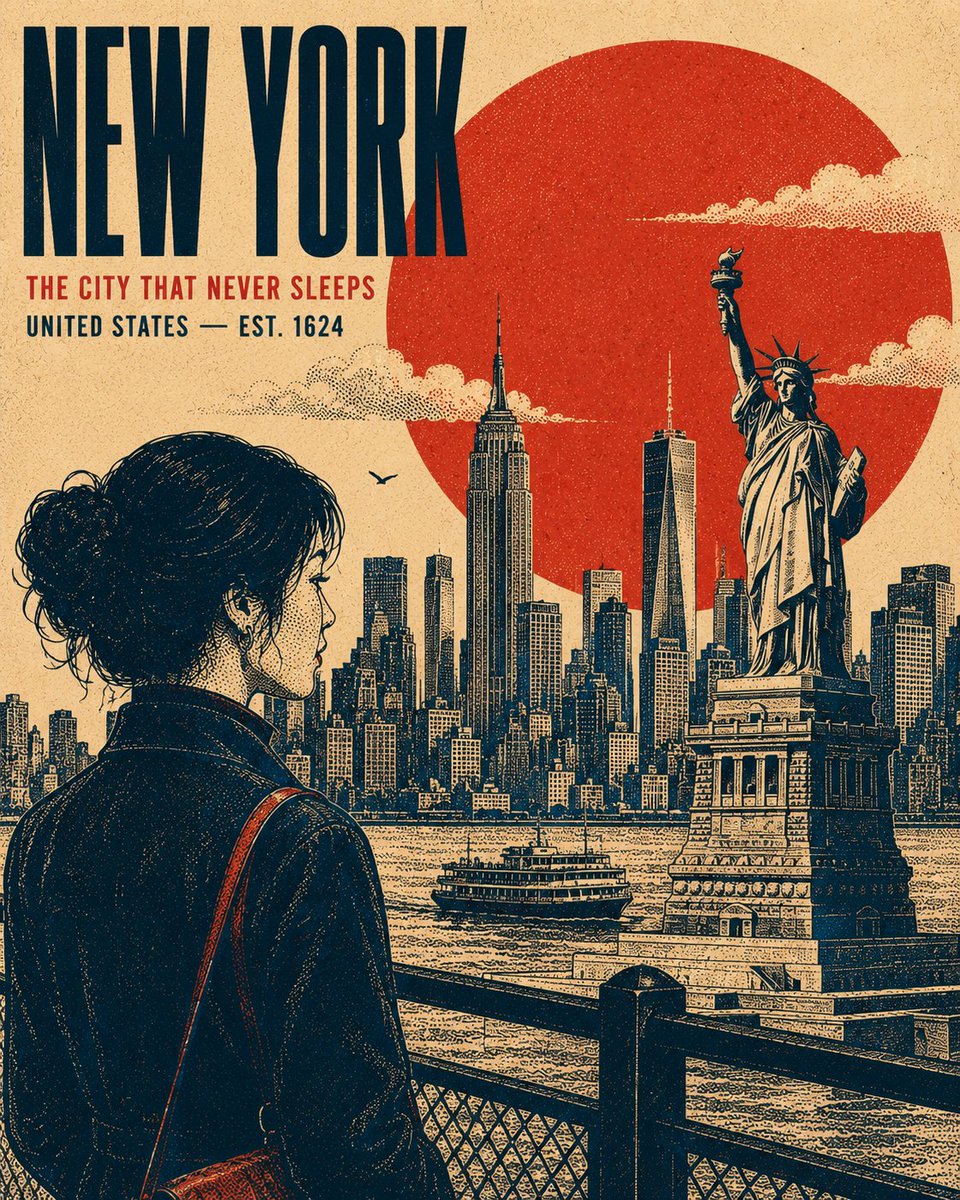
Vintage Retro Screen-Print Poster
A versatile prompt for creating authentic vintage travel or cultural screen-print posters, featuring stippled textures, bold typography, and a layered graphic aesthetic.
यह ग्राफिक और पोस्टर के लिए एक GPT Image 2 प्रॉम्प्ट केस है। इसी तरह के विज़ुअल बनाने के लिए नीचे दिए गए कॉपी-रेडी प्रॉम्प्ट का उपयोग करें, और पुनः उपयोग करने से पहले Awesome GPT Image 2 Prompts एट्रिब्यूशन और व्यावसायिक उपयोग अधिकारों की समीक्षा करें।
क्या आपको प्रॉम्प्ट्स का पूरा सेट चाहिए? इसका उपयोग करें ग्राफिक और पोस्टर अधिक संबंधित उदाहरणों के लिए विषय हब देखें, या खोलें GPT Image 2 त्वरित सूची संपूर्ण उदाहरण अनुक्रमणिका, पुन: प्रयोज्य संरचनाओं और स्रोत श्रेय के लिए।
Free 1K preview
Generate one preview image instantly, no sign-up required.
2998/4000
प्रॉम्प्ट
प्रतिलिपि के लिए तैयार संकेत
Create a premium 4:5 vertical retro screen-print poster illustration centered on {argument name="subject" default="New York"}. The composition should feel like a refined vintage travel or cultural print, while remaining adaptable to any location, historical period, landmark, or subject. TYPOGRAPHY: Place the primary title "{argument name="main title" default="NEW YORK"}" in a bold, condensed uppercase sans-serif, positioned within a balanced area of negative space. Add a smaller supporting line "[SECONDARY HEADLINE / LOCATION / DATE]" beneath it. Maintain strong typographic hierarchy, restrained spacing, and an authentic archival-poster character. MAIN SUBJECT: Feature [PRIMARY SUBJECT] as the dominant visual element, positioned within the lower or side third of the composition. Use a distinctive pose, silhouette, or profile that communicates the character of the subject. Include carefully rendered defining details, natural contours, expressive features, clothing or architectural details, and subtle highlights without making the artwork photorealistic. GEOMETRIC ANCHOR: Introduce one bold, simple geometric shape behind or around the main subject to create visual separation and establish a strong graphic focal point. BACKGROUND: Construct the environment as several flat, layered graphic planes rather than a conventional realistic scene. Use recognizable elements associated with [LOCATION / SUBJECT] — distant silhouettes, architectural forms, structural details, vegetation, terrain, atmospheric elements, or cultural motifs. Avoid a strong vanishing point. Build depth through overlapping shapes, scale, linework, and tonal density. Render clouds, smoke, mist, foliage, or atmospheric details as controlled stippled clusters where appropriate. RENDERING STYLE: Authentic vintage screen-print / silkscreen poster aesthetic. Create all tonal modeling exclusively through stippling, halftone patterns, and varying dot density — concentrated dots for shadows and sparse dots for highlights. No smooth gradients, airbrushing, photorealistic shading, or digital 3D rendering. Use crisp contour lines with consistent visual weight, subtle riso-style registration shifts, imperfect ink edges, natural paper grain, and faint woven-print texture. The result should feel physically printed rather than digitally rendered. COLOR SYSTEM: Use exactly four carefully selected high-contrast colors appropriate to the subject: {argument name="color theme" default="deep navy"}, [COLOR 2], [COLOR 3], [COLOR 4]. Do not introduce additional hues. Generate intermediate tonal values exclusively through stipple density, halftone overlap, and ink coverage, never by adding new colors. COMPOSITION: Strong editorial balance, clear focal hierarchy, generous negative space, layered depth, bold silhouette design, authentic vintage graphic-design proportions, and carefully controlled visual density. Keep the artwork sophisticated, collectible, and suitable for a premium travel or cultural poster.प्रॉम्प्ट वैरिएबल
प्रॉम्प्ट में पाए जाने वाले संपादन योग्य तर्क प्लेसहोल्डर, उनके डिफ़ॉल्ट मानों के साथ।
चर
subject
गलती करना
New York
चर
main title
गलती करना
NEW YORK
चर
color theme
गलती करना
deep navy
Best for
- - ग्राफिक और पोस्टर visual exploration
- - Image generation and reference-image edits
- - Reusable briefs that keep source attribution visible
Change these parts
- - Subject, product, character, or scene
- - Aspect ratio, camera, lighting, and background
- - Brand, text, color, and output constraints
Recommended model and settings
- - Model: gpt-image-2
- - Input mode: टेक्स्ट से छवि
- - Aspect ratio: source
- - Commercial status: review original source
How to use this prompt
- 1. Copy the prompt and preserve its structure for the first test.
- 2. Replace the subject, context, and publishing channel.
- 3. Change one camera, lighting, or style variable per iteration.
- 4. Inspect the output, source, text, and rights before reuse.
Limitations, source, and reuse cautions
- - Generated output is an editable draft, not factual, legal, or rights evidence.
- - Review the linked source, people, brands, logos, text, and third-party media before commercial use.
Awesome GPT Image 2 Prompts से आयातित। श्रेय देना आवश्यक है। वाणिज्यिक उपयोग की allowed ; सशुल्क उपयोग से पहले स्रोत अधिकारों की समीक्षा करें।
इस श्रेणी में और भी मामले
श्रेणी, इनपुट मोड अनुकूलता, गुणवत्ता और कम जोखिम को प्राथमिकता दी गई है।

Manga Desert Radio Telescope Road Trip
टेक्स्ट से छवि

Female Clown Cyborg Portrait
टेक्स्ट से छवि

Transparent Earbuds on Stone Pedestal
टेक्स्ट से छवि

Imperial Research Bunker on Volcanic Planet
टेक्स्ट से छवि

Pink Hijab Mirror Selfie Portrait
टेक्स्ट से छवि

Greyscale Puzzle Portrait with Color Accent
टेक्स्ट से छवि
पुनः उपयोग और स्रोत नोट्स
केस का पूर्वावलोकन करने के बाद इस प्रॉम्प्ट का सुरक्षित रूप से उपयोग करें।
- 1.प्रॉम्प्ट को कॉपी करें या जनरेशन बटन का उपयोग करके इसे सीधे डोवू में खोलें।
- 2.अपने उपयोग के अनुसार वैरिएबल, आस्पेक्ट रेशियो और संदर्भ छवियों को समायोजित करें।
- 3.प्रकाशन या सशुल्क उपयोग से पहले, स्रोत अधिकारों, श्रेय देने की आवश्यकताओं और ब्रांड या छवि से जुड़े जोखिमों की पुष्टि करें।