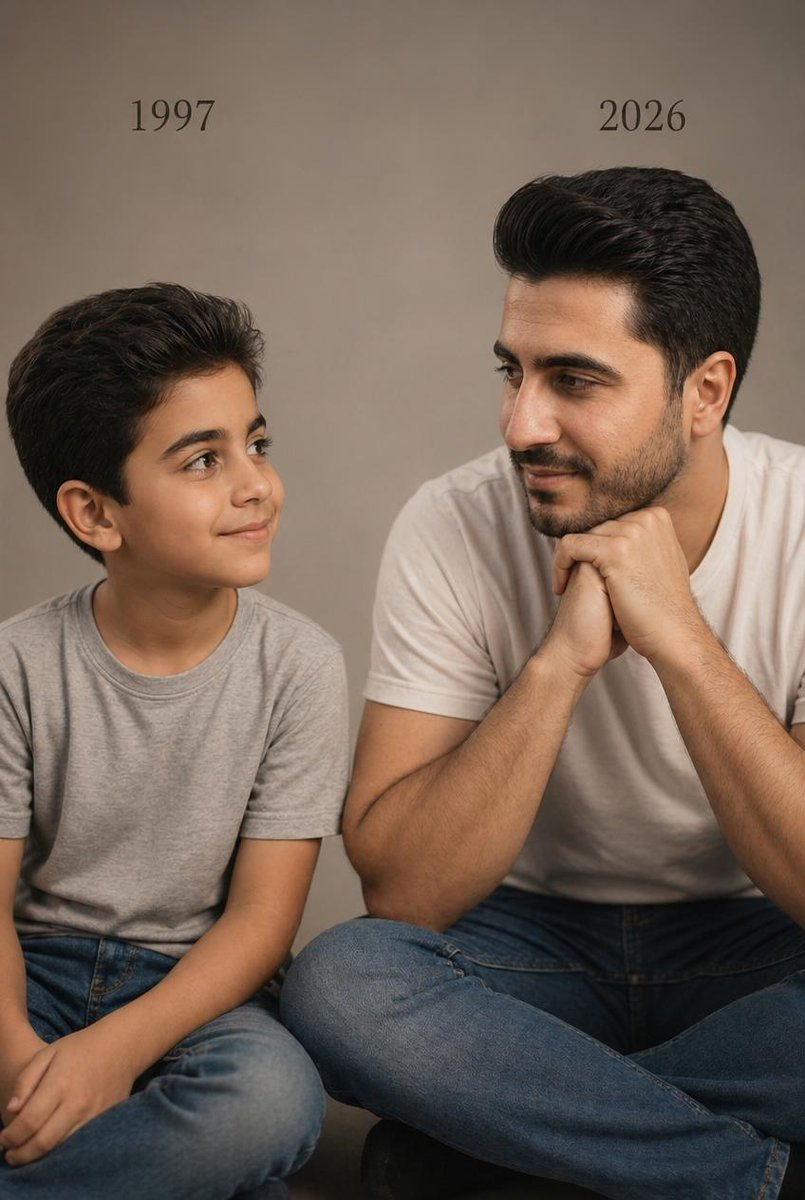
दो उम्रों का स्टूडियो पोर्ट्रेट
यह प्रॉम्प्ट एक ही व्यक्ति की बचपन और वयस्क अवस्था की यथार्थवादी भावनात्मक स्टूडियो फोटो तैयार करता है, जिसमें दोनों को वर्ष के लेबल के साथ अगल-बगल बैठाया गया है, जो उम्र की तुलना और स्मृति-थीम वाले पोर्ट्रेट के लिए आदर्श है।
यह चित्र और चरित्र के लिए एक GPT Image 2 प्रॉम्प्ट केस है। इसी तरह के विज़ुअल बनाने के लिए नीचे दिए गए कॉपी-रेडी प्रॉम्प्ट का उपयोग करें, और पुनः उपयोग करने से पहले Awesome GPT Image 2 Prompts एट्रिब्यूशन और व्यावसायिक उपयोग अधिकारों की समीक्षा करें।
क्या आपको प्रॉम्प्ट्स का पूरा सेट चाहिए? इसका उपयोग करें चित्र और चरित्र अधिक संबंधित उदाहरणों के लिए विषय हब देखें, या खोलें GPT Image 2 त्वरित सूची संपूर्ण उदाहरण अनुक्रमणिका, पुन: प्रयोज्य संरचनाओं और स्रोत श्रेय के लिए।
Free 1K preview
Generate one preview image instantly, no sign-up required.
1626/4000
प्रॉम्प्ट
प्रतिलिपि के लिए तैयार संकेत
A photorealistic studio portrait in a vertical 4:5 composition showing two versions of the same male person seated side by side against a plain warm beige-gray studio backdrop. On the left, a child version of {argument name="subject identity" default="the same person"} sits cross-legged, wearing a light gray crew-neck T-shirt and medium-blue jeans, with neatly styled dark brown to black hair swept back and slightly voluminous. The child is turned slightly to the right, looking toward the adult version with a soft innocent smile and relaxed posture. Above the child, place the text {argument name="left year text" default="1997"} in a simple elegant black serif font. On the right, the present-day version of the same person sits cross-legged, larger in scale and closer to camera, wearing a plain white crew-neck T-shirt and blue jeans, with matching facial structure and matching dark swept-back hair. He leans forward slightly with both hands clasped together under his chin, elbows resting near his knees, and looks left toward the child with a calm gentle smile. Above the adult, place the text {argument name="right year text" default="2026"} in the same black serif font. Keep both subjects visually consistent as the same person at two ages, emphasizing emotional connection, recognition, and quiet reflection. Use soft cinematic warm studio lighting, realistic skin texture, subtle shadows, minimal styling, professional editorial photography, sharp focus, natural proportions, and a clean uncluttered composition. The image should feel like a real photoshoot, intimate, minimal, emotional, and highly realistic.प्रॉम्प्ट वैरिएबल
प्रॉम्प्ट में पाए जाने वाले संपादन योग्य तर्क प्लेसहोल्डर, उनके डिफ़ॉल्ट मानों के साथ।
चर
subject identity
गलती करना
the same person
चर
left year text
गलती करना
1997
चर
right year text
गलती करना
2026
Best for
- - चित्र और चरित्र visual exploration
- - Image generation and reference-image edits
- - Reusable briefs that keep source attribution visible
Change these parts
- - Subject, product, character, or scene
- - Aspect ratio, camera, lighting, and background
- - Brand, text, color, and output constraints
Recommended model and settings
- - Model: gpt-image-2
- - Input mode: टेक्स्ट से छवि
- - Aspect ratio: source
- - Commercial status: review original source
How to use this prompt
- 1. Copy the prompt and preserve its structure for the first test.
- 2. Replace the subject, context, and publishing channel.
- 3. Change one camera, lighting, or style variable per iteration.
- 4. Inspect the output, source, text, and rights before reuse.
Limitations, source, and reuse cautions
- - Generated output is an editable draft, not factual, legal, or rights evidence.
- - Review the linked source, people, brands, logos, text, and third-party media before commercial use.
Awesome GPT Image 2 Prompts से आयातित। श्रेय देना आवश्यक है। वाणिज्यिक उपयोग की allowed ; सशुल्क उपयोग से पहले स्रोत अधिकारों की समीक्षा करें।
इस श्रेणी में और भी मामले
श्रेणी, इनपुट मोड अनुकूलता, गुणवत्ता और कम जोखिम को प्राथमिकता दी गई है।






पुनः उपयोग और स्रोत नोट्स
केस का पूर्वावलोकन करने के बाद इस प्रॉम्प्ट का सुरक्षित रूप से उपयोग करें।
- 1.प्रॉम्प्ट को कॉपी करें या जनरेशन बटन का उपयोग करके इसे सीधे डोवू में खोलें।
- 2.अपने उपयोग के अनुसार वैरिएबल, आस्पेक्ट रेशियो और संदर्भ छवियों को समायोजित करें।
- 3.प्रकाशन या सशुल्क उपयोग से पहले, स्रोत अधिकारों, श्रेय देने की आवश्यकताओं और ब्रांड या छवि से जुड़े जोखिमों की पुष्टि करें।