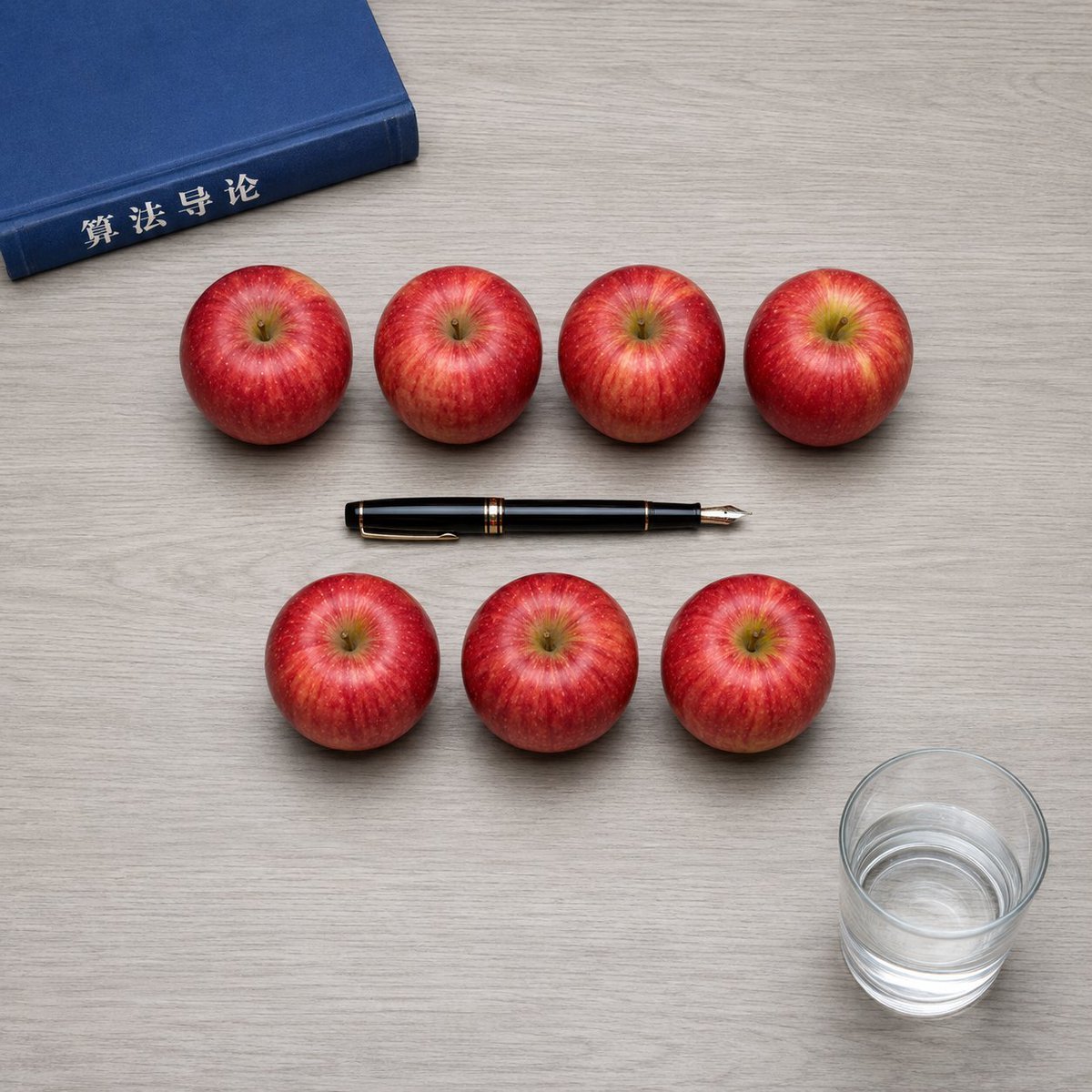
Top-Down Apple Counting Desk Scene
A photorealistic overhead tabletop arrangement for testing exact object counting and position control.
यह अन्य प्रेरणा के लिए एक GPT Image 2 प्रॉम्प्ट केस है। इसी तरह के विज़ुअल बनाने के लिए नीचे दिए गए कॉपी-रेडी प्रॉम्प्ट का उपयोग करें, और पुनः उपयोग करने से पहले Awesome GPT Image 2 Prompts एट्रिब्यूशन और व्यावसायिक उपयोग अधिकारों की समीक्षा करें।
क्या आपको प्रॉम्प्ट्स का पूरा सेट चाहिए? इसका उपयोग करें अन्य प्रेरणा अधिक संबंधित उदाहरणों के लिए विषय हब देखें, या खोलें GPT Image 2 त्वरित सूची संपूर्ण उदाहरण अनुक्रमणिका, पुन: प्रयोज्य संरचनाओं और स्रोत श्रेय के लिए।
Free 1K preview
Generate one preview image instantly, no sign-up required.
1153/4000
प्रॉम्प्ट
प्रतिलिपि के लिए तैयार संकेत
Create a square 1:1 photorealistic top-down tabletop scene on a pale gray wood-grain desk. Arrange exactly {argument name="apple count" default="7"} glossy red apples in two neat rows: exactly 4 apples in the upper row and exactly 3 apples in the lower row, evenly spaced, with realistic stems, yellow-red striping, soft shadows, and no extra apples. Place one blue hardcover book partially visible in the upper-left corner, angled slightly, with the spine facing inward and the Chinese title text {argument name="book spine text" default="Introduction to Algorithms"} printed in white on the spine. Place exactly one black fountain pen horizontally in the exact center of the composition between the two apple rows, with gold trim and the metal nib pointing to the right. Place exactly one transparent cylindrical glass in the lower-right corner, filled halfway with clear water, showing refraction, rim highlights, and a soft shadow. Use clean natural studio lighting, realistic scale, crisp focus, overhead perspective, balanced negative space, and strict object placement. Do not add any other objects, hands, labels, plates, leaves, or decorations.प्रॉम्प्ट वैरिएबल
प्रॉम्प्ट में पाए जाने वाले संपादन योग्य तर्क प्लेसहोल्डर, उनके डिफ़ॉल्ट मानों के साथ।
चर
apple count
गलती करना
7
चर
book spine text
गलती करना
Introduction to Algorithms
Best for
- - अन्य प्रेरणा visual exploration
- - Image generation and reference-image edits
- - Reusable briefs that keep source attribution visible
Change these parts
- - Subject, product, character, or scene
- - Aspect ratio, camera, lighting, and background
- - Brand, text, color, and output constraints
Recommended model and settings
- - Model: gpt-image-2
- - Input mode: टेक्स्ट से छवि
- - Aspect ratio: source
- - Commercial status: review original source
How to use this prompt
- 1. Copy the prompt and preserve its structure for the first test.
- 2. Replace the subject, context, and publishing channel.
- 3. Change one camera, lighting, or style variable per iteration.
- 4. Inspect the output, source, text, and rights before reuse.
Limitations, source, and reuse cautions
- - Generated output is an editable draft, not factual, legal, or rights evidence.
- - Review the linked source, people, brands, logos, text, and third-party media before commercial use.
Awesome GPT Image 2 Prompts से आयातित। श्रेय देना आवश्यक है। वाणिज्यिक उपयोग की allowed ; सशुल्क उपयोग से पहले स्रोत अधिकारों की समीक्षा करें।
इस श्रेणी में और भी मामले
श्रेणी, इनपुट मोड अनुकूलता, गुणवत्ता और कम जोखिम को प्राथमिकता दी गई है।

Transparent Earbuds on Stone Pedestal
टेक्स्ट से छवि

Manga Desert Radio Telescope Road Trip
टेक्स्ट से छवि

Female Clown Cyborg Portrait
टेक्स्ट से छवि

Imperial Research Bunker on Volcanic Planet
टेक्स्ट से छवि

Greyscale Puzzle Portrait with Color Accent
टेक्स्ट से छवि

Pink Hijab Mirror Selfie Portrait
टेक्स्ट से छवि
पुनः उपयोग और स्रोत नोट्स
केस का पूर्वावलोकन करने के बाद इस प्रॉम्प्ट का सुरक्षित रूप से उपयोग करें।
- 1.प्रॉम्प्ट को कॉपी करें या जनरेशन बटन का उपयोग करके इसे सीधे डोवू में खोलें।
- 2.अपने उपयोग के अनुसार वैरिएबल, आस्पेक्ट रेशियो और संदर्भ छवियों को समायोजित करें।
- 3.प्रकाशन या सशुल्क उपयोग से पहले, स्रोत अधिकारों, श्रेय देने की आवश्यकताओं और ब्रांड या छवि से जुड़े जोखिमों की पुष्टि करें।