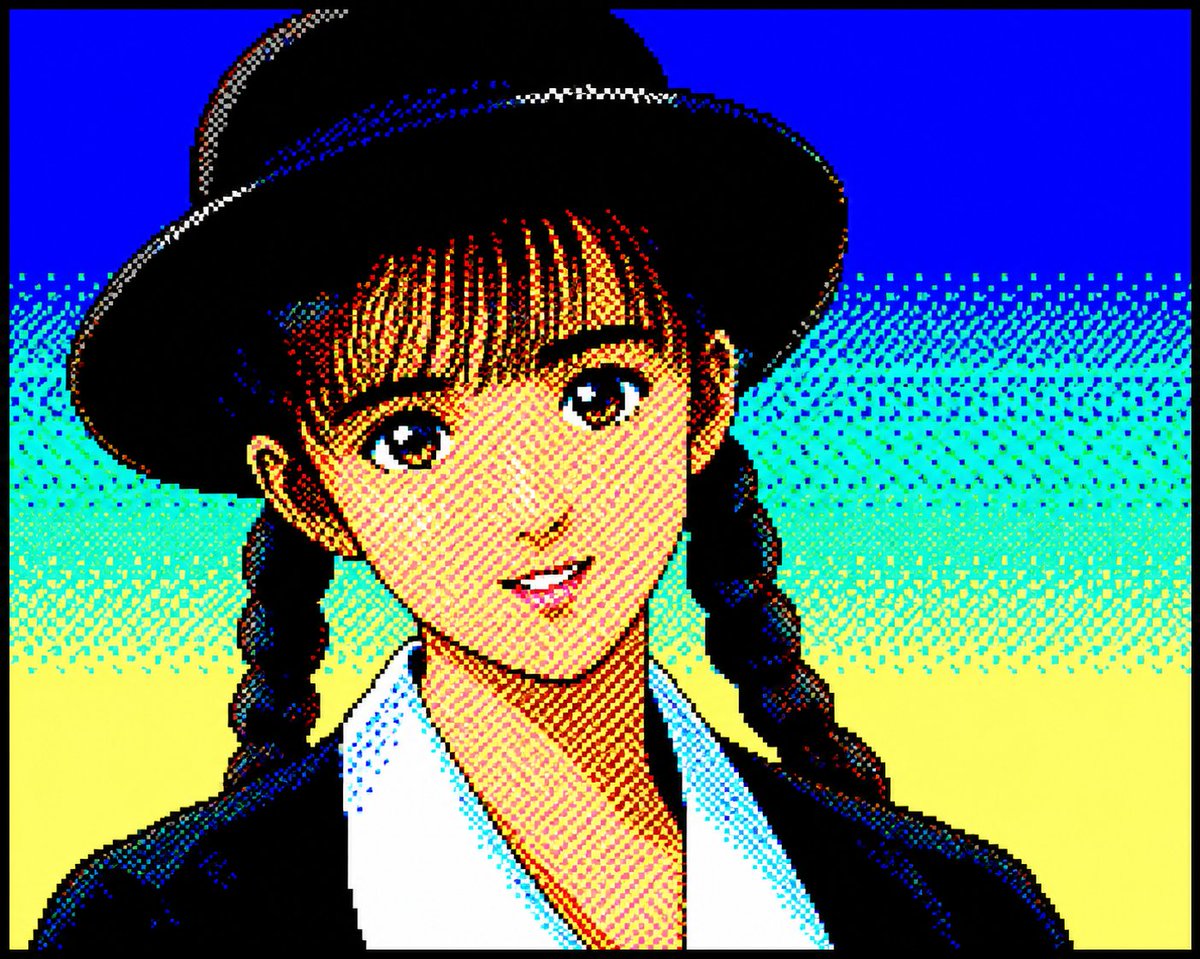
Retro PC-88 8-Bit Anime Portrait
Converts portrait photos into authentic late-1980s Japanese PC-88 pixel art using a strict 8-color RGB palette and dithered shading.
यह चित्र और चरित्र के लिए एक GPT Image 2 प्रॉम्प्ट केस है। इसी तरह के विज़ुअल बनाने के लिए नीचे दिए गए कॉपी-रेडी प्रॉम्प्ट का उपयोग करें, और पुनः उपयोग करने से पहले Awesome GPT Image 2 Prompts एट्रिब्यूशन और व्यावसायिक उपयोग अधिकारों की समीक्षा करें।
क्या आपको प्रॉम्प्ट्स का पूरा सेट चाहिए? इसका उपयोग करें चित्र और चरित्र अधिक संबंधित उदाहरणों के लिए विषय हब देखें, या खोलें GPT Image 2 त्वरित सूची संपूर्ण उदाहरण अनुक्रमणिका, पुन: प्रयोज्य संरचनाओं और स्रोत श्रेय के लिए।
Free 1K preview
Generate one preview image instantly, no sign-up required.
930/4000
प्रॉम्प्ट
प्रतिलिपि के लिए तैयार संकेत
Convert the attached portrait photo into anime artwork while preserving recognizability.

Preserve:

- facial proportions
- hairstyle silhouette
- expression
- recognizability
- clothing silhouette

PC-88 RGB rules:

- use only 8-color RGB palette
- black, blue, red, magenta, green, cyan, yellow, white
- no gradients
- no antialiasing
- strong dithering
- checkerboard shading
- 640x200 appearance
- large color blocks
- hard outlines
- slight CRT feeling

Character rendering:

- simplified facial construction
- reduce facial detail lines
- large hair highlight areas
- fewer shading layers
- preserve likeness over redesign

Composition:

- character-focused
- simple supporting background
- empty space around character
- 4:3 feeling

Avoid:

- game UI
- dialogue boxes
- excessive background density
- modern anime rendering

Goal:

Authentic late-1980s Japanese PC88 character artwork while preserving the original person.
Best for
- - चित्र और चरित्र visual exploration
- - Image generation and reference-image edits
- - Reusable briefs that keep source attribution visible
Change these parts
- - Subject, product, character, or scene
- - Aspect ratio, camera, lighting, and background
- - Brand, text, color, and output constraints
Recommended model and settings
- - Model: gpt-image-2
- - Input mode: टेक्स्ट से छवि
- - Aspect ratio: source
- - Commercial status: review original source
How to use this prompt
- 1. Copy the prompt and preserve its structure for the first test.
- 2. Replace the subject, context, and publishing channel.
- 3. Change one camera, lighting, or style variable per iteration.
- 4. Inspect the output, source, text, and rights before reuse.
Limitations, source, and reuse cautions
- - Generated output is an editable draft, not factual, legal, or rights evidence.
- - Review the linked source, people, brands, logos, text, and third-party media before commercial use.
Awesome GPT Image 2 Prompts से आयातित। श्रेय देना आवश्यक है। वाणिज्यिक उपयोग की allowed ; सशुल्क उपयोग से पहले स्रोत अधिकारों की समीक्षा करें।
इस श्रेणी में और भी मामले
श्रेणी, इनपुट मोड अनुकूलता, गुणवत्ता और कम जोखिम को प्राथमिकता दी गई है।






पुनः उपयोग और स्रोत नोट्स
केस का पूर्वावलोकन करने के बाद इस प्रॉम्प्ट का सुरक्षित रूप से उपयोग करें।
- 1.प्रॉम्प्ट को कॉपी करें या जनरेशन बटन का उपयोग करके इसे सीधे डोवू में खोलें।
- 2.अपने उपयोग के अनुसार वैरिएबल, आस्पेक्ट रेशियो और संदर्भ छवियों को समायोजित करें।
- 3.प्रकाशन या सशुल्क उपयोग से पहले, स्रोत अधिकारों, श्रेय देने की आवश्यकताओं और ब्रांड या छवि से जुड़े जोखिमों की पुष्टि करें।