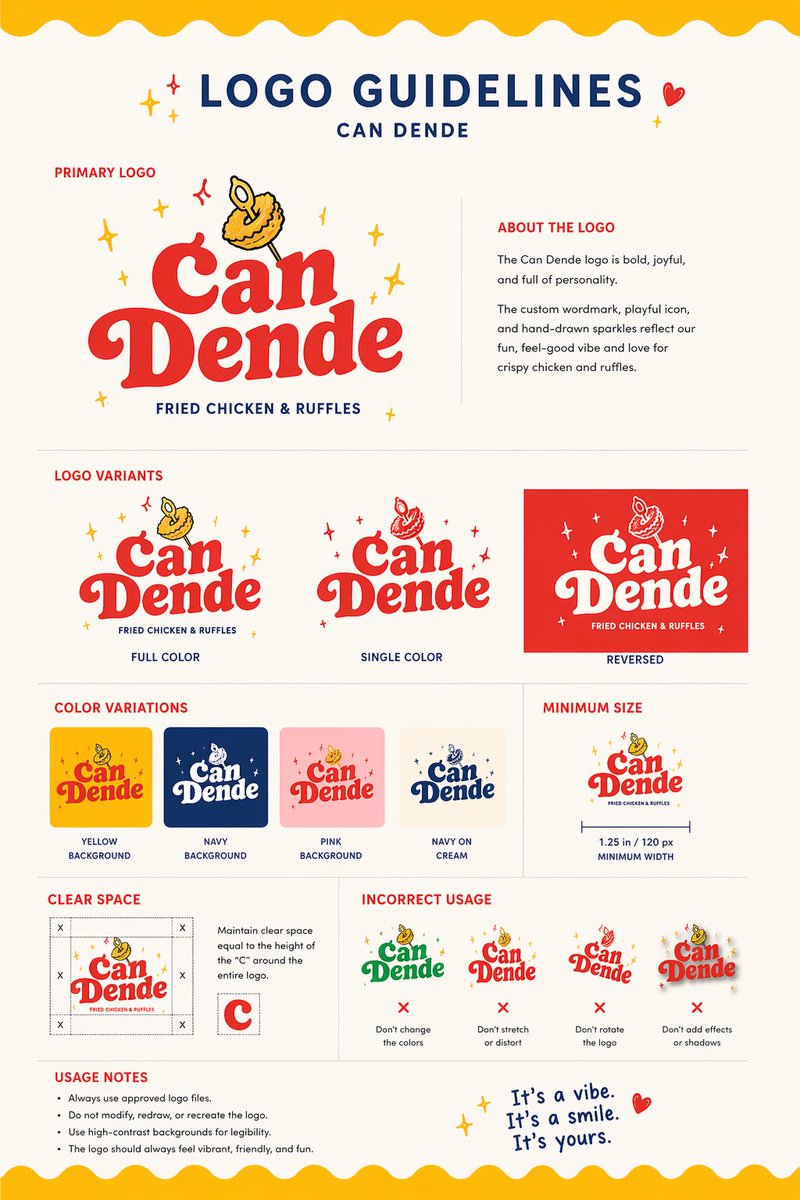
रेस्तरां लोगो दिशानिर्देश बोर्ड
यह प्रॉम्प्ट खाने की एक तस्वीर को एक परिष्कृत रेस्तरां ब्रांडिंग दिशानिर्देश पत्रक में बदल देता है, जो लोगो अवधारणा प्रस्तुतियों और त्वरित दृश्य पहचान विकास के लिए उपयोगी है।
यह ग्राफिक और पोस्टर के लिए एक GPT Image 2 प्रॉम्प्ट केस है। इसी तरह के विज़ुअल बनाने के लिए नीचे दिए गए कॉपी-रेडी प्रॉम्प्ट का उपयोग करें, और पुनः उपयोग करने से पहले Awesome GPT Image 2 Prompts एट्रिब्यूशन और व्यावसायिक उपयोग अधिकारों की समीक्षा करें।
क्या आपको प्रॉम्प्ट्स का पूरा सेट चाहिए? इसका उपयोग करें ग्राफिक और पोस्टर अधिक संबंधित उदाहरणों के लिए विषय हब देखें, या खोलें GPT Image 2 त्वरित सूची संपूर्ण उदाहरण अनुक्रमणिका, पुन: प्रयोज्य संरचनाओं और स्रोत श्रेय के लिए।
Free 1K preview
Generate one preview image instantly, no sign-up required.
Free text preview doesn’t preserve reference-image consistency.
1772/4000
प्रॉम्प्ट
प्रतिलिपि के लिए तैयार संकेत
Using the provided reference image as the brand inspiration, transform the fried chicken burger and waffle fries meal into a polished one-page logo guidelines board for a restaurant brand named {argument name="brand name" default="Can Dende"}. Create a cheerful, modern fast-casual identity derived from the food in the reference: turn the crispy fried topping into a playful mascot/icon above the wordmark, and build a bold custom logo in a warm palette inspired by the photo. Design the output as a clean editorial brand sheet on an off-white background with navy and red typography, yellow scalloped borders at the top and bottom, and small sparkle doodles. Include these exact sections and counts: 1 main header reading "LOGO GUIDELINES" with the brand name beneath it; 1 "PRIMARY LOGO" section with the main logo and an "ABOUT THE LOGO" text block; 1 "LOGO VARIANTS" section with 3 variants labeled "FULL COLOR", "SINGLE COLOR", and "REVERSED"; 1 "COLOR VARIATIONS" section with 4 tiles labeled "YELLOW BACKGROUND", "NAVY BACKGROUND", "PINK BACKGROUND", and "NAVY ON CREAM"; 1 "MINIMUM SIZE" section showing the logo with a width guide and the text "1.25 in / 120 px MINIMUM WIDTH"; 1 "CLEAR SPACE" section with a spacing diagram based on the height of the letter C; 1 "INCORRECT USAGE" section with 4 wrong examples labeled "Don't change the colors", "Don't stretch or distort", "Don't rotate the logo", and "Don't add effects or shadows"; 1 "USAGE NOTES" section with 4 bullet points; and a handwritten-style closing tagline at bottom right that says {argument name="tagline text" default="It's a vibe. It's a smile. It's yours."}. Keep the composition crisp, print-ready, highly legible, and presentation-quality, like a real branding deliverable for a restaurant.प्रॉम्प्ट वैरिएबल
प्रॉम्प्ट में पाए जाने वाले संपादन योग्य तर्क प्लेसहोल्डर, उनके डिफ़ॉल्ट मानों के साथ।
चर
brand name
गलती करना
Can Dende
चर
tagline text
गलती करना
It's a vibe. It's a smile. It's yours.
Best for
- - ग्राफिक और पोस्टर visual exploration
- - Image generation and reference-image edits
- - Reusable briefs that keep source attribution visible
Change these parts
- - Subject, product, character, or scene
- - Aspect ratio, camera, lighting, and background
- - Brand, text, color, and output constraints
Recommended model and settings
- - Model: gpt-image-2
- - Input mode: छवि से छवि
- - Aspect ratio: source
- - Commercial status: review original source
How to use this prompt
- 1. Copy the prompt and preserve its structure for the first test.
- 2. Replace the subject, context, and publishing channel.
- 3. Change one camera, lighting, or style variable per iteration.
- 4. Inspect the output, source, text, and rights before reuse.
Limitations, source, and reuse cautions
- - Generated output is an editable draft, not factual, legal, or rights evidence.
- - Review the linked source, people, brands, logos, text, and third-party media before commercial use.
Awesome GPT Image 2 Prompts से आयातित। श्रेय देना आवश्यक है। वाणिज्यिक उपयोग की allowed ; सशुल्क उपयोग से पहले स्रोत अधिकारों की समीक्षा करें।
इस श्रेणी में और भी मामले
श्रेणी, इनपुट मोड अनुकूलता, गुणवत्ता और कम जोखिम को प्राथमिकता दी गई है।






पुनः उपयोग और स्रोत नोट्स
केस का पूर्वावलोकन करने के बाद इस प्रॉम्प्ट का सुरक्षित रूप से उपयोग करें।
- 1.प्रॉम्प्ट को कॉपी करें या जनरेशन बटन का उपयोग करके इसे सीधे डोवू में खोलें।
- 2.अपने उपयोग के अनुसार वैरिएबल, आस्पेक्ट रेशियो और संदर्भ छवियों को समायोजित करें।
- 3.प्रकाशन या सशुल्क उपयोग से पहले, स्रोत अधिकारों, श्रेय देने की आवश्यकताओं और ब्रांड या छवि से जुड़े जोखिमों की पुष्टि करें।