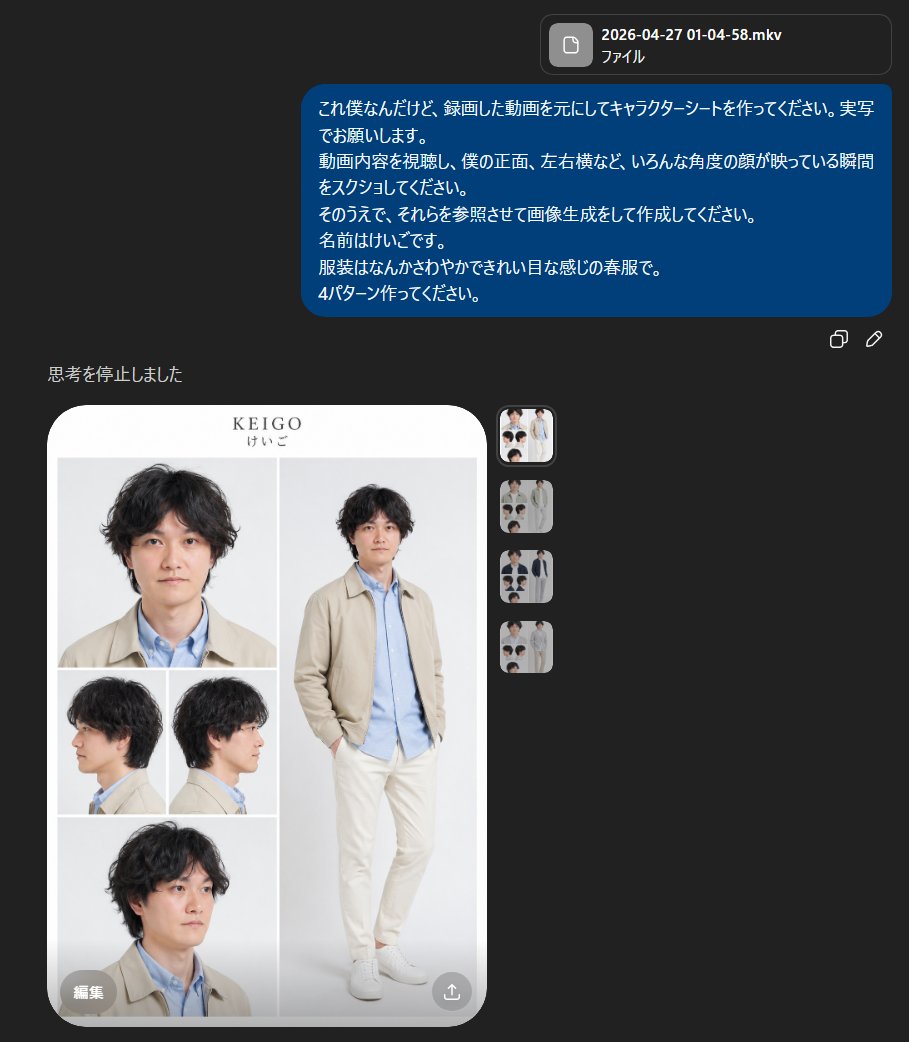
यथार्थवादी पुरुष चरित्र शीट
एक युवा जापानी व्यक्ति के लिए एक साफ-सुथरी, फोटो-यथार्थवादी चरित्र संदर्भ शीट, जो चेहरे के कोणों में एकरूपता लाने और वसंत ऋतु के परिधान में पूरे शरीर को प्रस्तुत करने के लिए उपयोगी है।
यह चित्र और चरित्र के लिए एक GPT Image 2 प्रॉम्प्ट केस है। इसी तरह के विज़ुअल बनाने के लिए नीचे दिए गए कॉपी-रेडी प्रॉम्प्ट का उपयोग करें, और पुनः उपयोग करने से पहले Awesome GPT Image 2 Prompts एट्रिब्यूशन और व्यावसायिक उपयोग अधिकारों की समीक्षा करें।
क्या आपको प्रॉम्प्ट्स का पूरा सेट चाहिए? इसका उपयोग करें चित्र और चरित्र अधिक संबंधित उदाहरणों के लिए विषय हब देखें, या खोलें GPT Image 2 त्वरित सूची संपूर्ण उदाहरण अनुक्रमणिका, पुन: प्रयोज्य संरचनाओं और स्रोत श्रेय के लिए।
Free 1K preview
Generate one preview image instantly, no sign-up required.
2686/4000
प्रॉम्प्ट
प्रतिलिपि के लिए तैयार संकेत
{
  "type": "character reference sheet",
  "style": "clean fashion lookbook mixed with a realistic model sheet",
  "subject": {
    "name": "{argument name=\"character name\" default=\"KEIGO\"}",
    "name_kana": "けいご",
    "gender_presentation": "young adult Japanese man",
    "appearance": {
      "hair_color": "dark brown to black",
      "hair_style": "medium-length wavy tousled hair with soft volume and a slightly messy natural texture",
      "build": "slim, average height",
      "face": "realistic Japanese facial structure, soft youthful features"
    },
    "outfit": {
      "count": 4,
      "featured_variant": "light spring casual outfit that looks gentle and neat",
      "pieces": [
        "beige lightweight jacket",
        "light blue button-up shirt",
        "off-white or cream straight pants",
        "white low-top sneakers"
      ]
    }
  },
  "layout": {
    "background": "very light gray studio background inside a rounded white presentation card",
    "overall_format": "vertical character sheet with large rounded corners and minimalist editorial spacing",
    "sections": [
      {
        "title": "head portrait",
        "position": "top left",
        "count": 1,
        "labels": [
          "front close-up"
        ]
      },
      {
        "title": "full body",
        "position": "right large panel",
        "count": 1,
        "labels": [
          "standing pose with one hand in pocket"
        ]
      },
      {
        "title": "side views",
        "position": "middle left",
        "count": 2,
        "labels": [
          "left profile",
          "right profile"
        ]
      },
      {
        "title": "lower portrait",
        "position": "bottom left",
        "count": 1,
        "labels": [
          "three-quarter close-up"
        ]
      }
    ],
    "total_images": 5
  },
  "composition": {
    "top_center_text": "{argument name=\"headline text\" default=\"KEIGO\"}",
    "subtitle_text": "けいご",
    "pose_details": "full-body figure standing casually, slight lean, relaxed shoulders, one hand in pocket, clean catalog-style posture",
    "camera_views": "front close-up, full body front, left profile, right profile, lower three-quarter portrait"
  },
  "rendering": {
    "photorealistic": true,
    "lighting": "soft even studio lighting with almost no harsh shadows",
    "color_palette": "beige, pale blue, cream, white, soft gray",
    "mood": "minimal, polished, springlike, calm, commercial fashion sheet"
  },
  "quality_notes": "high facial consistency across all 5 views, realistic clothing folds, clean magazine-like layout, no extra props, no dramatic styling, no heavy text beyond the name"
}
प्रॉम्प्ट वैरिएबल
प्रॉम्प्ट में पाए जाने वाले संपादन योग्य तर्क प्लेसहोल्डर, उनके डिफ़ॉल्ट मानों के साथ।
चर
character name
गलती करना
KEIGO
चर
headline text
गलती करना
KEIGO
Best for
- - चित्र और चरित्र visual exploration
- - Image generation and reference-image edits
- - Reusable briefs that keep source attribution visible
Change these parts
- - Subject, product, character, or scene
- - Aspect ratio, camera, lighting, and background
- - Brand, text, color, and output constraints
Recommended model and settings
- - Model: gpt-image-2
- - Input mode: टेक्स्ट से छवि
- - Aspect ratio: source
- - Commercial status: review original source
How to use this prompt
- 1. Copy the prompt and preserve its structure for the first test.
- 2. Replace the subject, context, and publishing channel.
- 3. Change one camera, lighting, or style variable per iteration.
- 4. Inspect the output, source, text, and rights before reuse.
Limitations, source, and reuse cautions
- - Generated output is an editable draft, not factual, legal, or rights evidence.
- - Review the linked source, people, brands, logos, text, and third-party media before commercial use.
Awesome GPT Image 2 Prompts से आयातित। श्रेय देना आवश्यक है। वाणिज्यिक उपयोग की allowed ; सशुल्क उपयोग से पहले स्रोत अधिकारों की समीक्षा करें।
इस श्रेणी में और भी मामले
श्रेणी, इनपुट मोड अनुकूलता, गुणवत्ता और कम जोखिम को प्राथमिकता दी गई है।






पुनः उपयोग और स्रोत नोट्स
केस का पूर्वावलोकन करने के बाद इस प्रॉम्प्ट का सुरक्षित रूप से उपयोग करें।
- 1.प्रॉम्प्ट को कॉपी करें या जनरेशन बटन का उपयोग करके इसे सीधे डोवू में खोलें।
- 2.अपने उपयोग के अनुसार वैरिएबल, आस्पेक्ट रेशियो और संदर्भ छवियों को समायोजित करें।
- 3.प्रकाशन या सशुल्क उपयोग से पहले, स्रोत अधिकारों, श्रेय देने की आवश्यकताओं और ब्रांड या छवि से जुड़े जोखिमों की पुष्टि करें।