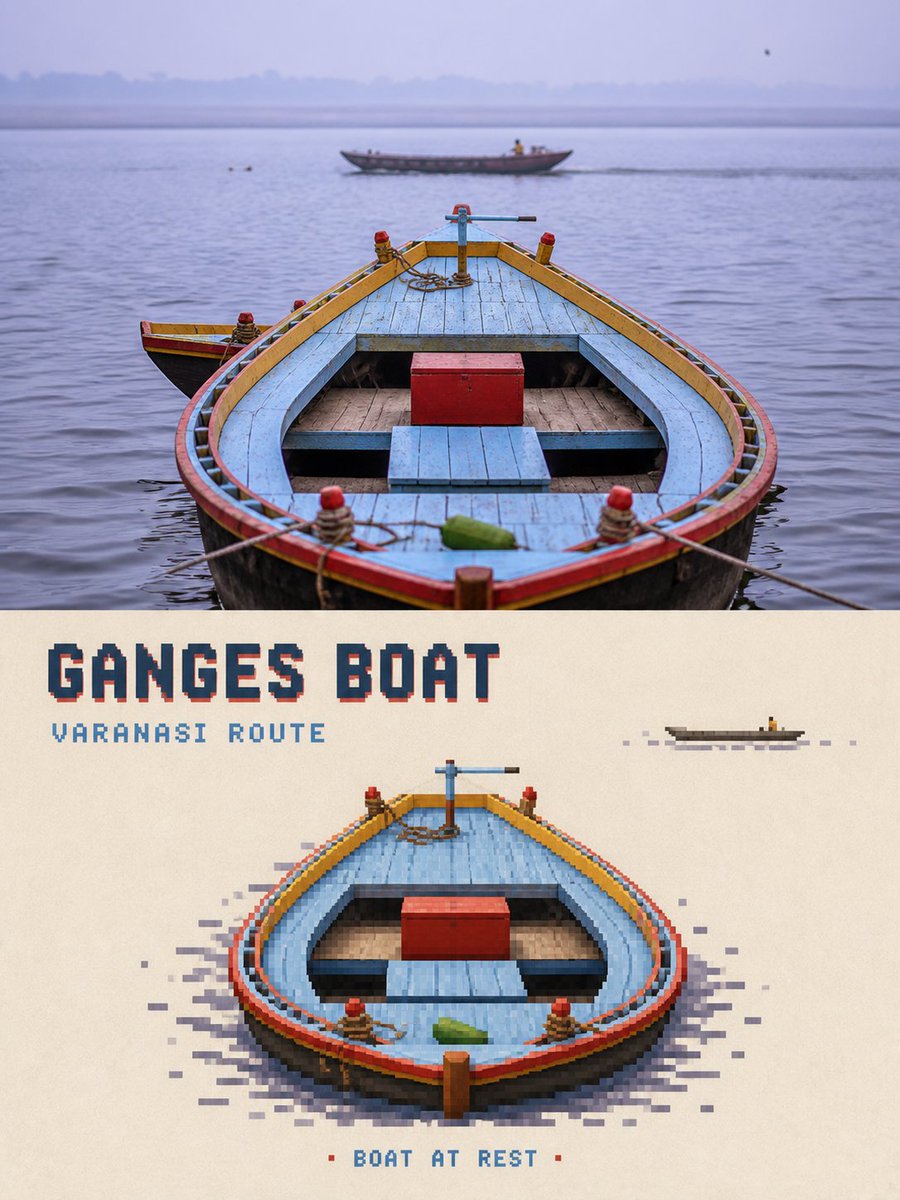
Pixel Art Travel Game Poster
A creative poster design that translates travel photographs into modular pixel art game assets, focusing on a single recognizable visual anchor.
यह ग्राफिक और पोस्टर के लिए एक GPT Image 2 प्रॉम्प्ट केस है। इसी तरह के विज़ुअल बनाने के लिए नीचे दिए गए कॉपी-रेडी प्रॉम्प्ट का उपयोग करें, और पुनः उपयोग करने से पहले Awesome GPT Image 2 Prompts एट्रिब्यूशन और व्यावसायिक उपयोग अधिकारों की समीक्षा करें।
क्या आपको प्रॉम्प्ट्स का पूरा सेट चाहिए? इसका उपयोग करें ग्राफिक और पोस्टर अधिक संबंधित उदाहरणों के लिए विषय हब देखें, या खोलें GPT Image 2 त्वरित सूची संपूर्ण उदाहरण अनुक्रमणिका, पुन: प्रयोज्य संरचनाओं और स्रोत श्रेय के लिए।
Free 1K preview
Generate one preview image instantly, no sign-up required.
Free text preview doesn’t preserve reference-image consistency.
1489/4000
प्रॉम्प्ट
प्रतिलिपि के लिए तैयार संकेत
Please transform each travel photo I upload into an individual high-end pixel game travel poster. No collage; one photo per final product.

Use a strict 3:4 vertical composition. Divide the frame into two areas of approximately 1:1 with a straight, clean horizontal boundary. Output only the poster face.

### Top Part: High-Fidelity Original Photography
Faithfully retain the original photo, preserving identities, structures, and lighting with minimal editorial grading and film grain. Do not illustrate the photo.

### Bottom Part: Subject-Refined Pixel Game Translation
Do not pixelate the whole photo. Identify a single visual subject worth exploring, such as: {argument name="visual anchor" default="a landmark building, ship, vehicle, person, gate, or bridge"}. Choose only one main visual anchor.

Reconstruct it into a mature travel game character, location, or interactive object. The subject should occupy 35-60% width and 25-45% height of the lower section.

### Environmental Simplification
Keep only 1-3 environment clues (e.g., a small stretch of road, a few trees, water ripples). Keep 50-65% of the lower area as continuous warm off-white paper.

### Pixel Medium
Use sharp square pixels to rebuild the subject. Use smaller, denser pixels for key recognizable details and medium pixels for the main volume. Gradually decrease pixel density for roads and vegetation. The subject should be relatively complete internally but fragmented at the edges along contours and paths.
प्रॉम्प्ट वैरिएबल
प्रॉम्प्ट में पाए जाने वाले संपादन योग्य तर्क प्लेसहोल्डर, उनके डिफ़ॉल्ट मानों के साथ।
चर
visual anchor
गलती करना
a landmark building, ship, vehicle, person, gate, or bridge
Best for
- - ग्राफिक और पोस्टर visual exploration
- - Image generation and reference-image edits
- - Reusable briefs that keep source attribution visible
Change these parts
- - Subject, product, character, or scene
- - Aspect ratio, camera, lighting, and background
- - Brand, text, color, and output constraints
Recommended model and settings
- - Model: gpt-image-2
- - Input mode: छवि से छवि
- - Aspect ratio: source
- - Commercial status: review original source
How to use this prompt
- 1. Copy the prompt and preserve its structure for the first test.
- 2. Replace the subject, context, and publishing channel.
- 3. Change one camera, lighting, or style variable per iteration.
- 4. Inspect the output, source, text, and rights before reuse.
Limitations, source, and reuse cautions
- - Generated output is an editable draft, not factual, legal, or rights evidence.
- - Review the linked source, people, brands, logos, text, and third-party media before commercial use.
Awesome GPT Image 2 Prompts से आयातित। श्रेय देना आवश्यक है। वाणिज्यिक उपयोग की allowed ; सशुल्क उपयोग से पहले स्रोत अधिकारों की समीक्षा करें।
इस श्रेणी में और भी मामले
श्रेणी, इनपुट मोड अनुकूलता, गुणवत्ता और कम जोखिम को प्राथमिकता दी गई है।






पुनः उपयोग और स्रोत नोट्स
केस का पूर्वावलोकन करने के बाद इस प्रॉम्प्ट का सुरक्षित रूप से उपयोग करें।
- 1.प्रॉम्प्ट को कॉपी करें या जनरेशन बटन का उपयोग करके इसे सीधे डोवू में खोलें।
- 2.अपने उपयोग के अनुसार वैरिएबल, आस्पेक्ट रेशियो और संदर्भ छवियों को समायोजित करें।
- 3.प्रकाशन या सशुल्क उपयोग से पहले, स्रोत अधिकारों, श्रेय देने की आवश्यकताओं और ब्रांड या छवि से जुड़े जोखिमों की पुष्टि करें।