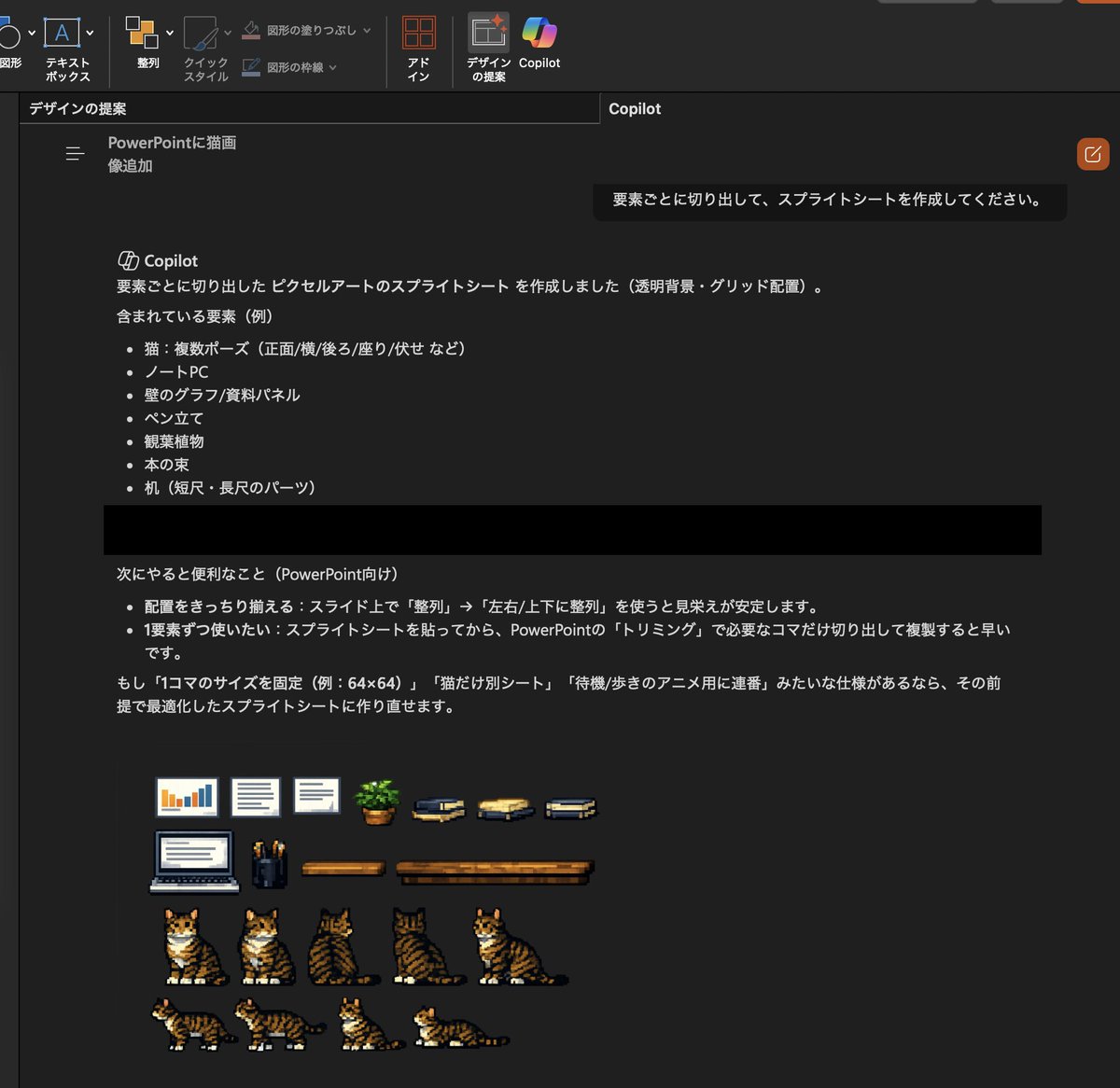
बिल्ली की तस्वीर से पिक्सेल आर्ट स्प्राइट शीट
यह प्रॉम्प्ट वर्कस्पेस में मौजूद बिल्ली की एक संदर्भ छवि को प्रेजेंटेशन स्लाइड और सरल विज़ुअल मॉकअप के लिए पुन: प्रयोज्य पिक्सेल-आर्ट एसेट शीट में परिवर्तित करता है।
यह चित्रण एवं कला के लिए एक GPT Image 2 प्रॉम्प्ट केस है। इसी तरह के विज़ुअल बनाने के लिए नीचे दिए गए कॉपी-रेडी प्रॉम्प्ट का उपयोग करें, और पुनः उपयोग करने से पहले Awesome GPT Image 2 Prompts एट्रिब्यूशन और व्यावसायिक उपयोग अधिकारों की समीक्षा करें।
क्या आपको प्रॉम्प्ट्स का पूरा सेट चाहिए? इसका उपयोग करें चित्रण एवं कला अधिक संबंधित उदाहरणों के लिए विषय हब देखें, या खोलें GPT Image 2 त्वरित सूची संपूर्ण उदाहरण अनुक्रमणिका, पुन: प्रयोज्य संरचनाओं और स्रोत श्रेय के लिए।
Free 1K preview
Generate one preview image instantly, no sign-up required.
Free text preview doesn’t preserve reference-image consistency.
933/4000
प्रॉम्प्ट
प्रतिलिपि के लिए तैयार संकेत
Using the provided reference image, turn the inserted realistic cat photo and the visible desk scene into a transparent-background pixel-art sprite sheet for PowerPoint. Extract the scene elements and redraw them as clean retro game-style assets arranged on a dark workspace in a tidy grid. Include exactly 7 cat sprites showing different views/poses from the reference cat: 1 sitting front-left, 1 sitting front, 1 sitting back view, 1 sitting side/back view, 1 sitting three-quarter view, 1 walking side view, and 1 lying down side view. Also include the surrounding props from the reference as separate pixel-art items: 1 laptop, 2 wall chart/document panels, 1 pen holder, 1 potted plant, 3 book stacks, and 2 desk pieces in different lengths. Keep the cat recognizable as the same tabby-and-white cat from the reference, but simplify everything into crisp low-resolution pixel art suitable for cutting out and reusing on slides.
Best for
- - चित्रण एवं कला visual exploration
- - Image generation and reference-image edits
- - Reusable briefs that keep source attribution visible
Change these parts
- - Subject, product, character, or scene
- - Aspect ratio, camera, lighting, and background
- - Brand, text, color, and output constraints
Recommended model and settings
- - Model: gpt-image-2
- - Input mode: छवि से छवि
- - Aspect ratio: source
- - Commercial status: review original source
How to use this prompt
- 1. Copy the prompt and preserve its structure for the first test.
- 2. Replace the subject, context, and publishing channel.
- 3. Change one camera, lighting, or style variable per iteration.
- 4. Inspect the output, source, text, and rights before reuse.
Limitations, source, and reuse cautions
- - Generated output is an editable draft, not factual, legal, or rights evidence.
- - Review the linked source, people, brands, logos, text, and third-party media before commercial use.
Awesome GPT Image 2 Prompts से आयातित। श्रेय देना आवश्यक है। वाणिज्यिक उपयोग की allowed ; सशुल्क उपयोग से पहले स्रोत अधिकारों की समीक्षा करें।
इस श्रेणी में और भी मामले
श्रेणी, इनपुट मोड अनुकूलता, गुणवत्ता और कम जोखिम को प्राथमिकता दी गई है।






पुनः उपयोग और स्रोत नोट्स
केस का पूर्वावलोकन करने के बाद इस प्रॉम्प्ट का सुरक्षित रूप से उपयोग करें।
- 1.प्रॉम्प्ट को कॉपी करें या जनरेशन बटन का उपयोग करके इसे सीधे डोवू में खोलें।
- 2.अपने उपयोग के अनुसार वैरिएबल, आस्पेक्ट रेशियो और संदर्भ छवियों को समायोजित करें।
- 3.प्रकाशन या सशुल्क उपयोग से पहले, स्रोत अधिकारों, श्रेय देने की आवश्यकताओं और ब्रांड या छवि से जुड़े जोखिमों की पुष्टि करें।