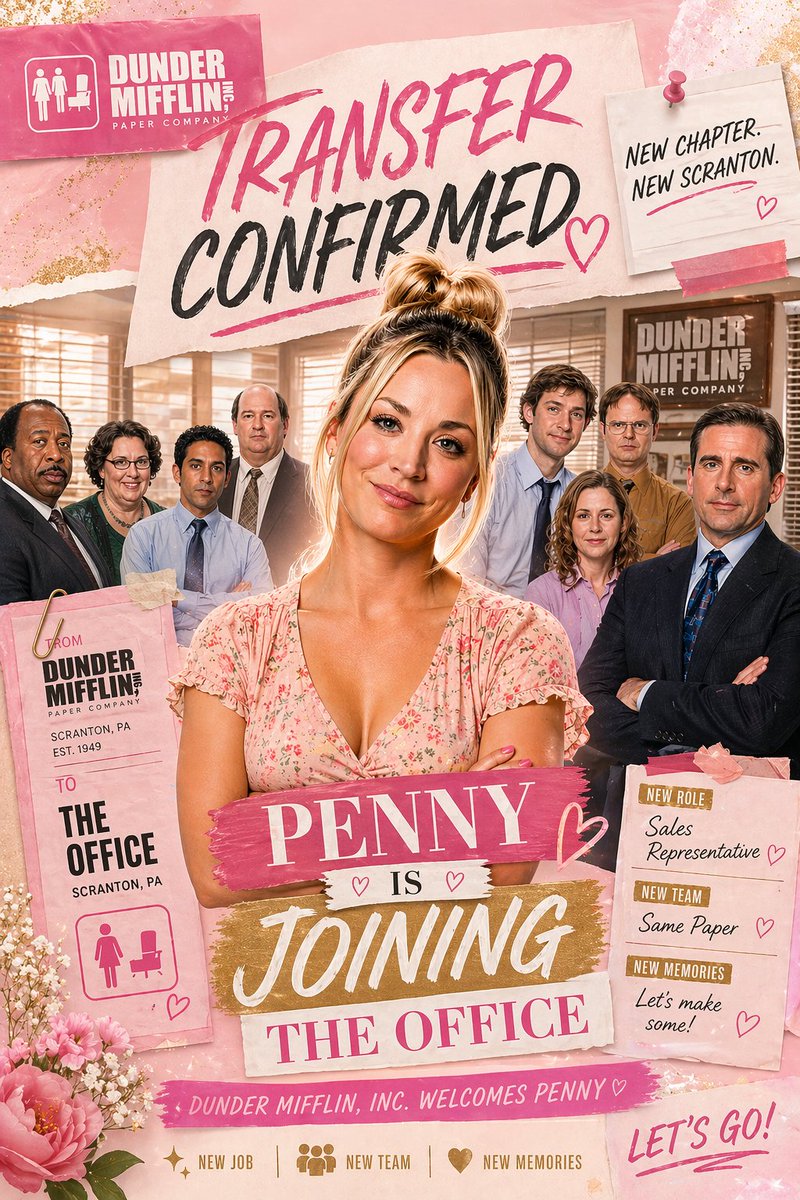
गुलाबी रंग का कार्यालय स्थानांतरण घोषणा पोस्टर
स्क्रैपबुक शैली का एक गुलाबी रंग का कार्यस्थल घोषणा पोस्टर जिसमें एक महिला कर्मचारी और उसकी कार्यालय टीम को दर्शाया गया है, जो पैरोडी प्रोमो, चरित्र संपादन या खुशी भरे स्थानांतरण घोषणाओं के लिए आदर्श है।
यह ग्राफिक और पोस्टर के लिए एक GPT Image 2 प्रॉम्प्ट केस है। इसी तरह के विज़ुअल बनाने के लिए नीचे दिए गए कॉपी-रेडी प्रॉम्प्ट का उपयोग करें, और पुनः उपयोग करने से पहले Awesome GPT Image 2 Prompts एट्रिब्यूशन और व्यावसायिक उपयोग अधिकारों की समीक्षा करें।
क्या आपको प्रॉम्प्ट्स का पूरा सेट चाहिए? इसका उपयोग करें ग्राफिक और पोस्टर अधिक संबंधित उदाहरणों के लिए विषय हब देखें, या खोलें GPT Image 2 त्वरित सूची संपूर्ण उदाहरण अनुक्रमणिका, पुन: प्रयोज्य संरचनाओं और स्रोत श्रेय के लिए।
Free 1K preview
Generate one preview image instantly, no sign-up required.
2775/4000
प्रॉम्प्ट
प्रतिलिपि के लिए तैयार संकेत
A glossy, feminine scrapbook-style office announcement poster inspired by a sitcom workplace promo, in a vertical 2:3 composition. The scene shows 1 central woman standing in front of a group of 7 office coworkers inside a warm beige office with venetian blinds, desks, and a visible Dunder Mifflin-style wall sign in the background. The central woman has blonde hair in a messy high bun, a light pink floral V-neck dress, folded arms, and a confident, celebratory pose. Behind her, the 7 coworkers are arranged in a loose semicircle, wearing office attire in muted blues, browns, black, and lavender. Build the image as a mixed-media collage with torn paper, taped notes, brush-lettered headlines, glitter textures, flowers, and pink-and-gold accents. At the top left, place a pink rectangular company card with a white office icon and the text “DUNDER MIFFLIN, INC” and “PAPER COMPANY”. Across the upper center, place a large torn-paper headline reading “TRANSFER CONFIRMED” in expressive brush lettering, with “TRANSFER” in hot pink and “CONFIRMED” in black, plus pink underline strokes and a hand-drawn heart. At the top right, pin a small off-white note card with a pink pushpin and pink tape reading “NEW CHAPTER. NEW SCRANTON.” Near the lower center, layer a bold title made of 4 stacked text strips: “{argument name="character name" default="PENNY"}” on a pink paint-stroke banner, “IS” on a small white strip with 2 tiny hearts, “JOINING” on a gold brush-stroke banner, and “THE OFFICE” on a pale pink strip. On the lower left, hang a tall pink transfer tag clipped with a gold paperclip, reading “FROM DUNDER MIFFLIN, INC PAPER COMPANY / SCRANTON, PA / EST. 1949” and below that “TO THE OFFICE / SCRANTON, PA”, with a pink women-and-desk restroom-style icon at the bottom. On the lower right, place a pink note card with 3 labeled sections: “NEW ROLE” with “{argument name="job title" default="Sales Representative"}”, “NEW TEAM” with “{argument name="team text" default="Same Paper"}”, and “NEW MEMORIES” with “{argument name="memories text" default="Let’s make some!"}”, each accented with small pink hearts. Along the bottom center, add a pink ribbon strip reading “DUNDER MIFFLIN, INC. WELCOMES {argument name="character name" default="PENNY"}♡”. Beneath that, include 3 small icon-and-text items in one row: sparkle icon with “NEW JOB”, group icon with “NEW TEAM”, and heart icon with “NEW MEMORIES”. At the bottom right, add large handwritten pink script saying “LET’S GO!”. Decorate the corners with pink peonies, tiny white filler flowers, torn paper edges, soft glitter dust, and subtle gold foil flecks. Use a warm rosy palette with blush pink, cream, gold, and black, with polished poster compositing, soft glam lighting, and a cheerful celebratory mood.प्रॉम्प्ट वैरिएबल
प्रॉम्प्ट में पाए जाने वाले संपादन योग्य तर्क प्लेसहोल्डर, उनके डिफ़ॉल्ट मानों के साथ।
चर
character name
गलती करना
PENNY
चर
job title
गलती करना
Sales Representative
चर
team text
गलती करना
Same Paper
चर
memories text
गलती करना
Let’s make some!
Best for
- - ग्राफिक और पोस्टर visual exploration
- - Image generation and reference-image edits
- - Reusable briefs that keep source attribution visible
Change these parts
- - Subject, product, character, or scene
- - Aspect ratio, camera, lighting, and background
- - Brand, text, color, and output constraints
Recommended model and settings
- - Model: gpt-image-2
- - Input mode: टेक्स्ट से छवि
- - Aspect ratio: source
- - Commercial status: review original source
How to use this prompt
- 1. Copy the prompt and preserve its structure for the first test.
- 2. Replace the subject, context, and publishing channel.
- 3. Change one camera, lighting, or style variable per iteration.
- 4. Inspect the output, source, text, and rights before reuse.
Limitations, source, and reuse cautions
- - Generated output is an editable draft, not factual, legal, or rights evidence.
- - Review the linked source, people, brands, logos, text, and third-party media before commercial use.
Awesome GPT Image 2 Prompts से आयातित। श्रेय देना आवश्यक है। वाणिज्यिक उपयोग की allowed ; सशुल्क उपयोग से पहले स्रोत अधिकारों की समीक्षा करें।
इस श्रेणी में और भी मामले
श्रेणी, इनपुट मोड अनुकूलता, गुणवत्ता और कम जोखिम को प्राथमिकता दी गई है।

Manga Desert Radio Telescope Road Trip
टेक्स्ट से छवि

Female Clown Cyborg Portrait
टेक्स्ट से छवि

Transparent Earbuds on Stone Pedestal
टेक्स्ट से छवि

Imperial Research Bunker on Volcanic Planet
टेक्स्ट से छवि

Pink Hijab Mirror Selfie Portrait
टेक्स्ट से छवि

Greyscale Puzzle Portrait with Color Accent
टेक्स्ट से छवि
पुनः उपयोग और स्रोत नोट्स
केस का पूर्वावलोकन करने के बाद इस प्रॉम्प्ट का सुरक्षित रूप से उपयोग करें।
- 1.प्रॉम्प्ट को कॉपी करें या जनरेशन बटन का उपयोग करके इसे सीधे डोवू में खोलें।
- 2.अपने उपयोग के अनुसार वैरिएबल, आस्पेक्ट रेशियो और संदर्भ छवियों को समायोजित करें।
- 3.प्रकाशन या सशुल्क उपयोग से पहले, स्रोत अधिकारों, श्रेय देने की आवश्यकताओं और ब्रांड या छवि से जुड़े जोखिमों की पुष्टि करें।