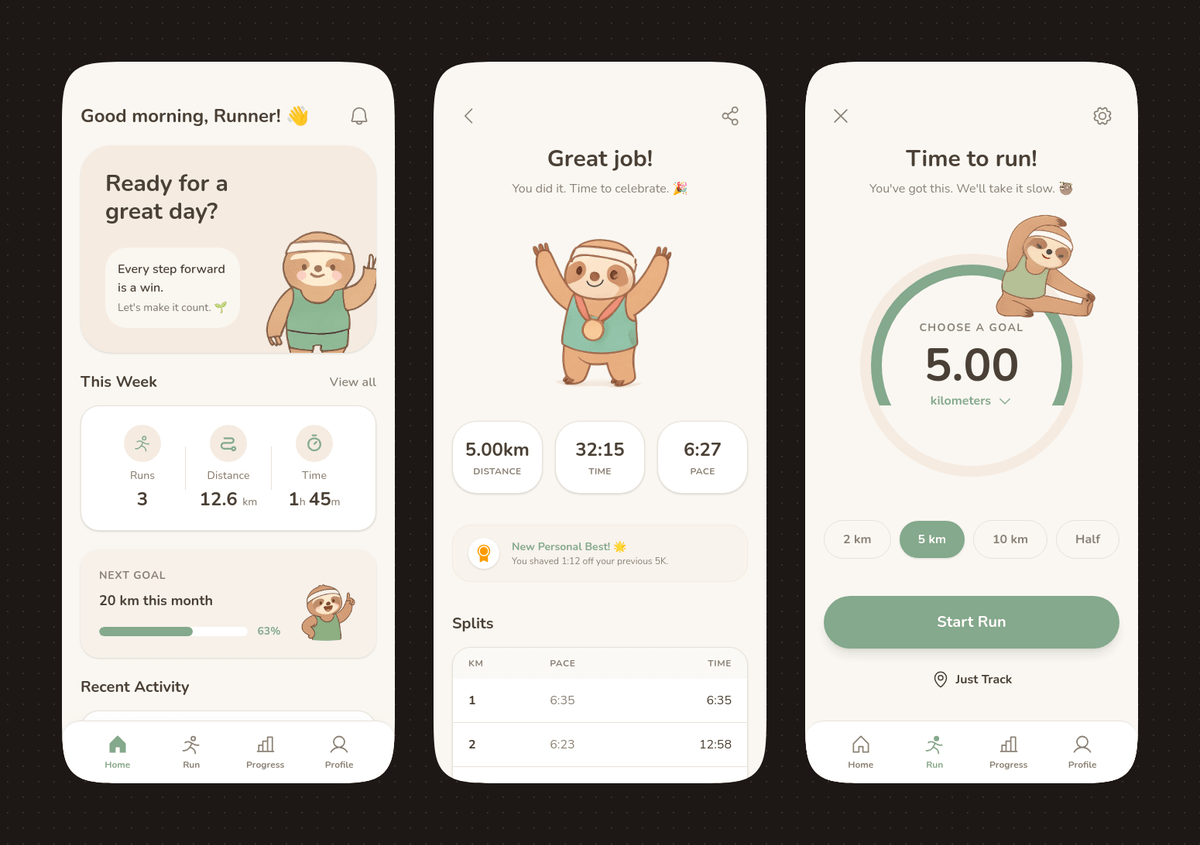
स्लॉथ मैस्कॉट के साथ पेस्टल रनिंग ऐप यूआई
यह प्रॉम्प्ट सॉफ्ट पेस्टल स्टाइलिंग और एक प्यारे स्लॉथ मैस्कॉट के साथ एक आकर्षक तीन-स्क्रीन मोबाइल रनिंग ऐप कॉन्सेप्ट तैयार करता है, जो ऐप डिजाइन शोकेस और एडिटेबल यूआई मॉकअप के लिए आदर्श है।
यह ग्राफिक और पोस्टर के लिए एक GPT Image 2 प्रॉम्प्ट केस है। इसी तरह के विज़ुअल बनाने के लिए नीचे दिए गए कॉपी-रेडी प्रॉम्प्ट का उपयोग करें, और पुनः उपयोग करने से पहले Awesome GPT Image 2 Prompts एट्रिब्यूशन और व्यावसायिक उपयोग अधिकारों की समीक्षा करें।
क्या आपको प्रॉम्प्ट्स का पूरा सेट चाहिए? इसका उपयोग करें ग्राफिक और पोस्टर अधिक संबंधित उदाहरणों के लिए विषय हब देखें, या खोलें GPT Image 2 त्वरित सूची संपूर्ण उदाहरण अनुक्रमणिका, पुन: प्रयोज्य संरचनाओं और स्रोत श्रेय के लिए।
Free 1K preview
Generate one preview image instantly, no sign-up required.
4000/4000
प्रॉम्प्ट
प्रतिलिपि के लिए तैयार संकेत
{
  "type": "mobile fitness app UI mockup",
  "style": "clean modern pastel app design, soft beige and warm white surfaces, muted sage green accents, rounded cards and buttons, subtle shadows, thin minimalist line icons, friendly playful branding with a sloth mascot, dribbble-style presentation on a dark brown dotted background",
  "theme": "running tracker app",
  "layout": {
    "device_count": 3,
    "arrangement": "three tall smartphone screens side by side, evenly spaced, front view",
    "background": "very dark brown with a faint evenly spaced dot grid",
    "screens": [
      {
        "position": "left",
        "screen_type": "home dashboard",
        "header": {
          "greeting": "Good morning, Runner! 👋",
          "left_icon": "none",
          "right_icon": "notification bell"
        },
        "hero_card": {
          "headline": "Ready for a great day?",
          "subcard_text_line_1": "Every step forward is a win.",
          "subcard_text_line_2": "Let's make it count. 🌱",
          "illustration": "cute sloth wearing a cream headband and mint-green workout outfit, standing and waving inside the card on the right"
        },
        "sections": [
          {
            "title": "This Week",
            "position": "upper middle",
            "count": 3,
            "labels": [
              "Runs",
              "Distance",
              "Time"
            ],
            "values": [
              "3",
              "12.6 km",
              "1h 45m"
            ],
            "presentation": "single rounded stats card with three equal columns and pale green circular icons"
          },
          {
            "title": "NEXT GOAL",
            "position": "middle lower",
            "count": 1,
            "labels": [
              "20 km this month"
            ],
            "values": [
              "63%"
            ],
            "presentation": "rounded progress card with green progress bar and small waving sloth illustration on the right"
          },
          {
            "title": "Recent Activity",
            "position": "lower",
            "count": 1,
            "labels": [
              "Recent Activity"
            ],
            "presentation": "top edge of another rounded card visible, cropped by the bottom navigation"
          }
        ],
        "bottom_nav": {
          "count": 4,
          "labels": [
            "Home",
            "Run",
            "Progress",
            "Profile"
          ],
          "active": "Home"
        }
      },
      {
        "position": "center",
        "screen_type": "run summary",
        "header": {
          "left_icon": "back chevron",
          "center_text": "Great job!",
          "subtext": "You did it. Time to celebrate. 🎉",
          "right_icon": "share"
        },
        "hero_illustration": "cute sloth wearing a headband, mint athletic outfit, and a gold medal, both arms raised in celebration",
        "stats_row": {
          "count": 3,
          "labels": [
            "Distance",
            "Time",
            "PACE"
          ],
          "values": [
            "5.00km",
            "32:15",
            "6:27"
          ],
          "presentation": "three rounded statistic pills"
        },
        "achievement_card": {
          "count": 1,
          "title": "New Personal Best! 🌟",
          "subtitle": "You shaved 1:12 off your previous 5K.",
          "icon": "small gold medal badge"
        },
        "table_section": {
          "title": "Splits",
          "count": 2,
          "columns": [
            "KM",
            "PACE",
            "Time"
          ],
          "rows": [
            [
              "1",
              "6:35",
              "6:35"
            ],
            [
              "2",
              "6:23",
              "12:58"
            ]
          ],
          "presentation": "rounded white table card with light dividers"
        }
      },
      {
        "position": "right",
        "screen_type": "run goal setup",
        "header": {
          "left_icon": "close x",
          "center_text": "Time to run!",
          "subtext": "You've got this. We'll take it slow. 🦥",
          "right_icon": "settings gear"
        },
        "goal_visual": {
          "type": "circular progress selector",
          "top_label": "CHOOSE A GOAL",
          "main_value": "5.00",
          "unit": "KM",
          "ring": "thick partial sage-green arc on a pale beige circle",
          "illustration": "small sloth stretching on the upper-right edge of the circle"
        },
        "goal_options": {
          "count": 4,
          "labels": [
            "2 km",
            "5 km",
            "10 km",
            "Half"
          ],
          "active": "5 km"
        },
        "primary_cta": {
          "label": "Start Run",
          "style": "large rounded sage-green button"
        },
        "secondary_action": {
          "label": "Just Track",
          "icon": "location pin"
        },
        "bottom_nav": {
          "count": 4,
          "labels": [
            "Home",
            "Run",
            "Progress",
            "Profile"
          ],
          "active": "Run"
        }
      }
    ]
  }
}
Best for
- - ग्राफिक और पोस्टर visual exploration
- - Image generation and reference-image edits
- - Reusable briefs that keep source attribution visible
Change these parts
- - Subject, product, character, or scene
- - Aspect ratio, camera, lighting, and background
- - Brand, text, color, and output constraints
Recommended model and settings
- - Model: gpt-image-2
- - Input mode: टेक्स्ट से छवि
- - Aspect ratio: source
- - Commercial status: review original source
How to use this prompt
- 1. Copy the prompt and preserve its structure for the first test.
- 2. Replace the subject, context, and publishing channel.
- 3. Change one camera, lighting, or style variable per iteration.
- 4. Inspect the output, source, text, and rights before reuse.
Limitations, source, and reuse cautions
- - Generated output is an editable draft, not factual, legal, or rights evidence.
- - Review the linked source, people, brands, logos, text, and third-party media before commercial use.
Awesome GPT Image 2 Prompts से आयातित। श्रेय देना आवश्यक है। वाणिज्यिक उपयोग की allowed ; सशुल्क उपयोग से पहले स्रोत अधिकारों की समीक्षा करें।
इस श्रेणी में और भी मामले
श्रेणी, इनपुट मोड अनुकूलता, गुणवत्ता और कम जोखिम को प्राथमिकता दी गई है।

Manga Desert Radio Telescope Road Trip
टेक्स्ट से छवि

Female Clown Cyborg Portrait
टेक्स्ट से छवि

Transparent Earbuds on Stone Pedestal
टेक्स्ट से छवि

Imperial Research Bunker on Volcanic Planet
टेक्स्ट से छवि

Pink Hijab Mirror Selfie Portrait
टेक्स्ट से छवि

Greyscale Puzzle Portrait with Color Accent
टेक्स्ट से छवि
पुनः उपयोग और स्रोत नोट्स
केस का पूर्वावलोकन करने के बाद इस प्रॉम्प्ट का सुरक्षित रूप से उपयोग करें।
- 1.प्रॉम्प्ट को कॉपी करें या जनरेशन बटन का उपयोग करके इसे सीधे डोवू में खोलें।
- 2.अपने उपयोग के अनुसार वैरिएबल, आस्पेक्ट रेशियो और संदर्भ छवियों को समायोजित करें।
- 3.प्रकाशन या सशुल्क उपयोग से पहले, स्रोत अधिकारों, श्रेय देने की आवश्यकताओं और ब्रांड या छवि से जुड़े जोखिमों की पुष्टि करें।