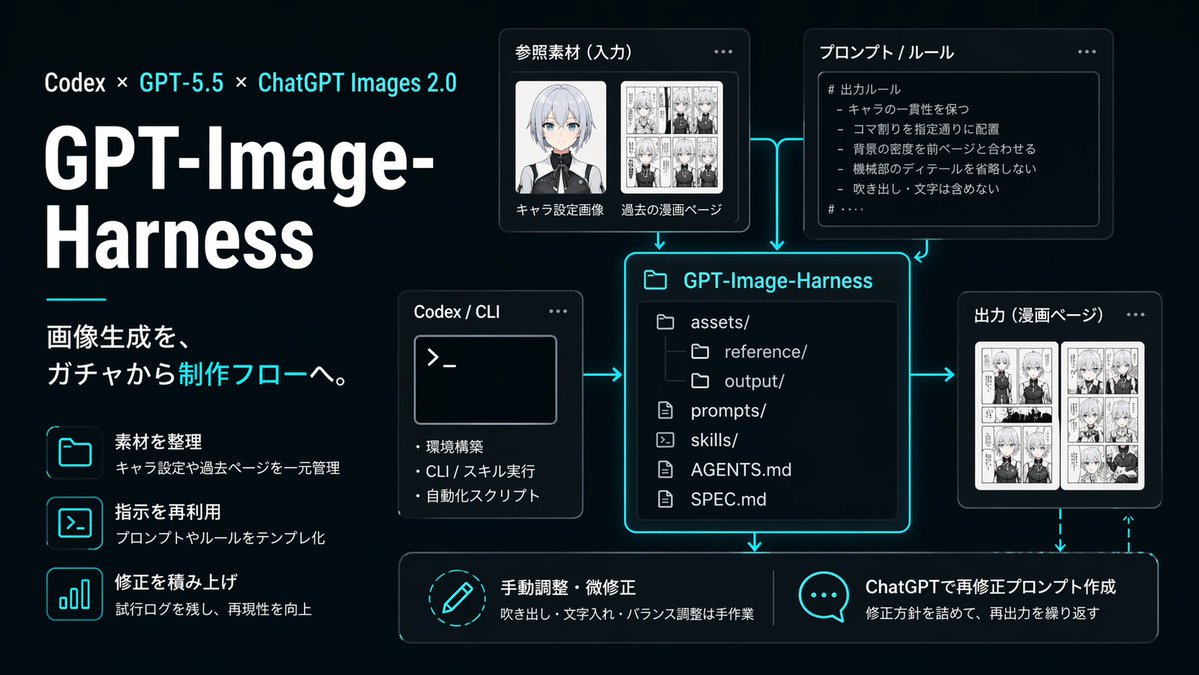
नियॉन एआई इमेज वर्कफ़्लो इन्फोग्राफिक
एक आकर्षक जापानी भाषा का डार्क यूआई इन्फोग्राफिक जो जीपीटी-इमेज-हार्नेस उत्पादन कार्यप्रवाह को दर्शाता है, जो तकनीकी प्रस्तुतियों, उत्पाद स्पष्टीकरणों और प्रतिलिपि योग्य छवि-उत्पादन पाइपलाइनों के बारे में सोशल मीडिया पोस्ट के लिए उपयुक्त है।
यह ग्राफिक और पोस्टर के लिए एक GPT Image 2 प्रॉम्प्ट केस है। इसी तरह के विज़ुअल बनाने के लिए नीचे दिए गए कॉपी-रेडी प्रॉम्प्ट का उपयोग करें, और पुनः उपयोग करने से पहले Awesome GPT Image 2 Prompts एट्रिब्यूशन और व्यावसायिक उपयोग अधिकारों की समीक्षा करें।
क्या आपको प्रॉम्प्ट्स का पूरा सेट चाहिए? इसका उपयोग करें ग्राफिक और पोस्टर अधिक संबंधित उदाहरणों के लिए विषय हब देखें, या खोलें GPT Image 2 त्वरित सूची संपूर्ण उदाहरण अनुक्रमणिका, पुन: प्रयोज्य संरचनाओं और स्रोत श्रेय के लिए।
Free 1K preview
Generate one preview image instantly, no sign-up required.
4000/4000
प्रॉम्प्ट
प्रतिलिपि के लिए तैयार संकेत
{
  "branding": {
    "subtitle": "画像生成を、ガチャから制作フローへ。",
    "title": "GPT-Image-Harness",
    "topline": "Codex × GPT-5.5 × ChatGPT Images 2.0"
  },
  "canvas": {
    "aspect_ratio": "16:9",
    "composition": "left-aligned title block with modular diagram on the right and bottom"
  },
  "diagram": {
    "connectors": "cyan glowing arrows connecting input, rules, and CLI into the central repository card; arrows from repository to output and downward to the two bottom action cards; dashed cyan feedback arrow looping from output back toward the bottom-right action area",
    "nodes": [
      {
        "kind": "input card",
        "title": "Reference Material (Input)",
        "visual": "two thumbnail areas, Show every face clearly with natural, detailed facial features, one black-and-white manga page collage"
      },
      {
        "body_text": [
          "# 出力ルール",
          "- キャラの一貫性を保つ",
          "- コマ割りを指定通りに配置",
          "- 背景の密度を前ページと合わせる",
          "- 機械部のディテールを省略しない",
          "- 吹き出し・文字は含めない"
        ],
        "kind": "rule card",
        "title": "プロンプト / ルール",
        "visual": "bullet list inside code-like panel"
      },
      {
        "kind": "tool card",
        "title": "Codex / CLI",
        "visual": "terminal window with prompt symbol >_ and three bullet points"
      },
      {
        "kind": "repository card",
        "title": "GPT-Image-Harness",
        "visual": "large central file-tree panel with glowing cyan border"
      },
      {
        "kind": "output card",
        "title": "出力(漫画ページ)",
        "visual": "two manga page thumbnails side by side"
      },
      {
        "description": "吹き出し・文字入れ・バランス調整は手作業",
        "kind": "action card",
        "title": "手動調整・微修正",
        "visual": "circular pencil icon"
      },
      {
        "description": "修正方針を詰めて、再出力を繰り返す",
        "kind": "action card",
        "title": "ChatGPTで再修正プロンプト作成",
        "visual": "speech bubble icon with three dots"
      }
    ]
  },
  "layout": {
    "sections": [
      {
        "count": 3,
        "labels": [
          "素材を整理",
          "指示を再利用",
          "修正を積み上げ"
        ],
        "position": "left column",
        "title": "left feature list"
      },
      {
        "count": 2,
        "labels": [
          "キャラ設定画像",
          "過去の漫画ページ"
        ],
        "position": "upper center-left",
        "title": "Reference Material (Input)"
      },
      {
        "count": 1,
        "labels": [
          "# 出力ルール"
        ],
        "position": "upper center-right",
        "title": "プロンプト / ルール"
      },
      {
        "count": 3,
        "labels": [
          "Environment Setup",
          "CLI / スキル実行",
          "自動化スクリプト"
        ],
        "position": "middle left of center",
        "title": "Codex / CLI"
      },
      {
        "count": 6,
        "labels": [
          "assets/",
          "reference/",
          "output/",
          "prompts/",
          "skills/",
          "AGENTS.md",
          "SPEC.md"
        ],
        "position": "center",
        "title": "GPT-Image-Harness"
      },
      {
        "count": 1,
        "labels": [
          "漫画ページ"
        ],
        "position": "middle right",
        "title": "出力(漫画ページ)"
      },
      {
        "count": 2,
        "labels": [
          "手動調整・微修正",
          "ChatGPTで再修正プロンプト作成"
        ],
        "position": "bottom row",
        "title": "bottom actions"
      }
    ]
  },
  "left_panel": {
    "decorative_line": "short horizontal cyan line under title block",
    "feature_items": [
      {
        "description": "キャラ設定や過去ページを一元管理",
        "icon": "folder outline glowing cyan",
        "title": "素材を整理"
      },
      {
        "description": "プロンプトやルールをテンプレ化",
        "icon": "terminal window outline glowing cyan",
        "title": "指示を再利用"
      },
      {
        "description": "試行ログを残し、再現性を向上",
        "icon": "bar chart outline glowing cyan",
        "title": "修正を積み上げ"
      }
    ],
    "headline_scale": "very large",
    "title_weight": "bold extra-heavy"
  },
  "lighting": "soft neon edge glow around cards and icons",
  "quality": "crisp vector-like infographic, presentation-ready, precise alignment, no watermarks",
  "style": "clean futuristic presentation slide, black to deep navy gradient background, neon cyan glow accents, thin cyan connector arrows, modern UI cards with rounded corners, subtle shadows, high contrast white typography, polished startup branding aesthetic",
  "type": "dark tech workflow infographic",
  "typography": {
    "accent_color": "bright cyan",
    "body_color": "light gray-white",
    "language": "Japanese",
    "title_color": "white"
  }
}
Best for
- - ग्राफिक और पोस्टर visual exploration
- - Image generation and reference-image edits
- - Reusable briefs that keep source attribution visible
Change these parts
- - Subject, product, character, or scene
- - Aspect ratio, camera, lighting, and background
- - Brand, text, color, and output constraints
Recommended model and settings
- - Model: gpt-image-2
- - Input mode: टेक्स्ट से छवि
- - Aspect ratio: source
- - Commercial status: review original source
How to use this prompt
- 1. Copy the prompt and preserve its structure for the first test.
- 2. Replace the subject, context, and publishing channel.
- 3. Change one camera, lighting, or style variable per iteration.
- 4. Inspect the output, source, text, and rights before reuse.
Limitations, source, and reuse cautions
- - Generated output is an editable draft, not factual, legal, or rights evidence.
- - Review the linked source, people, brands, logos, text, and third-party media before commercial use.
Awesome GPT Image 2 Prompts से आयातित। श्रेय देना आवश्यक है। वाणिज्यिक उपयोग की allowed ; सशुल्क उपयोग से पहले स्रोत अधिकारों की समीक्षा करें।
इस श्रेणी में और भी मामले
श्रेणी, इनपुट मोड अनुकूलता, गुणवत्ता और कम जोखिम को प्राथमिकता दी गई है।

Manga Desert Radio Telescope Road Trip
टेक्स्ट से छवि

Female Clown Cyborg Portrait
टेक्स्ट से छवि

Transparent Earbuds on Stone Pedestal
टेक्स्ट से छवि

Imperial Research Bunker on Volcanic Planet
टेक्स्ट से छवि

Pink Hijab Mirror Selfie Portrait
टेक्स्ट से छवि

Greyscale Puzzle Portrait with Color Accent
टेक्स्ट से छवि
पुनः उपयोग और स्रोत नोट्स
केस का पूर्वावलोकन करने के बाद इस प्रॉम्प्ट का सुरक्षित रूप से उपयोग करें।
- 1.प्रॉम्प्ट को कॉपी करें या जनरेशन बटन का उपयोग करके इसे सीधे डोवू में खोलें।
- 2.अपने उपयोग के अनुसार वैरिएबल, आस्पेक्ट रेशियो और संदर्भ छवियों को समायोजित करें।
- 3.प्रकाशन या सशुल्क उपयोग से पहले, स्रोत अधिकारों, श्रेय देने की आवश्यकताओं और ब्रांड या छवि से जुड़े जोखिमों की पुष्टि करें।