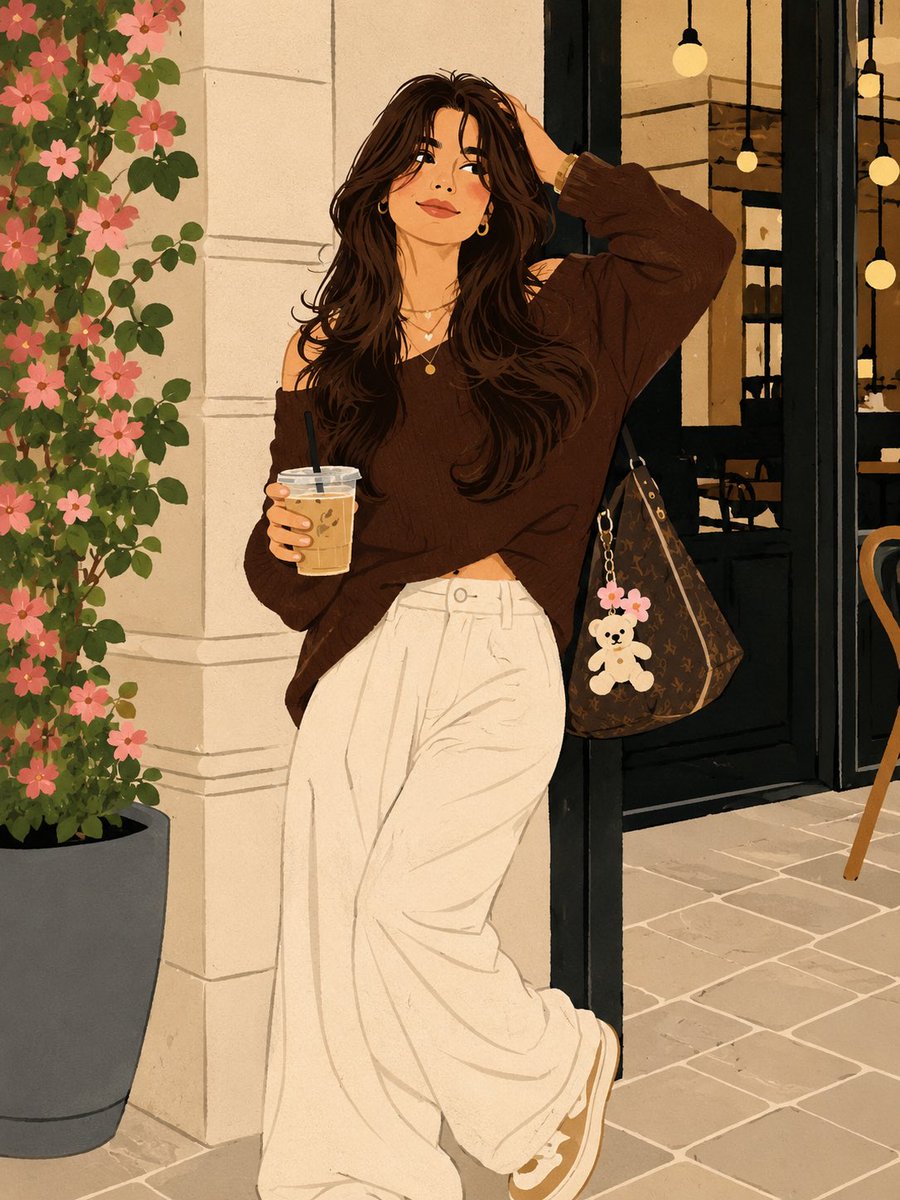
Naive Illustration Portrait Transformation
A comprehensive prompt designed to transform a reference photo into a minimalist, contemporary naive art illustration while strictly preserving the subject's identity and composition.
यह चित्रण एवं कला के लिए एक GPT Image 2 प्रॉम्प्ट केस है। इसी तरह के विज़ुअल बनाने के लिए नीचे दिए गए कॉपी-रेडी प्रॉम्प्ट का उपयोग करें, और पुनः उपयोग करने से पहले Awesome GPT Image 2 Prompts एट्रिब्यूशन और व्यावसायिक उपयोग अधिकारों की समीक्षा करें।
क्या आपको प्रॉम्प्ट्स का पूरा सेट चाहिए? इसका उपयोग करें चित्रण एवं कला अधिक संबंधित उदाहरणों के लिए विषय हब देखें, या खोलें GPT Image 2 त्वरित सूची संपूर्ण उदाहरण अनुक्रमणिका, पुन: प्रयोज्य संरचनाओं और स्रोत श्रेय के लिए।
Free 1K preview
Generate one preview image instantly, no sign-up required.
Free text preview doesn’t preserve reference-image consistency.
1723/4000
प्रॉम्प्ट
प्रतिलिपि के लिए तैयार संकेत
Transform the uploaded image into a premium {argument name="illustration style" default="contemporary naïve illustration"} while preserving the exact facial identity, facial structure, hairstyle, expression, body proportions, pose, clothing silhouette, composition, and overall scene from the reference image.\nFORMAT LOCK\nVertical 3:4 composition. Preserve the original framing, camera angle, perspective, subject placement, and overall composition. Clean centered layout with a premium poster aesthetic.\nIDENTITY LOCK\nPreserve the exact facial features, hairstyle, expression, body proportions, clothing silhouette, and recognizable identity. Simplify the illustration without changing the person’s appearance.\nILLUSTRATION STYLE\nCreate a contemporary authorial naïve illustration with a minimalist hand-drawn aesthetic. Use playful proportions, slightly irregular hand-drawn outlines, expressive decorative linework, and intentionally imperfect craftsmanship. Simplify forms while keeping the subject immediately recognizable.\nCOLOR SYSTEM\nUse flat high-contrast color blocks with a refined contemporary palette. No gradients. No shadows. No realistic lighting. No 3D effects. Clean graphic shapes with bold visual balance.\nSTYLE\nPremium designer poster. Editorial illustration. Modern naïve art. Handmade graphic illustration. Museum-quality print design. Minimalist composition. Contemporary art-book aesthetic. Expressive handcrafted character. Ultra-clean premium artwork.\nNEGATIVE PROMPT\nAvoid photorealism, gradients, shadows, 3D effects, CGI appearance, digital painting, excessive detail, messy linework, blurry edges, distorted anatomy, extra limbs, text, logos, watermarks, or low-quality rendering.प्रॉम्प्ट वैरिएबल
प्रॉम्प्ट में पाए जाने वाले संपादन योग्य तर्क प्लेसहोल्डर, उनके डिफ़ॉल्ट मानों के साथ।
चर
illustration style
गलती करना
contemporary naïve illustration
Best for
- - चित्रण एवं कला visual exploration
- - Image generation and reference-image edits
- - Reusable briefs that keep source attribution visible
Change these parts
- - Subject, product, character, or scene
- - Aspect ratio, camera, lighting, and background
- - Brand, text, color, and output constraints
Recommended model and settings
- - Model: gpt-image-2
- - Input mode: छवि से छवि
- - Aspect ratio: source
- - Commercial status: review original source
How to use this prompt
- 1. Copy the prompt and preserve its structure for the first test.
- 2. Replace the subject, context, and publishing channel.
- 3. Change one camera, lighting, or style variable per iteration.
- 4. Inspect the output, source, text, and rights before reuse.
Limitations, source, and reuse cautions
- - Generated output is an editable draft, not factual, legal, or rights evidence.
- - Review the linked source, people, brands, logos, text, and third-party media before commercial use.
Awesome GPT Image 2 Prompts से आयातित। श्रेय देना आवश्यक है। वाणिज्यिक उपयोग की allowed ; सशुल्क उपयोग से पहले स्रोत अधिकारों की समीक्षा करें।
इस श्रेणी में और भी मामले
श्रेणी, इनपुट मोड अनुकूलता, गुणवत्ता और कम जोखिम को प्राथमिकता दी गई है।






पुनः उपयोग और स्रोत नोट्स
केस का पूर्वावलोकन करने के बाद इस प्रॉम्प्ट का सुरक्षित रूप से उपयोग करें।
- 1.प्रॉम्प्ट को कॉपी करें या जनरेशन बटन का उपयोग करके इसे सीधे डोवू में खोलें।
- 2.अपने उपयोग के अनुसार वैरिएबल, आस्पेक्ट रेशियो और संदर्भ छवियों को समायोजित करें।
- 3.प्रकाशन या सशुल्क उपयोग से पहले, स्रोत अधिकारों, श्रेय देने की आवश्यकताओं और ब्रांड या छवि से जुड़े जोखिमों की पुष्टि करें।