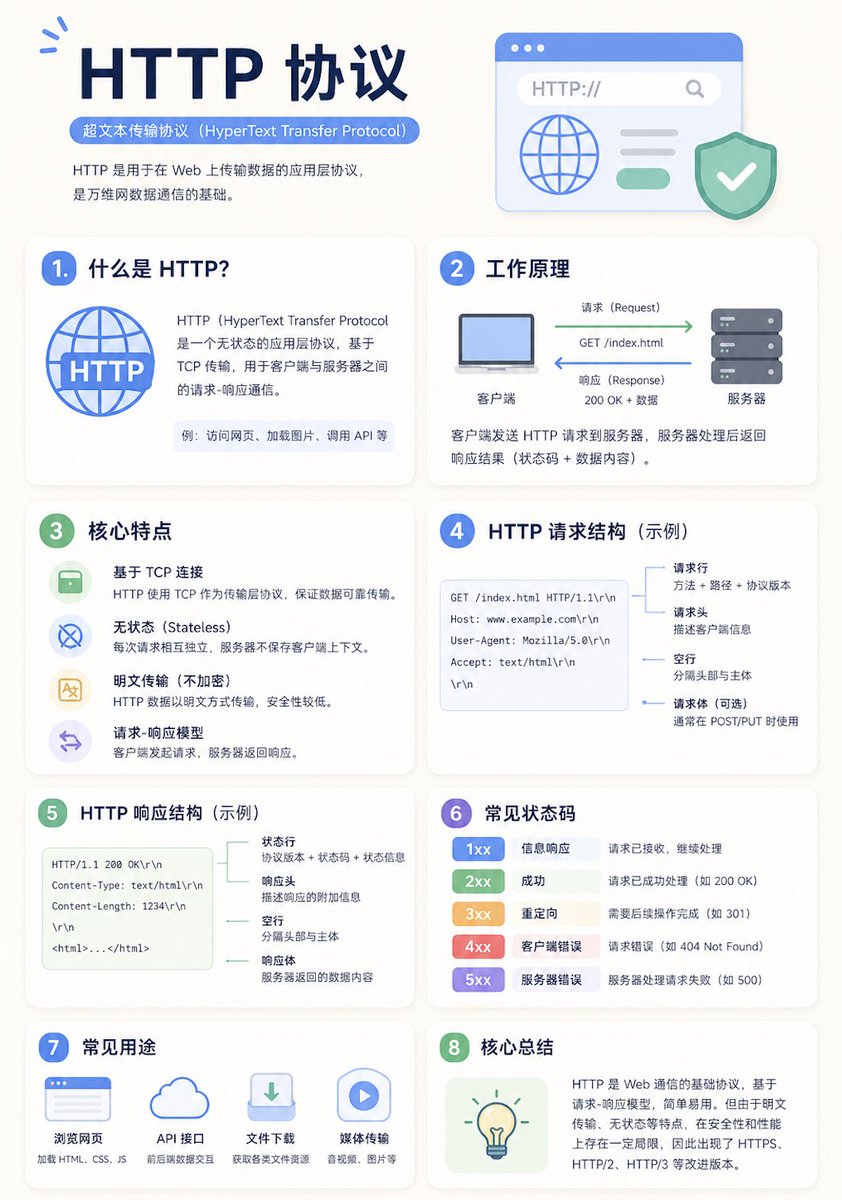
न्यूनतम शैक्षिक इन्फोग्राफिक टेम्पलेट
आधुनिक, स्वच्छ शैक्षिक इन्फोग्राफिक पोस्टर बनाने के लिए एक बहुमुखी टेम्पलेट प्रॉम्प्ट, जिसमें अनुकूली ग्रिड लेआउट और स्पष्ट दृश्य पदानुक्रम शामिल हैं।
यह ग्राफिक और पोस्टर के लिए एक GPT Image 2 प्रॉम्प्ट केस है। इसी तरह के विज़ुअल बनाने के लिए नीचे दिए गए कॉपी-रेडी प्रॉम्प्ट का उपयोग करें, और पुनः उपयोग करने से पहले Awesome GPT Image 2 Prompts एट्रिब्यूशन और व्यावसायिक उपयोग अधिकारों की समीक्षा करें।
क्या आपको प्रॉम्प्ट्स का पूरा सेट चाहिए? इसका उपयोग करें ग्राफिक और पोस्टर अधिक संबंधित उदाहरणों के लिए विषय हब देखें, या खोलें GPT Image 2 त्वरित सूची संपूर्ण उदाहरण अनुक्रमणिका, पुन: प्रयोज्य संरचनाओं और स्रोत श्रेय के लिए।
Free 1K preview
Generate one preview image instantly, no sign-up required.
2129/4000
प्रॉम्प्ट
प्रतिलिपि के लिए तैयार संकेत
A clean educational infographic poster explaining "{argument name="topic" default="Topic"}".

[Overall Style]
Modern minimalist UI style, background in soft light colors (e.g., cream #FAF7F2 / light gray-blue), restrained and comfortable color palette suitable for long reading sessions.

[Core Requirements (Key)]
Naturally organize content modules based on the information structure of the "topic". Do not force a fixed number or order of modules; prioritize clear logical information over formal symmetry.

[Layout (Adaptive)]
- Use grid layout (auto-select 2 columns / 3 columns / irregular distribution)
- Card count adjusts based on content (usually 5–9)
- High information density modules can be enlarged (higher visual weight)
- Simple modules can be shrunk or merged

[Card Design]
- White cards (#FFFFFF)
- Rounded corners + subtle shadows (soft layering)
- Maintain uniform spacing and alignment

[Each Information Module Includes]
- Simple illustrations (unified style)
- Clear headings (strong hierarchy)
- 1–3 core explanatory sentences (avoid wordiness)
- Examples / comparisons / summaries provided where necessary

[Content Organization Principles (Emphasis)]
Auto-select appropriate structure based on theme, e.g.:
- Concept type → definition + principle + characteristics + example
- Contrast type → A vs B (comparative structure)
- Process type → steps / flowcharts
- System type → components + relationships
- Skill type → methods + tips + common mistakes

[Visual Hierarchy]
- Title > Module Title > Main Text > Supporting Information
- Important info can be highlighted with color or icons

[Color Suggestions]
- Primary color: Choose based on theme (Tech=Blue, Learning=Green, Warning=Orange)
- Secondary colors: 1–2 types suffice
- Avoid high saturation and flashiness

[Style Requirements]
- Generous negative space, strong sense of "breathability"
- Unified icons (linear or flat)
- High readability as priority
- Clear educational orientation

[Extra Optimization (Optional)]
- Can include: comparison blocks / process arrows / structure diagrams
- Can have a "Core Summary" module as a visual finale.
प्रॉम्प्ट वैरिएबल
प्रॉम्प्ट में पाए जाने वाले संपादन योग्य तर्क प्लेसहोल्डर, उनके डिफ़ॉल्ट मानों के साथ।
चर
topic
गलती करना
Topic
Best for
- - ग्राफिक और पोस्टर visual exploration
- - Image generation and reference-image edits
- - Reusable briefs that keep source attribution visible
Change these parts
- - Subject, product, character, or scene
- - Aspect ratio, camera, lighting, and background
- - Brand, text, color, and output constraints
Recommended model and settings
- - Model: gpt-image-2
- - Input mode: टेक्स्ट से छवि
- - Aspect ratio: source
- - Commercial status: review original source
How to use this prompt
- 1. Copy the prompt and preserve its structure for the first test.
- 2. Replace the subject, context, and publishing channel.
- 3. Change one camera, lighting, or style variable per iteration.
- 4. Inspect the output, source, text, and rights before reuse.
Limitations, source, and reuse cautions
- - Generated output is an editable draft, not factual, legal, or rights evidence.
- - Review the linked source, people, brands, logos, text, and third-party media before commercial use.
Awesome GPT Image 2 Prompts से आयातित। श्रेय देना आवश्यक है। वाणिज्यिक उपयोग की allowed ; सशुल्क उपयोग से पहले स्रोत अधिकारों की समीक्षा करें।
इस श्रेणी में और भी मामले
श्रेणी, इनपुट मोड अनुकूलता, गुणवत्ता और कम जोखिम को प्राथमिकता दी गई है।

Manga Desert Radio Telescope Road Trip
टेक्स्ट से छवि

Female Clown Cyborg Portrait
टेक्स्ट से छवि

Transparent Earbuds on Stone Pedestal
टेक्स्ट से छवि

Imperial Research Bunker on Volcanic Planet
टेक्स्ट से छवि

Pink Hijab Mirror Selfie Portrait
टेक्स्ट से छवि

Greyscale Puzzle Portrait with Color Accent
टेक्स्ट से छवि
पुनः उपयोग और स्रोत नोट्स
केस का पूर्वावलोकन करने के बाद इस प्रॉम्प्ट का सुरक्षित रूप से उपयोग करें।
- 1.प्रॉम्प्ट को कॉपी करें या जनरेशन बटन का उपयोग करके इसे सीधे डोवू में खोलें।
- 2.अपने उपयोग के अनुसार वैरिएबल, आस्पेक्ट रेशियो और संदर्भ छवियों को समायोजित करें।
- 3.प्रकाशन या सशुल्क उपयोग से पहले, स्रोत अधिकारों, श्रेय देने की आवश्यकताओं और ब्रांड या छवि से जुड़े जोखिमों की पुष्टि करें।