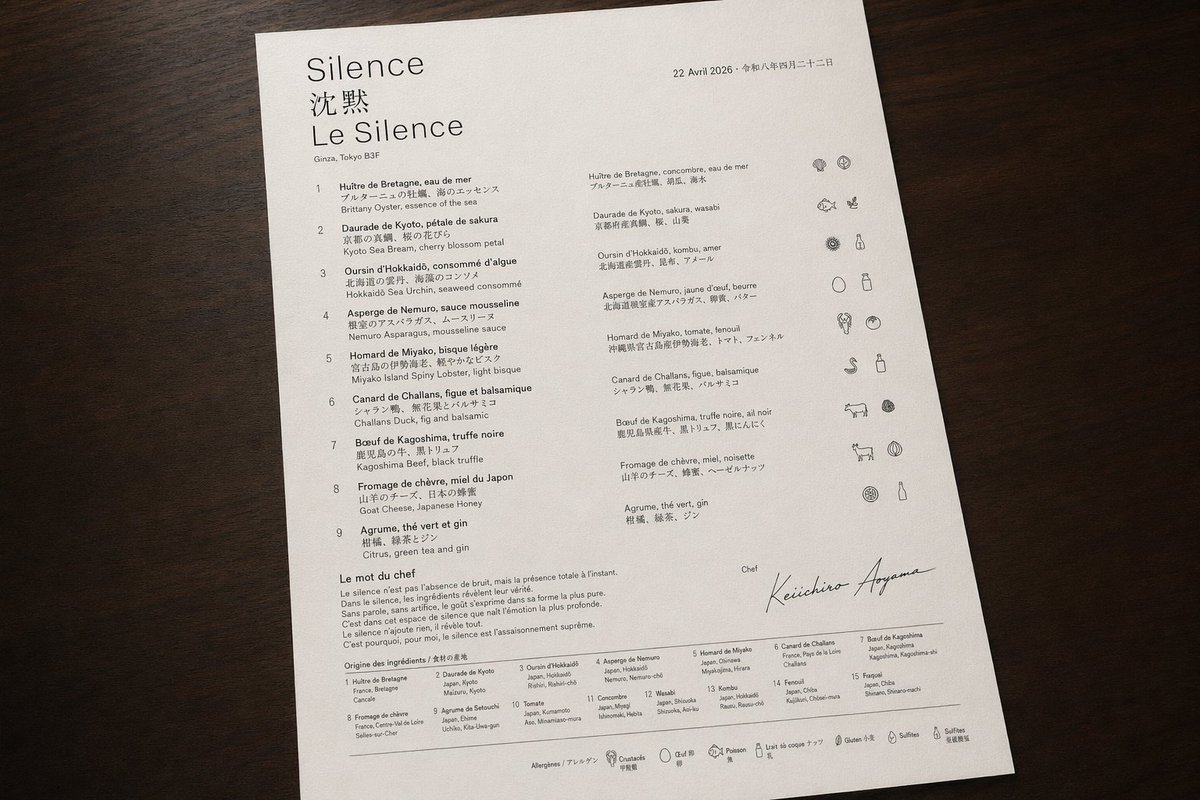
लक्ज़री द्विभाषी चखने के मेनू की फोटो
एक सुरुचिपूर्ण फ्रेंच-जापानी फाइन-डाइनिंग मेनू शीट की यथार्थवादी ओवरहेड तस्वीर, जो एआई-जनित संपादकीय मेनू डिजाइन प्रणालियों को प्रदर्शित करने के लिए आदर्श है।
यह उत्पाद एवं वाणिज्यिक के लिए एक GPT Image 2 प्रॉम्प्ट केस है। इसी तरह के विज़ुअल बनाने के लिए नीचे दिए गए कॉपी-रेडी प्रॉम्प्ट का उपयोग करें, और पुनः उपयोग करने से पहले Awesome GPT Image 2 Prompts एट्रिब्यूशन और व्यावसायिक उपयोग अधिकारों की समीक्षा करें।
क्या आपको प्रॉम्प्ट्स का पूरा सेट चाहिए? इसका उपयोग करें उत्पाद एवं वाणिज्यिक अधिक संबंधित उदाहरणों के लिए विषय हब देखें, या खोलें GPT Image 2 त्वरित सूची संपूर्ण उदाहरण अनुक्रमणिका, पुन: प्रयोज्य संरचनाओं और स्रोत श्रेय के लिए।
Free 1K preview
Generate one preview image instantly, no sign-up required.
2889/4000
प्रॉम्प्ट
प्रतिलिपि के लिए तैयार संकेत
A photorealistic top-down product-style photograph of a single luxury tasting menu printed on bright white textured paper and placed on a dark walnut wooden tabletop, with soft warm ambient lighting and gentle natural shadows. The sheet is portrait orientation, slightly rotated clockwise, occupying most of the frame with clean margins around it. The design is an ultra-minimal fine-dining menu with elegant editorial typography, lots of negative space, precise alignment, and a refined black-and-dark-gray ink palette. At the upper left, the restaurant identity appears in 3 stacked lines: a large serif word {argument name="restaurant name" default="Silence"}, below it 2 Chinese characters "沈默", and below that a large serif French line "Le Silence". Under the title is a small location line reading "Ginza, Tokyo B3F". At the upper right is a small date line in French followed by Japanese date text: {argument name="date text" default="April 22, 2026 • April 22, 2026"}. The main body is organized into 3 vertical content zones: a left numbered course list, a middle translated course list, and a far-right icon column. The left list contains exactly 9 numbered courses labeled 1 through 9, each with French title and Japanese subtitle and an English ingredient line beneath; the 9 visible course titles are: "Huître de Bretagne, eau de mer", "Daurade de Kyoto, pétale de sakura", "Oursin d’Hokkaidō, consommé d’algue", "Asperge de Nemuro, sauce mousseline", "Homard de Miyako, bisque légère", "Canard de Challans, figue et balsamique", "Boeuf de Kagoshima, truffe noire", "Fromage de chèvre, miel du Japon", and "Agrume, thé vert et gin". The middle list repeats the 9 dishes in a second compact column with French titles and Japanese descriptions. The far-right column contains exactly 9 horizontal icon rows aligned to the courses, each row showing small monochrome hand-drawn ingredient or allergen pictograms; some rows have 2 icons and some 3, for a total of 19 icons overall. Near the lower left is a section titled "Le mot du chef" followed by a short French paragraph in small serif text. Below that is a section titled "Origine des ingrédients / 食材の産地" with a dense 2-row ingredient-origin grid listing exactly 15 numbered origin entries in tiny text. In the lower right quadrant, include a small label "Chef" above a large sweeping handwritten signature reading {argument name="chef name" default="Keiichiro Aoyama"}. Along the very bottom edge is a thin horizontal rule and a centered allergen legend line with exactly 7 small outline icons and labels: shellfish, crustaceans, egg, fish, milk, gluten, sulfites, each labeled in French with Japanese beneath. The overall impression should be high-end Michelin-style menu design, editorial restraint, immaculate spacing, subtle paper grain, sharply legible text hierarchy, and realistic photography rather than a flat scan.प्रॉम्प्ट वैरिएबल
प्रॉम्प्ट में पाए जाने वाले संपादन योग्य तर्क प्लेसहोल्डर, उनके डिफ़ॉल्ट मानों के साथ।
चर
restaurant name
गलती करना
Silence
चर
date text
गलती करना
April 22, 2026 • April 22, 2026
चर
chef name
गलती करना
Keiichiro Aoyama
Best for
- - उत्पाद एवं वाणिज्यिक visual exploration
- - Image generation and reference-image edits
- - Reusable briefs that keep source attribution visible
Change these parts
- - Subject, product, character, or scene
- - Aspect ratio, camera, lighting, and background
- - Brand, text, color, and output constraints
Recommended model and settings
- - Model: gpt-image-2
- - Input mode: टेक्स्ट से छवि
- - Aspect ratio: source
- - Commercial status: review original source
How to use this prompt
- 1. Copy the prompt and preserve its structure for the first test.
- 2. Replace the subject, context, and publishing channel.
- 3. Change one camera, lighting, or style variable per iteration.
- 4. Inspect the output, source, text, and rights before reuse.
Limitations, source, and reuse cautions
- - Generated output is an editable draft, not factual, legal, or rights evidence.
- - Review the linked source, people, brands, logos, text, and third-party media before commercial use.
Awesome GPT Image 2 Prompts से आयातित। श्रेय देना आवश्यक है। वाणिज्यिक उपयोग की allowed ; सशुल्क उपयोग से पहले स्रोत अधिकारों की समीक्षा करें।
इस श्रेणी में और भी मामले
श्रेणी, इनपुट मोड अनुकूलता, गुणवत्ता और कम जोखिम को प्राथमिकता दी गई है।






पुनः उपयोग और स्रोत नोट्स
केस का पूर्वावलोकन करने के बाद इस प्रॉम्प्ट का सुरक्षित रूप से उपयोग करें।
- 1.प्रॉम्प्ट को कॉपी करें या जनरेशन बटन का उपयोग करके इसे सीधे डोवू में खोलें।
- 2.अपने उपयोग के अनुसार वैरिएबल, आस्पेक्ट रेशियो और संदर्भ छवियों को समायोजित करें।
- 3.प्रकाशन या सशुल्क उपयोग से पहले, स्रोत अधिकारों, श्रेय देने की आवश्यकताओं और ब्रांड या छवि से जुड़े जोखिमों की पुष्टि करें।