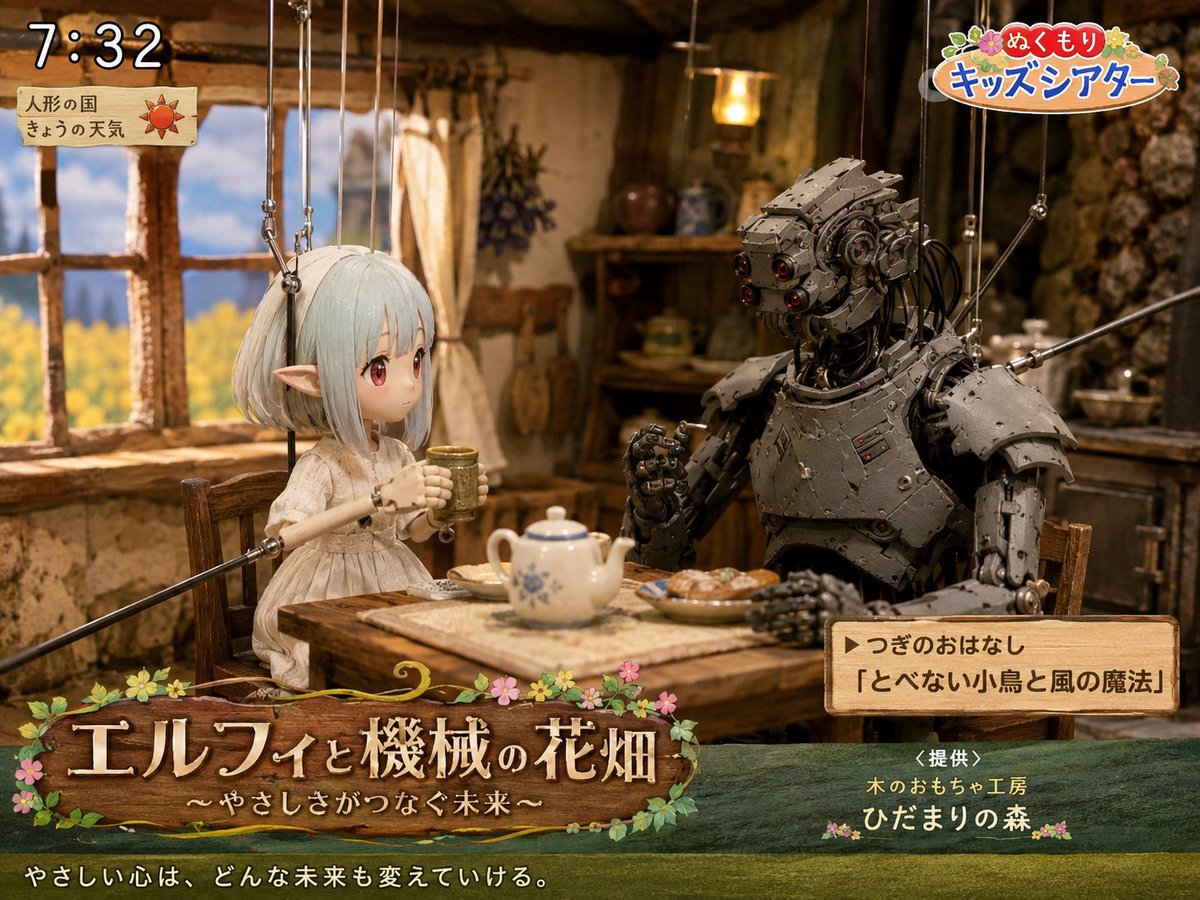
Elf and Robot Puppet Theater Still
A detailed prompt for generating a nostalgic Japanese children's TV puppet-theater still with an elf, a robot, cozy cottage set, and broadcast overlays.
यह चित्रण एवं कला के लिए एक GPT Image 2 प्रॉम्प्ट केस है। इसी तरह के विज़ुअल बनाने के लिए नीचे दिए गए कॉपी-रेडी प्रॉम्प्ट का उपयोग करें, और पुनः उपयोग करने से पहले Awesome GPT Image 2 Prompts एट्रिब्यूशन और व्यावसायिक उपयोग अधिकारों की समीक्षा करें।
क्या आपको प्रॉम्प्ट्स का पूरा सेट चाहिए? इसका उपयोग करें चित्रण एवं कला अधिक संबंधित उदाहरणों के लिए विषय हब देखें, या खोलें GPT Image 2 त्वरित सूची संपूर्ण उदाहरण अनुक्रमणिका, पुन: प्रयोज्य संरचनाओं और स्रोत श्रेय के लिए।
Free 1K preview
Generate one preview image instantly, no sign-up required.
2874/4000
प्रॉम्प्ट
प्रतिलिपि के लिए तैयार संकेत
Goal: Create a cozy Japanese children's TV theater still showing a puppet-style fantasy scene titled {argument name="show title" default="エルフィと機械の花畑"}, with a gentle storybook atmosphere and visible broadcast graphics.

Canvas: 4:3 landscape frame, warm cinematic lighting, shallow depth of field, detailed handcrafted miniature set.

Main scene: Inside a rustic cottage kitchen with clay-plaster walls, exposed wood beams, a wooden window on the left looking out to a bright yellow flower field and blue sky, shelves and hanging herbs in the background, and a small wooden table in the foreground. Two marionette characters sit at the table drinking tea: 1) a delicate elf girl puppet on the left with pale mint-white bobbed hair, long pointed ears, a simple cream linen dress, slim wooden puppet arms, and visible suspension strings attached above; her face area is softly blurred/obscured as if anonymized, 2) a large humanoid robot puppet on the right made of dark riveted metal plates, exposed cables, red lens eyes, bulky shoulder armor, articulated hands, and visible marionette rods/strings. The elf holds a small cup with both hands; the robot raises one hand as if speaking. On the table include exactly 4 visible food and tea items: a white teapot with blue floral pattern, one small cup in the elf's hands, one plate of pastries, and a rectangular cloth or tray under the teapot.

Broadcast overlay layout: Add exactly 5 graphic/text areas: 1) top-left digital clock reading {argument name="broadcast time" default="7:32"} in large white outlined numerals, 2) below it a small parchment weather card with Japanese text 「人形の国」 and 「きょうの天気」 plus a red sun icon, 3) top-right colorful logo reading {argument name="program logo" default="ぬくもり キッズシアター"} with flowers and rounded playful lettering, 4) bottom-left large wooden signboard title with flowers and vines reading 「エルフィと機械の花畑」 and subtitle 「〜やさしさがつなぐ未来〜」, 5) lower-right wooden next-story box reading 「▶つぎのおはなし」 and 「『とべない小鳥と風の魔法』」.

Additional bottom text: Across the very bottom, add the white Japanese tagline {argument name="tagline" default="やさしい心は、どんな未来も変えていける。"}. Near the lower-right above the bottom edge, add sponsor text 「<提供>」, 「木のおもちゃ工房」, and 「ひだまりの森」 with small flower decorations.

Visual style: Hyper-detailed stop-motion puppetry mixed with fantasy miniature photography, warm amber interior light, nostalgic NHK-style children's morning program, polished gpt-image-2 realism, tactile wood, cloth, metal, and paper textures. Keep all marionette strings visible and delicate. Use soft bloom around the window and cozy shadows in the cottage.

Constraints: Use exactly 2 seated characters, exactly 5 broadcast graphic/text areas, and exactly 4 table items as listed. Keep the scene wholesome and gentle, no extra logos beyond the described fake TV graphics, no modern appliances, no watermark.
प्रॉम्प्ट वैरिएबल
प्रॉम्प्ट में पाए जाने वाले संपादन योग्य तर्क प्लेसहोल्डर, उनके डिफ़ॉल्ट मानों के साथ।
चर
show title
गलती करना
エルフィと機械の花畑
चर
broadcast time
गलती करना
7:32
चर
program logo
गलती करना
ぬくもり キッズシアター
चर
tagline
गलती करना
やさしい心は、どんな未来も変えていける。
Best for
- - चित्रण एवं कला visual exploration
- - Image generation and reference-image edits
- - Reusable briefs that keep source attribution visible
Change these parts
- - Subject, product, character, or scene
- - Aspect ratio, camera, lighting, and background
- - Brand, text, color, and output constraints
Recommended model and settings
- - Model: gpt-image-2
- - Input mode: टेक्स्ट से छवि
- - Aspect ratio: source
- - Commercial status: review original source
How to use this prompt
- 1. Copy the prompt and preserve its structure for the first test.
- 2. Replace the subject, context, and publishing channel.
- 3. Change one camera, lighting, or style variable per iteration.
- 4. Inspect the output, source, text, and rights before reuse.
Limitations, source, and reuse cautions
- - Generated output is an editable draft, not factual, legal, or rights evidence.
- - Review the linked source, people, brands, logos, text, and third-party media before commercial use.
Awesome GPT Image 2 Prompts से आयातित। श्रेय देना आवश्यक है। वाणिज्यिक उपयोग की allowed ; सशुल्क उपयोग से पहले स्रोत अधिकारों की समीक्षा करें।
इस श्रेणी में और भी मामले
श्रेणी, इनपुट मोड अनुकूलता, गुणवत्ता और कम जोखिम को प्राथमिकता दी गई है।






पुनः उपयोग और स्रोत नोट्स
केस का पूर्वावलोकन करने के बाद इस प्रॉम्प्ट का सुरक्षित रूप से उपयोग करें।
- 1.प्रॉम्प्ट को कॉपी करें या जनरेशन बटन का उपयोग करके इसे सीधे डोवू में खोलें।
- 2.अपने उपयोग के अनुसार वैरिएबल, आस्पेक्ट रेशियो और संदर्भ छवियों को समायोजित करें।
- 3.प्रकाशन या सशुल्क उपयोग से पहले, स्रोत अधिकारों, श्रेय देने की आवश्यकताओं और ब्रांड या छवि से जुड़े जोखिमों की पुष्टि करें।