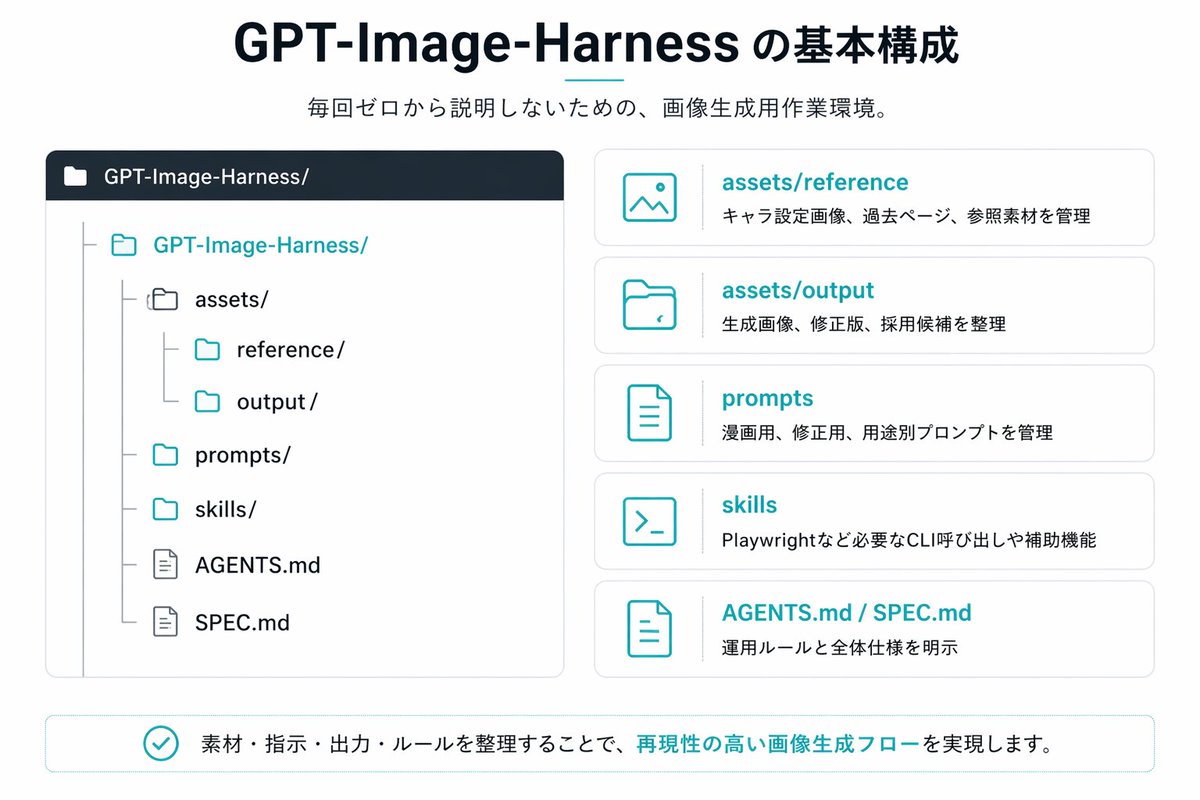
जापानी जीपीटी-इमेज-हार्नेस इन्फोग्राफिक
एक साफ-सुथरा जापानी प्रस्तुति शैली का इन्फोग्राफिक जो एक रिपॉजिटरी संरचना और पांच व्याख्यात्मक कार्ड दिखाता है, जो एआई छवि निर्माण वर्कफ़्लो या प्रोजेक्ट फ़ोल्डर सिस्टम को दस्तावेज़ित करने के लिए आदर्श है।
यह ग्राफिक और पोस्टर के लिए एक GPT Image 2 प्रॉम्प्ट केस है। इसी तरह के विज़ुअल बनाने के लिए नीचे दिए गए कॉपी-रेडी प्रॉम्प्ट का उपयोग करें, और पुनः उपयोग करने से पहले Awesome GPT Image 2 Prompts एट्रिब्यूशन और व्यावसायिक उपयोग अधिकारों की समीक्षा करें।
क्या आपको प्रॉम्प्ट्स का पूरा सेट चाहिए? इसका उपयोग करें ग्राफिक और पोस्टर अधिक संबंधित उदाहरणों के लिए विषय हब देखें, या खोलें GPT Image 2 त्वरित सूची संपूर्ण उदाहरण अनुक्रमणिका, पुन: प्रयोज्य संरचनाओं और स्रोत श्रेय के लिए।
Free 1K preview
Generate one preview image instantly, no sign-up required.
3201/4000
प्रॉम्प्ट
प्रतिलिपि के लिए तैयार संकेत
{
  "type": "Japanese infographic slide",
  "style": "clean flat vector presentation graphic, minimal corporate design, white background, dark navy and teal accent colors, subtle light gray borders, crisp typography, balanced spacing",
  "canvas": {
    "aspect_ratio": "16:9"
  },
  "title_block": {
    "headline": "{argument name=\"headline text\" default=\"GPT-Image-Harness の基本構成\"}",
    "subheadline": "{argument name=\"subheadline text\" default=\"毎回ゼロから説明しないための、画像生成用作業環境。\"}",
    "headline_alignment": "center top",
    "headline_style": "bold sans-serif, very large, dark navy",
    "accent": "short horizontal teal line under headline"
  },
  "layout": {
    "sections": [
      {
        "title": "repository tree",
        "position": "left large panel",
        "count": 1,
        "panel_style": "rounded rectangle with light gray outline and dark navy header bar",
        "header_label": "GPT-Image-Harness/",
        "content": {
          "type": "folder tree",
          "root": "GPT-Image-Harness/",
          "items_count": 8,
          "items": [
            "assets/",
            "reference/",
            "output/",
            "prompts/",
            "skills/",
            "AGENTS.md",
            "SPEC.md"
          ],
          "hierarchy": "assets contains reference and output; root also contains prompts, skills, AGENTS.md, and SPEC.md",
          "icon_style": "outline folder and document icons, teal for active folders, gray for nested guides"
        }
      },
      {
        "title": "feature cards",
        "position": "right stacked column",
        "count": 5,
        "panel_style": "five separate rounded white cards with light gray outline, evenly spaced vertically",
        "labels": [
          "assets/reference",
          "assets/output",
          "prompts",
          "skills",
          "AGENTS.md / SPEC.md"
        ],
        "descriptions": [
          "キャラ設定画像、過去ページ、参照素材を管理",
          "生成画像、修正版、採用候補を整理",
          "漫画用、修正版、用途別プロンプトを管理",
          "Playwrightなど必要なCLI呼び出しや補助機能",
          "運用ルールと全体仕様を明示"
        ],
        "icons": [
          "image icon",
          "folder icon",
          "document icon",
          "terminal icon",
          "document icon"
        ],
        "title_color": "teal",
        "body_color": "dark gray"
      },
      {
        "title": "bottom message",
        "position": "bottom full width banner",
        "count": 1,
        "panel_style": "rounded rectangle with light teal outline",
        "content": {
          "icon": "teal circled checkmark",
          "text": "{argument name=\"footer message\" default=\"素材・指示・出力・ルールを整理することで、再現性の高い画像生成フローを実現します。\"}",
          "emphasis": "the phrase 再現性の高い画像生成フロー is teal and bold"
        }
      }
    ],
    "composition": "title and subtitle centered at top, large repository diagram on left, five explanatory cards on right, summary banner across bottom"
  },
  "text_language": "Japanese",
  "visual_details": {
    "left_panel_header_gradient": "dark navy to slightly lighter navy",
    "folder_tree_line_color": "light gray",
    "teal_hex_approx": "#22B8C7",
    "navy_hex_approx": "#0F2236",
    "background": "very light gray-white"
  }
}
प्रॉम्प्ट वैरिएबल
प्रॉम्प्ट में पाए जाने वाले संपादन योग्य तर्क प्लेसहोल्डर, उनके डिफ़ॉल्ट मानों के साथ।
चर
headline text
गलती करना
GPT-Image-Harness の基本構成
चर
subheadline text
गलती करना
毎回ゼロから説明しないための、画像生成用作業環境。
चर
footer message
गलती करना
素材・指示・出力・ルールを整理することで、再現性の高い画像生成フローを実現します。
Best for
- - ग्राफिक और पोस्टर visual exploration
- - Image generation and reference-image edits
- - Reusable briefs that keep source attribution visible
Change these parts
- - Subject, product, character, or scene
- - Aspect ratio, camera, lighting, and background
- - Brand, text, color, and output constraints
Recommended model and settings
- - Model: gpt-image-2
- - Input mode: टेक्स्ट से छवि
- - Aspect ratio: source
- - Commercial status: review original source
How to use this prompt
- 1. Copy the prompt and preserve its structure for the first test.
- 2. Replace the subject, context, and publishing channel.
- 3. Change one camera, lighting, or style variable per iteration.
- 4. Inspect the output, source, text, and rights before reuse.
Limitations, source, and reuse cautions
- - Generated output is an editable draft, not factual, legal, or rights evidence.
- - Review the linked source, people, brands, logos, text, and third-party media before commercial use.
Awesome GPT Image 2 Prompts से आयातित। श्रेय देना आवश्यक है। वाणिज्यिक उपयोग की allowed ; सशुल्क उपयोग से पहले स्रोत अधिकारों की समीक्षा करें।
इस श्रेणी में और भी मामले
श्रेणी, इनपुट मोड अनुकूलता, गुणवत्ता और कम जोखिम को प्राथमिकता दी गई है।

Manga Desert Radio Telescope Road Trip
टेक्स्ट से छवि

Female Clown Cyborg Portrait
टेक्स्ट से छवि

Transparent Earbuds on Stone Pedestal
टेक्स्ट से छवि

Imperial Research Bunker on Volcanic Planet
टेक्स्ट से छवि

Pink Hijab Mirror Selfie Portrait
टेक्स्ट से छवि

Greyscale Puzzle Portrait with Color Accent
टेक्स्ट से छवि
पुनः उपयोग और स्रोत नोट्स
केस का पूर्वावलोकन करने के बाद इस प्रॉम्प्ट का सुरक्षित रूप से उपयोग करें।
- 1.प्रॉम्प्ट को कॉपी करें या जनरेशन बटन का उपयोग करके इसे सीधे डोवू में खोलें।
- 2.अपने उपयोग के अनुसार वैरिएबल, आस्पेक्ट रेशियो और संदर्भ छवियों को समायोजित करें।
- 3.प्रकाशन या सशुल्क उपयोग से पहले, स्रोत अधिकारों, श्रेय देने की आवश्यकताओं और ब्रांड या छवि से जुड़े जोखिमों की पुष्टि करें।