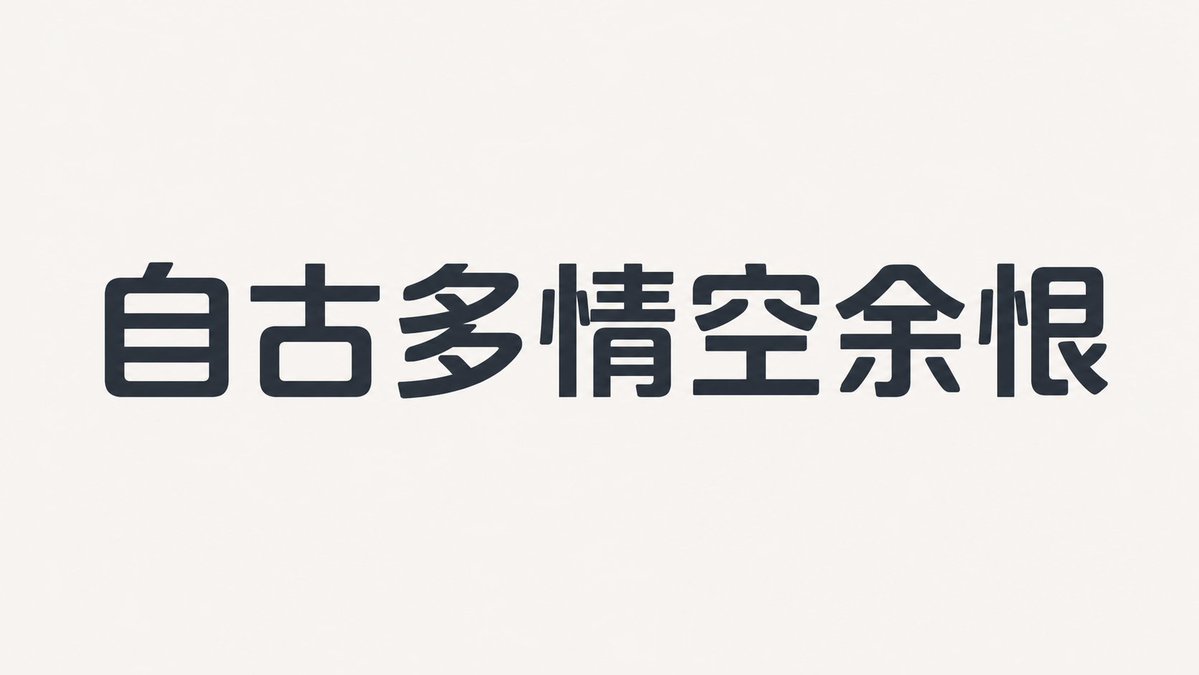
Humanist Sans-Serif Typography Design
A technical design prompt for generating a humanist sans-serif font, specifying details like stroke contrast, corner radius, and key identifier characters for layout design.
यह ग्राफिक और पोस्टर के लिए एक GPT Image 2 प्रॉम्प्ट केस है। इसी तरह के विज़ुअल बनाने के लिए नीचे दिए गए कॉपी-रेडी प्रॉम्प्ट का उपयोग करें, और पुनः उपयोग करने से पहले Awesome GPT Image 2 Prompts एट्रिब्यूशन और व्यावसायिक उपयोग अधिकारों की समीक्षा करें।
क्या आपको प्रॉम्प्ट्स का पूरा सेट चाहिए? इसका उपयोग करें ग्राफिक और पोस्टर अधिक संबंधित उदाहरणों के लिए विषय हब देखें, या खोलें GPT Image 2 त्वरित सूची संपूर्ण उदाहरण अनुक्रमणिका, पुन: प्रयोज्य संरचनाओं और स्रोत श्रेय के लिए।
Free 1K preview
Generate one preview image instantly, no sign-up required.
916/4000
प्रॉम्प्ट
प्रतिलिपि के लिए तैयार संकेत
This is a {argument name="font type" default="sans-serif"} typeface with a slightly wide face, low center of gravity, and open counters. The skeleton is based on a humanist structure, overall compact but not crowded.
The strokes have low contrast, with horizontal strokes slightly thinner than vertical ones. The outer curves are full while the inner sides are tightened. The corners use small-radius rounded corners, and the ends are mostly slightly beveled.
The letter spacing is tight but with sufficient internal white space. Repeated components maintain the same curvature. Lowercase a, e, the number 2, and uppercase R are the core identifying characters. The bold version increases weight by expanding the inner side of the strokes rather than compressing the counter.
——
Text Content: {argument name="text" default="Shanghai tap water comes from the sea"}
Aspect Ratio: {argument name="ratio" default="16:9"}
प्रॉम्प्ट वैरिएबल
प्रॉम्प्ट में पाए जाने वाले संपादन योग्य तर्क प्लेसहोल्डर, उनके डिफ़ॉल्ट मानों के साथ।
चर
font type
गलती करना
sans-serif
चर
text
गलती करना
Shanghai tap water comes from the sea
चर
ratio
गलती करना
16:9
Best for
- - ग्राफिक और पोस्टर visual exploration
- - Image generation and reference-image edits
- - Reusable briefs that keep source attribution visible
Change these parts
- - Subject, product, character, or scene
- - Aspect ratio, camera, lighting, and background
- - Brand, text, color, and output constraints
Recommended model and settings
- - Model: gpt-image-2
- - Input mode: टेक्स्ट से छवि
- - Aspect ratio: source
- - Commercial status: review original source
How to use this prompt
- 1. Copy the prompt and preserve its structure for the first test.
- 2. Replace the subject, context, and publishing channel.
- 3. Change one camera, lighting, or style variable per iteration.
- 4. Inspect the output, source, text, and rights before reuse.
Limitations, source, and reuse cautions
- - Generated output is an editable draft, not factual, legal, or rights evidence.
- - Review the linked source, people, brands, logos, text, and third-party media before commercial use.
Awesome GPT Image 2 Prompts से आयातित। श्रेय देना आवश्यक है। वाणिज्यिक उपयोग की allowed ; सशुल्क उपयोग से पहले स्रोत अधिकारों की समीक्षा करें।
इस श्रेणी में और भी मामले
श्रेणी, इनपुट मोड अनुकूलता, गुणवत्ता और कम जोखिम को प्राथमिकता दी गई है।

GPT Image 2 Real-Life Character Street Snap
टेक्स्ट से छवि

MotoGP POV Cornering Shot
टेक्स्ट से छवि

Orange Rooftop Fashion Photo Prompt
टेक्स्ट से छवि

Luxury Travel Fashion Portrait Prompt
टेक्स्ट से छवि

Cute Focus Desk Flat Lay and Kawaii Illustration
टेक्स्ट से छवि

Street Selfie with Cat in Matching Cap
टेक्स्ट से छवि
पुनः उपयोग और स्रोत नोट्स
केस का पूर्वावलोकन करने के बाद इस प्रॉम्प्ट का सुरक्षित रूप से उपयोग करें।
- 1.प्रॉम्प्ट को कॉपी करें या जनरेशन बटन का उपयोग करके इसे सीधे डोवू में खोलें।
- 2.अपने उपयोग के अनुसार वैरिएबल, आस्पेक्ट रेशियो और संदर्भ छवियों को समायोजित करें।
- 3.प्रकाशन या सशुल्क उपयोग से पहले, स्रोत अधिकारों, श्रेय देने की आवश्यकताओं और ब्रांड या छवि से जुड़े जोखिमों की पुष्टि करें।